.avif)
Webflow AEO Guide : What Works & What Doesn't in 2026
If your management just asked whether your Webflow site is ready for AI search, you're probably scrambling for an answer right now. Most teams are.
That's called answer engine optimization, or AEO. Most of what's available online either sells you a tactics checklist or explains Webflow's own AEO tool, without ever testing whether any of it actually makes any measurable difference.
Webflow AEO covers two different things people mean by the phrase. It's the practice of optimizing a Webflow site so tools like ChatGPT, Perplexity, Google's AI Overviews, Gemini, Claude, and Microsoft Copilot can find, understand, and cite it, and it's also the name of the actual answer engine optimization product Webflow built into its platform.
Webflow's own study of 100 marketing leaders and 300 practitioners, independently reported by CMSWire, found that 93% of marketing leaders see AEO as critical to their brand's success over the next two years. Only a quarter of practitioners say they actually understand it.
At magier, we build and maintain Webflow sites for clients who keep asking the same question, so we went looking for a real answer instead of another checklist. This guide covers both: the product Webflow AEO and the AEO best practices specific to the platform, plus what happens when someone actually tests the common advice against real Webflow pages.
Here's what this guide covers:
- What AEO actually means
- What Webflow's built-in AEO product does
- Webflow AEO technical checklist
- A real experiment: what happens when someone tests this on Webflow pages
- Where AEO tactics fall short
- A step-by-step process for approaching AEO on your own Webflow site
- When it makes sense to hire an agency instead of doing this yourself
{{freebie}}
What is AEO?
To understand Webflow AEO, we need to first get a grip on AEO.
Answer engine optimization is the practice of structuring content so AI systems can find it, understand it, and quote it directly in a conversational answer. Instead of ranking for a search query and hoping someone clicks through, the goal is to become the source an AI assistant cites when someone asks a related question.
The gravity of AEO is rapidly increasing because people phrase questions to AI tools very differently than they type into a search bar. The average conversational query on an AI system runs around 23 words, compared to roughly 4 words for a typical Google search, which is exactly why content built around direct answers to full questions tends to perform better here than content built around short keyword phrases.
The easiest way to keep the related terms straight is to separate what each one actually optimizes for.
| Term | What it optimizes for |
|---|---|
| SEO | Ranking in traditional search results pages |
| AEO | Being the source an AI system cites in a generated answer |
| GEO | Building a consistent brand point of view that AI models recognize and repeat across many answers |
AEO doesn't replace SEO, it depends on it. AI systems still rely on crawlable, indexed, well-structured web content to generate their answers, so the technical basics that have always mattered for search still matter here too.

What is Webflow AEO?
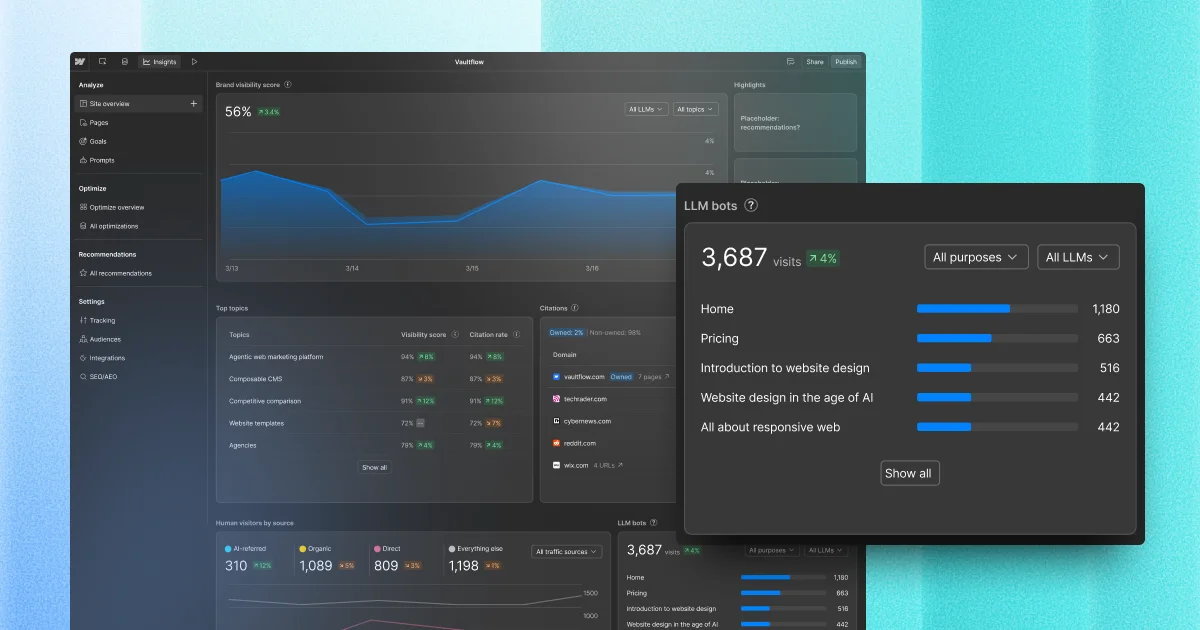
This part is about the actual product, not the general practice covered above. Webflow built Webflow AEO to answer one specific question: is your site showing up when someone asks an AI tool about your business?
The product runs as a loop with three steps: measure, recommend, and act. It tracks how often your brand appears in AI-generated answers, which AI crawlers visit your site, and how people who arrive from an AI tool behave once they're there. Then it scans your site for fixes, like missing schema or broken links, and once you approve a fix, it applies the change the next time you publish.
| Step | What it does | What it requires |
|---|---|---|
| Measure | Tracks brand mentions in AI answers, AI bot activity, and AI-referred visitor behavior | Team or Enterprise plan with the Workspace AI toggle enabled, plus the Analyze add-on for full analytics |
| Recommend | Surfaces prioritized fixes for metadata, schema, alt text, and broken links | Included for all Webflow Enterprise customers |
| Act | Applies approved changes directly to page settings, CMS items, and assets | Uses Webflow AI credits each time an agent runs |
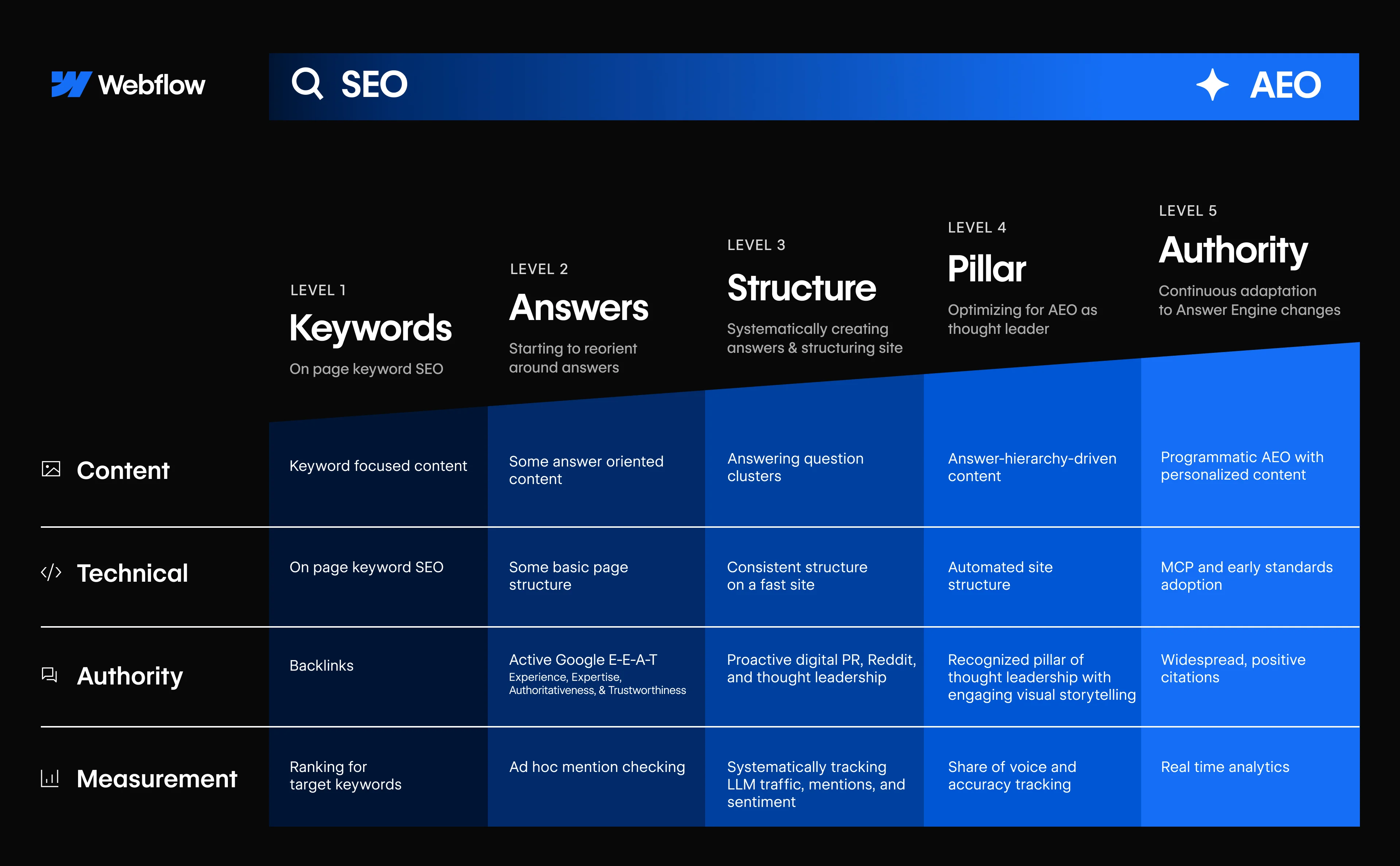
Webflow also runs a separate AEO Assessment that scores a site across four pillars, Content, Technical, Authority, and Measurement, worth checking even before you touch the analytics or agents.
A few other platforms have built similar tools, including Adobe's LLM Optimizer, Conductor's AgentStack, SiteImprove AEO, and HubSpot's own AEO feature. Since this guide is about Webflow specifically, the rest of this post sticks to what you can do inside Webflow itself, with or without the built-in product.
{{cta}}
The Webflow AEO checklist
Most AEO advice boils down to the same handful of technical building blocks. Here's what they mean inside Webflow specifically, and where each one actually lives.
- Content architecture: organize pages around direct questions instead of long, unbroken sections, so an AI system can find the exact part that answers a query.
- Semantic HTML: use Webflow's actual heading, list, and table elements instead of styled divs, since AI tools parse the underlying HTML structure, not how a page looks visually. Building a whole page out of styled divs when Webflow gives you real heading tags is a bit like writing a resume in Comic Sans. Technically legible, but you're making the reader work harder than they should have to.
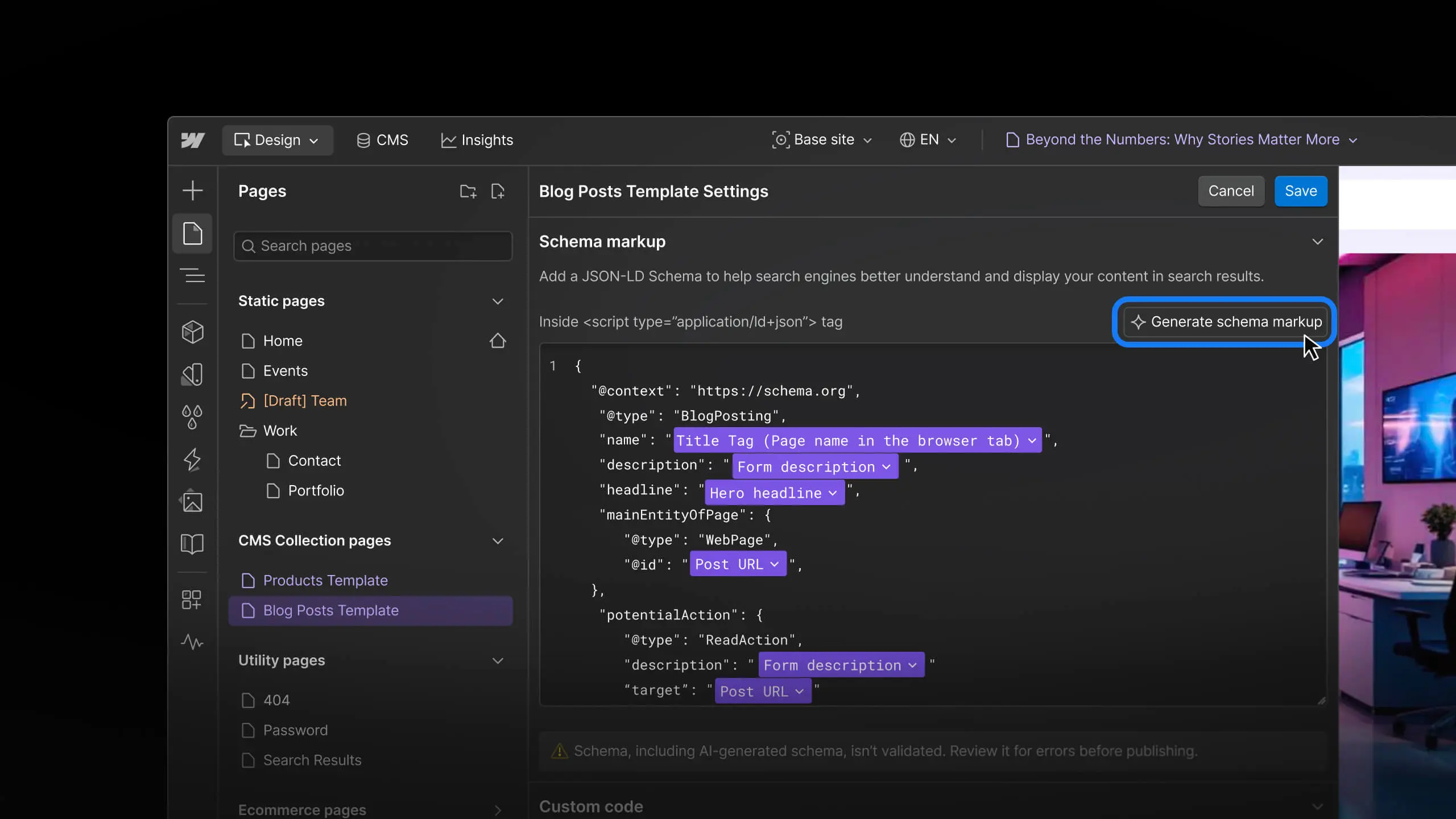
- Structured data: add JSON-LD schema through Webflow's Page Settings, Collection Templates, or a Custom Code embed, covering types like Article, Organization, Person, and FAQPage. Most websites still skip this step entirely, even though it shows up on the large majority of first-page Google results, which is exactly the kind of gap Rotten Tomatoes closed for a reported 25% lift in click-through rate.
- Entity optimization: build clear relationships between related topics, tools, and concepts instead of repeating the same keyword, since AI systems think in terms of entities rather than exact phrases.
- Technical performance: keep Core Web Vitals within range, meaning Largest Contentful Paint under 2.5 seconds, Interaction to Next Paint under 200 milliseconds, and Cumulative Layout Shift under 0.1, since AI systems can't cite what they can't crawl efficiently.
- E-E-A-T signals: show a real author, a publication date, a last-updated date, and genuine original detail, since AI systems weigh credibility the same way search engines do. NerdWallet is a useful proof point here: after doubling down on expert-led answers, it reported 35% revenue growth even with 20% less traffic, which suggests AI-era visitors convert better when the source looks credible.
- AI file access: newer standards like an llms.txt file and the Model Context Protocol let AI tools and coding assistants pull a site's structure and content directly. Adoption is still early, but it's worth knowing about.
| Schema type | Best use in Webflow |
|---|---|
| Article | Blog posts |
| Organization | Company homepage |
| Person | Author pages |
| Product | Ecommerce and SaaS pages |
| FAQPage | FAQ sections |
| HowTo | Tutorials and guides |
These building blocks help. But six months of testing on real Webflow pages showed they're not enough on their own. Which is what you’ll see below and together we’ll work out the solution.

Does Webflow AEO work?
Let's be honest, most AEO advice reads like it was written before anyone actually tested it against a real site. Our team at magier decided to run a six-month experiment across our own Webflow site as well as a few of the portfolio brands at Wizard Ventures, tracking exactly which tactics affected whether pages got surfaced in Google's AI results and tools like ChatGPT, and the results split cleanly into what held up and what didn't.
What works
- Indexing: getting a page indexed turned out to be a prerequisite, not a technique. If Google or Bing hasn't indexed a page, AI systems generally can't retrieve it through web search, no matter how well the page is structured. A simple test proves this: publish a new page, then ask an AI tool with web search enabled about information that only exists there. Until the page gets indexed, it usually won't find it.
- Search intent: checking what Google Search Console showed a page actually ranking for, compared to what it was written to be, made a real difference. When a comparison page started getting classified more like a how-to page, adjusting the content to match that intent worked better than forcing the original framing.
- Competition: a page on a specific Webflow and Bing Webmaster topic, published into very little existing competition, started showing up in Google's AI results and ChatGPT within about a week. Broader, heavily-covered topics saw far less success using the same process on the same site. Finding a topic with real room to become a strong source mattered more than anything else tested.
What doesn’t work on its own
- Answer-first paragraphs: leading with a direct answer didn't reliably help a page get surfaced on its own, even though it's one of the most repeated pieces of AEO advice.
- FAQ schema: adding structured FAQ markup made no consistent difference when the surrounding content didn't already cover the topic well.
- Tables: breaking information into tables improved scannability, not visibility, when tested against pages with weaker topical coverage.
- Small content chunks: splitting pages into short sections helped readability but didn't move the needle on its own.
- Question-style headings: phrasing every heading as a question didn't affect whether a page got cited.
Limitations of Webflow AEO
It's worth zooming out from any single Webflow site to the bigger picture, since most AEO advice skips the downside entirely. One widely cited example: HubSpot reported a 36% organic traffic drop in a single month following a major AI search rollout, and estimates from Bain put the overall decline attributable to AI-driven search somewhere between 15% and 25%.
None of that is a reason to ignore AEO on your Webflow site, especially because HubSpot has recovered all that loss through AEO solely. But the potential drawback could be a reason to expect a real transition rather than a simple upgrade, and to keep watching your own analytics instead of assuming every visible ranking drop means something went wrong.
How to do AEO on Webflow
Here's how to actually improve AEO on your Webflow site, in order.
- Confirm your Webflow pages are actually indexed before doing anything else, using Google Search Console or a direct search for the page's exact title.
- Check what Google Search Console shows each page ranking for, and compare that to what you intended the page to be about.
- Look for a specific, under-covered angle within your topic before you start writing, rather than covering the same ground as every other Webflow site in your space.
- Build the technical foundation once you have the right angle, including semantic HTML, the right schema type, and a clear heading structure.
- Group related Webflow pages into a real cluster with internal links, instead of publishing standalone posts.
- Track citation and referral data over time using Webflow AEO analytics or your own analytics setup, and adjust based on what actually changes, not on assumption.
- Refresh your top-performing Webflow pages on a regular cycle rather than leaving them untouched. Pages updated within roughly every 90 days have been shown to earn close to 5 times more AI citations than pages that sit stale, and pages with a visible last-updated date get nearly twice as many citations as pages without one. Webflow's own team reported a 40% traffic uplift after running exactly this kind of refresh at scale using an automation tool, so this is worth testing against your own analytics rather than taking on faith.
Types of Webflow AEO agencies to consider
If you're looking for one of the leading AEO agencies for Webflow in 2026, or just trying to figure out whether you need one, some of this is worth outsourcing, especially the parts that take ongoing attention rather than a one-time setup. Here's a quick look at how different types of help break down.
| Provider type | What they typically do | Best for |
|---|---|---|
| Full-service Webflow agency | Design, build, and maintain the site plus ongoing AEO and SEO work | Teams that want one partner handling both design and optimization |
| AEO or SEO specialist consultancy | Audits, content strategy, and technical recommendations without building the site itself | Teams with an in-house Webflow developer who need direction |
| Freelance Webflow developer | Implementation of specific technical fixes, schema, or CMS structure changes | Small, well-defined projects with a clear scope |
| In-house team using Webflow's built-in AEO tool | Handles monitoring and basic fixes directly inside Webflow | Teams with existing marketing capacity who mainly need better visibility into AI citations |
"A good AEO partner will tell you which of your pages aren't worth touching yet. That's usually the sentence that separates the ones who've actually done this from the ones who just read about it."

How magier can help with Webflow AEO
Most of the technical checklist above (semantic HTML, schema, Core Web Vitals, a clean heading structure) is Webflow development work. That's the part of this whole practice magier actually builds, day to day, for marketing teams that don't have an in-house developer to handle it.
If your Webflow site is slow, built on styled divs instead of real headings, or missing schema on pages that should have it, that's a scope magier covers directly: Webflow design and development on a fixed monthly subscription, 48-hour turnaround per task, with a QA process that catches structural issues before they ship.
What magier isn't is a content strategy or competitive-research service. The biggest finding in this post, that competition and topic selection mattered more than any technical fix, is a content call your team still has to make. magier can build the page well once you know what it should be about. It can't tell you which topic has room to become a strong source in your market.
If your Webflow AEO problem is technical, that's worth a conversation. If it's a content and competition problem, that part still sits with whoever owns your content strategy. Book a call to see which one you're dealing with.
Final thoughts
Webflow AEO is worth doing, both the built-in product and the broader practice around it, but the checklist alone was never going to be the whole answer. The harder part, finding a topic with real room to become a strong source and matching what you publish to how Google already reads it, takes actual judgment, not just correct formatting.
Getting there takes real work, including checking your own indexing, watching your Search Console data, and building topical clusters instead of one-off pages. None of that happens automatically just because a page has the right schema.
If you'd rather have a team handle the Webflow side of this for you, that's where magier comes in. Check out how magier works, and derive some web design inspiration while you're there.
If you're just getting started, check whether your key pages are indexed first. Everything else in this guide will matter a lot more once that part is confirmed.
{{cta}}
FAQ
Yes. Webflow's clean HTML, native schema support, and LLMs.txt compatibility make it well-suited for answer engine optimization. In April 2026, Webflow launched AEO-specific tooling in Enterprise beta with structured content schemas and AI-optimized metadata fields.
AEO is the practice of structuring your content so that AI tools like Google's AI Overview, ChatGPT, and Perplexity can cite your brand in their answers. This matters because the way people find information is shifting. With 58.5% of US searches now ending without a click (according to SparkToro/Datos research), a growing number of buyers are getting their answers directly from AI-generated summaries rather than clicking through to a website. For B2B companies, this means that ranking on page one of Google is no longer enough. You also need to be the source that AI references when a buyer asks something like "what are the best B2B marketing channels" or "how much does a design subscription cost." The way to do this is by writing clear, factual, well-structured content that directly answers common questions in your space, which is exactly what AEO-optimized content is designed to do.
Webflow provides a strong SEO foundation. You can manage meta titles, descriptions, alt texts, URL structures, canonicals, Open Graph data, sitemap settings, and 301 redirects. Optimal rankings don't happen automatically, though. The right content, alignment with specific search intents of your target audience, internal linking, and clean structures all remain essential and need to be executed well.
An AEO website is one structured so AI tools like ChatGPT, Perplexity, and Google's AI Overviews can easily find, understand, and quote its content. That generally means clear headings, proper schema, and content organized around direct answers to real questions.
Start by confirming your pages are actually indexed, since AI systems generally can't cite what search engines haven't found. From there, focus on matching search intent, covering topics with less existing competition, and building the technical basics like schema and semantic HTML.
AEO is about being cited as the source in a single AI-generated answer. GEO is about building a consistent brand point of view that AI models recognize and repeat across many different answers over time. In practice, the two overlap heavily and most of the same technical work supports both.
It depends on whether your bottleneck is technical implementation or ongoing strategy. Simple technical fixes are often reasonable to handle in-house or with a freelancer, while finding the right competitive angles and maintaining momentum over time is where a specialist agency tends to earn its cost.
Yes, Webflow includes an AI Assistant that can help with tasks like page layout, CMS content, and site audits. It's separate from Webflow AEO, which focuses specifically on how AI search tools discover and cite your content.
.avif)