.avif)
How to Hire a Motion Graphics Designer: Costs, Skills, and What to Look for in 2026
Since you've landed on this guide of ours, we can safely assume this is your first time hiring a motion graphics designer.
Motion graphics designers are the people who create animated visual content, such as, explainer videos, product demos, social media ads, brand animations, and those smooth UI interactions you see inside apps and websites. And unless your company already has a well-structured design team or the budget for a full-time creative hire, chances are you don't have someone who does this on your team. So you Google it, but the results aren't exactly helpful. Some designers charge $30 an hour, others charge $175. Some work on day rates, others on project fees. If you haven’t hired before, all these nuances can be pretty confusing.
The right way to hire a motion designer starts with a clear brief, the right hiring channel for your budget, and a small test project before you commit to anything bigger. That process matters more than you'd think, because expert-level freelancers in this field charge $125 to $175+ per hour, and a single 60-second explainer video can cost anywhere from $3,000 to $15,000. This means that hiring the wrong designer can turn into an expensive lesson.
This guide breaks down everything you need to get it right. Here's what we cover:
- What a motion graphics designer actually does, and how they differ from animators and video editors
- The full cost breakdown by experience level, project type, and hiring model
- Where to find motion designers and which platforms are worth your time
- How to evaluate a portfolio when you're not a designer yourself
- How to write a brief that gets you better results
- The production process from start to finish, with realistic timelines
Let’s make you an expert at hiring motion graphics designer now!
{{freebie}}
What is a motion graphics designer?
A motion graphics designer is a creative professional who takes static graphic design elements and brings them to life through animation. They work with things like text, icons, illustrations, shapes, data, and brand visuals, and they animate them in ways that tell a story, explain a concept, or hold someone's attention long enough to deliver a message.
Even if the title sounds unfamiliar, you've already seen their work hundreds of times. The animated logo that plays before a YouTube video, the moving charts inside a SaaS product demo, the kinetic text in an Instagram ad, the smooth transitions during an app's onboarding experience — all of that is motion graphics. It's one of those roles where the output is everywhere, but the job title rarely gets the credit.
So how is this different from regular graphic design? The simplest way to think about it is that a graphic designer creates static visuals, and a motion graphics designer makes those visuals move with a specific purpose. That "with a specific purpose" part matters because good motion design is never just decoration. It guides the viewer's eye, reinforces the message, and turns complex information into something people can understand in seconds rather than minutes.
Motion graphics as a discipline sits between graphic design and animation, but it isn't quite the same as either. If you're wondering where the boundaries are, we'll cover that in detail in the next section.
{{cta}}
What does a motion graphics designer actually do?
The day-to-day responsibilities of a motion graphics designer go well beyond "making things move." If you're hiring one, it helps to understand what the actual workflow looks like so you can set realistic expectations from the start.
Core responsibilities
Every project typically starts with the designer reading and interpreting a creative brief. They take the project goals, target audience, brand guidelines, and key messages and begin translating all of that into a visual concept. This is the thinking stage, and it's more important than most clients realize because the quality of the concept determines the quality of everything that follows.
From there, the designer creates storyboards and style frames. These are static images that preview what the key moments of the animation will look like before anyone starts animating. The reason this step exists is practical. It is much cheaper and faster to revise a static image than to redo an animation that took 20 hours to build. If you skip this step or rush through it, you'll almost certainly pay for it later in revision rounds.
Once the concept is approved, the designer moves into production. This is where they design and animate all the elements using software like After Effects, Cinema 4D, or Blender. They make decisions about typography, color, layout, timing, and pacing to make sure the final product communicates the intended message effectively.
Motion designers also collaborate regularly with other team members. Depending on the project, they might work alongside a video editor who handles live footage, a sound designer who creates audio, an illustrator who draws custom assets, or a marketing team that provides direction on messaging. It's rarely a solo operation, especially on larger projects.
And in 2026, the job increasingly involves creating modular, scalable content. A single animation often needs to be adapted into a 15-second cutdown, a 6-second bumper, a vertical version for Stories, a square version for feeds, and variations for different audience segments. Motion designers who can build flexible template systems to handle this kind of output are particularly valuable right now because the demand for multi-format content keeps growing.
Types of work they deliver
The range of content a motion graphics designer can produce is wide, and it helps to know what's possible before you start a hiring conversation. Here are the most common deliverables:
- Explainer and product demo videos that break down complex features into simple visual stories
- Social media ad animations optimized for platforms like Instagram, LinkedIn, TikTok, and YouTube
- Brand identity animations including logo reveals, animated brand guidelines, and motion systems
- UI/UX animations and micro-interactions for apps and websites
- Lottie animations for lightweight, scalable web and mobile animations
- Kinetic typography that turns text into engaging visual sequences
- Animated infographics and data visualizations that make numbers easier to digest
- Title sequences and lower thirds for video content
- 3D product renders and visualizations for SaaS and e-commerce
Motion graphics designer vs. animator vs. video editor
These three roles get confused all the time, and hiring the wrong one for your project leads to frustrating results for everyone involved. So let's clear this up.
Understanding these distinctions before you start your search will save you a lot of time and a lot of awkward conversations.
When you don't actually need a motion graphics designer
Not every project that involves movement or video requires a dedicated motion designer. Knowing when you can handle things without one saves you both time and budget, and it's a sign that you understand what you're buying when you do eventually hire.
- When you already have filmed footage: A video editor will do the job at a lower rate. If the source material exists and doesn't need custom animation layered on top, there's no reason to hire a motion designer.
- When you need simple micro-interactions for your website or app: A Lottie or animation library like LottieFiles is enough. Developers can implement pre-built loading spinners, icon animations, and scroll-triggered effects directly without involving a designer at all.
- When you need quick, low-stakes social media animations: Canva or template-based tools can fill the gap. This works best for startups producing high-volume social content on a tight budget where visual consistency isn't critical yet.
- When the project is primarily about custom artwork with minimal movement: An illustrator with basic After Effects skills is enough. Some illustrators can add subtle motion to their own work without a dedicated motion specialist.
The general rule is this: if the animation needs to communicate a complex message, reinforce a brand system, or meet a professional standard for paid campaigns or product marketing, hire a motion designer. If it's functional, decorative, or based on existing templates, there are simpler and cheaper options available.
Skills and tools every motion graphics designer needs
Whether you're hiring a motion designer or evaluating one, knowing what skills and tools to look for helps you make better decisions. And if you're considering the career yourself, this is a good map of what you'll need to develop.
Technical skills
- Animation principles (timing, spacing, easing, anticipation, follow-through): These determine whether an animation feels natural and polished or stiff and robotic. A designer can know every feature of After Effects and still produce mediocre work if they don't have a strong feel for timing and movement.
- Graphic design fundamentals (typography, color theory, layout, visual hierarchy): Motion graphics is essentially graphic design that moves. If the underlying design is weak, adding movement won't fix it. Strong design skills are the prerequisite, not the bonus.
- Storyboarding and pre-visualization: Clients need to see and approve a visual direction before animation begins. A designer who can create clear and compelling style frames saves everyone time and budget, since changing direction at the storyboard stage is far cheaper than changing it during animation.
- Basic sound design understanding: Even if the motion designer isn't producing the audio themselves, knowing how animation and sound complement each other leads to a noticeably better final product. The best motion work feels incomplete without the right audio, and designers who understand that relationship make smarter creative decisions.
Software and tools
The software a motion designer uses depends on their specialization, but the industry has a fairly standard toolkit at this point.
When you're evaluating candidates, don't just ask what software they use. Ask them to walk you through how they approach a project from start to finish. The tools matter less than the thinking behind how someone uses them.
Soft skills that actually matter
Technical ability gets a designer considered. Soft skills determine whether the working relationship is smooth or painful.
- Communication is probably the most important one. A motion designer needs to interpret a brief accurately, ask the right clarifying questions when something is unclear, present their work in a way that makes it easy to give feedback, and receive criticism constructively. When communication breaks down, you end up with misaligned expectations, excessive revision rounds, and wasted budget. That's frustrating for both sides.
- Time management matters because most motion projects run on tight timelines. A designer who consistently delivers on schedule is more valuable to your business than one who produces slightly better work but regularly misses deadlines. Reliability compounds over time, especially in ongoing working relationships.
- Lastly, understanding marketing goals is what separates a good motion designer from a great one. The best designers don't just focus on making something visually impressive. They think about what the animation needs to accomplish for your business, whether that's increasing click-through rates, simplifying a complex concept for prospects, or building brand recognition over time.
How much do motion graphics designers cost?
This is one of the most common questions people have, and it's also one of the hardest to get a clear answer on. Most guides either avoid specific numbers or give ranges so wide that they're not useful for actual budget planning. So let's fix that with real numbers based on current market data.
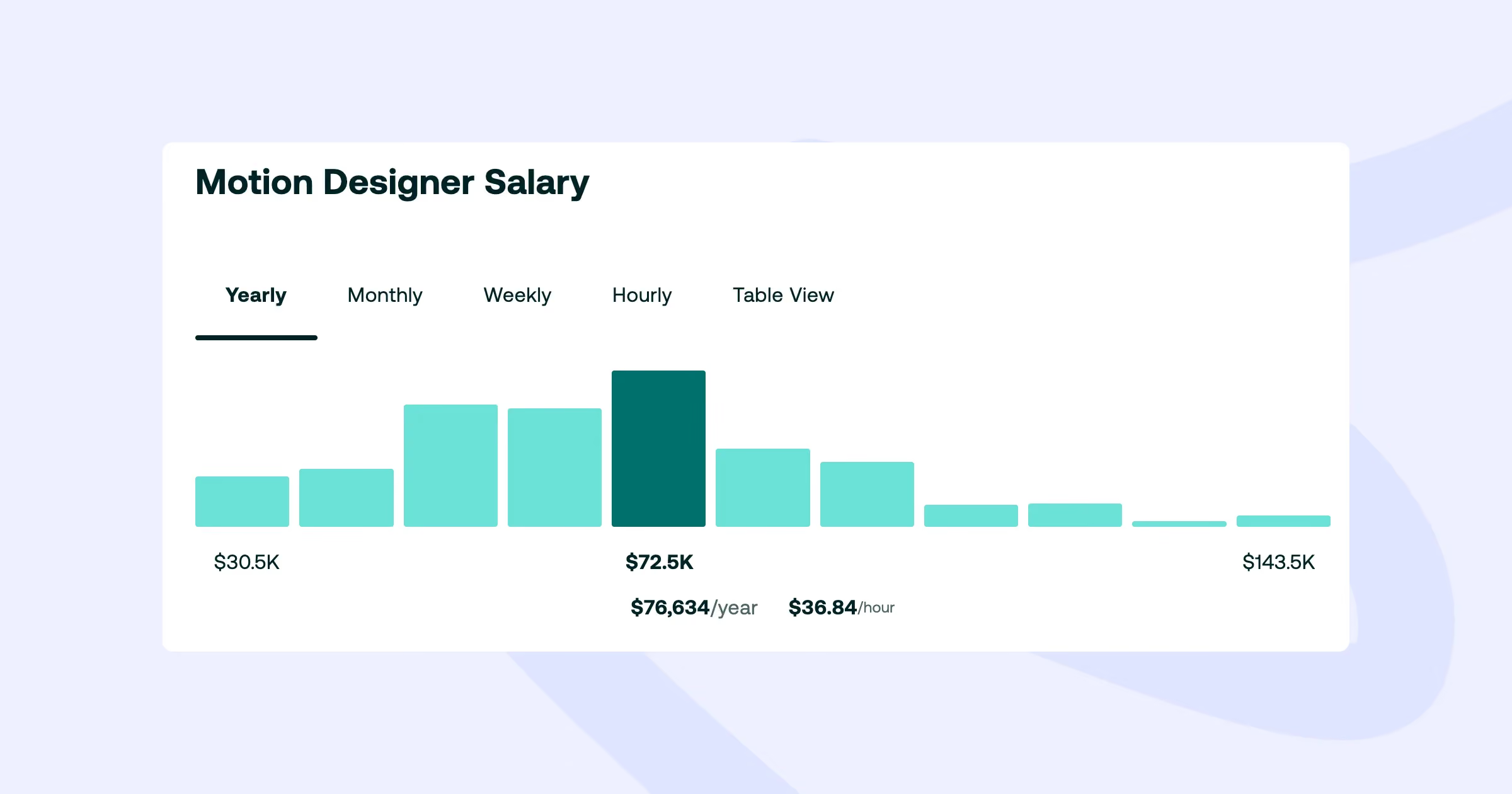
Full-time salary ranges (US, 2026)
If you're considering hiring a motion graphics designer as a full-time employee, here's what to expect based on Robert Half's 2026 salary data and industry benchmarks:
- Entry-level (0-2 years experience): $55,000 to $70,000 per year
- Mid-level (3-5 years experience): $76,000 to $107,000 per year
- Senior (6+ years experience): $100,000 to $140,000+ per year
For additional context, ZipRecruiter reports average annual salaries between $50,000 and $105,000 as of mid-2026, with the top 10% earning over $120,000. These numbers vary depending on location. Designers in cities like San Francisco or New York tend to command higher salaries than those in smaller markets. Remote work has narrowed this gap over the past few years, but it still exists.
A full-time hire makes the most financial sense when you have a consistent, high-volume need for motion content. If your team is producing animated assets every week, the per-project economics of a full-time designer are usually better than paying freelance rates repeatedly.
Freelance rates
Freelance motion designers set their rates based on experience, specialization, and project complexity. Here's what the current market looks like:
- Junior freelancers: $30 to $60 per hour
- Mid-level freelancers: $60 to $100 per hour
- Expert/senior freelancers: $125 to $175+ per hour
Some freelancers prefer day rates, which are typically 1.5x to 2x their hourly rate for a guaranteed full day of work. Others prefer project-based pricing, which is often better for clients because it aligns the cost with the deliverable rather than the number of hours spent.
Project-based pricing
If you're planning a specific project and need to set a budget, here's what you can expect to pay. These ranges assume mid-to-senior level quality:
- 15-30 second social media animation: $500 to $3,000
- 60-90 second explainer video: $3,000 to $15,000
- Full brand animation package (logo reveal + brand motion system): $10,000 to $50,000+
- UI/UX animation for web or app: $1,000 to $10,000
- Animated infographic or data visualization: $1,000 to $5,000
The reason for the wide ranges is that pricing depends heavily on complexity, visual style (2D is generally cheaper than 3D), the number of revision rounds included, and the turnaround timeline. A simple 2D text animation for Instagram costs a fraction of a polished 3D product demo with custom sound design.
Comparing hiring models
There are four main ways to get motion design work done, and each one comes with a different cost structure. Understanding the tradeoffs helps you pick the model that fits your situation.
What to do when your budget is limited
If you're a startup or early-stage company and the numbers above feel out of reach, there are practical ways to get motion design work done without compromising quality entirely.
- Reduce scope, not quality: Instead of commissioning a full 90-second explainer video, start with a single 15-30 second animation that covers your most important feature or value proposition. A well-executed short piece is more valuable than a long one that had to be rushed because the budget was stretched too thin.
- Use project-based pricing instead of hourly: When you agree on a fixed project fee, both sides know exactly what the deliverable and cost will be. This eliminates the anxiety of watching hours accumulate and gives the designer clarity on what's expected.
- Consider junior or mid-level freelancers for simpler projects: Not every animation needs a senior specialist charging $150 per hour. A mid-level freelancer charging $60 to $80 per hour can produce strong work for social media animations, simple explainers, and basic brand motion. Save the senior talent for your most important, client-facing or investor-facing content.
- Look at design subscriptions for ongoing needs: If you need motion design alongside other design work (social graphics, landing pages, ad creatives), a subscription model often costs less per month than hiring a freelancer for each individual project. The predictable monthly fee also makes budgeting much simpler.
- Use template-based animation when appropriate: For internal presentations, quick social posts, or low-stakes content, tools like Canva, LottieFiles, or After Effects templates can give you decent results without custom work. Just don't use this approach for anything client-facing or brand-critical.
How to hire a motion graphics designer
Now that you understand the role, the tools, and the costs, let's talk about how to actually find and hire the right person. This is where most companies run into trouble, not because motion designers are hard to find, but because the hiring process itself is easy to get wrong if you don't have a clear approach.
Step 1: Define your project before you start searching
The single biggest mistake companies make when hiring motion designers is starting the search before they've clearly defined what they need. This leads to vague briefs, misaligned expectations, and wasted time on both sides.
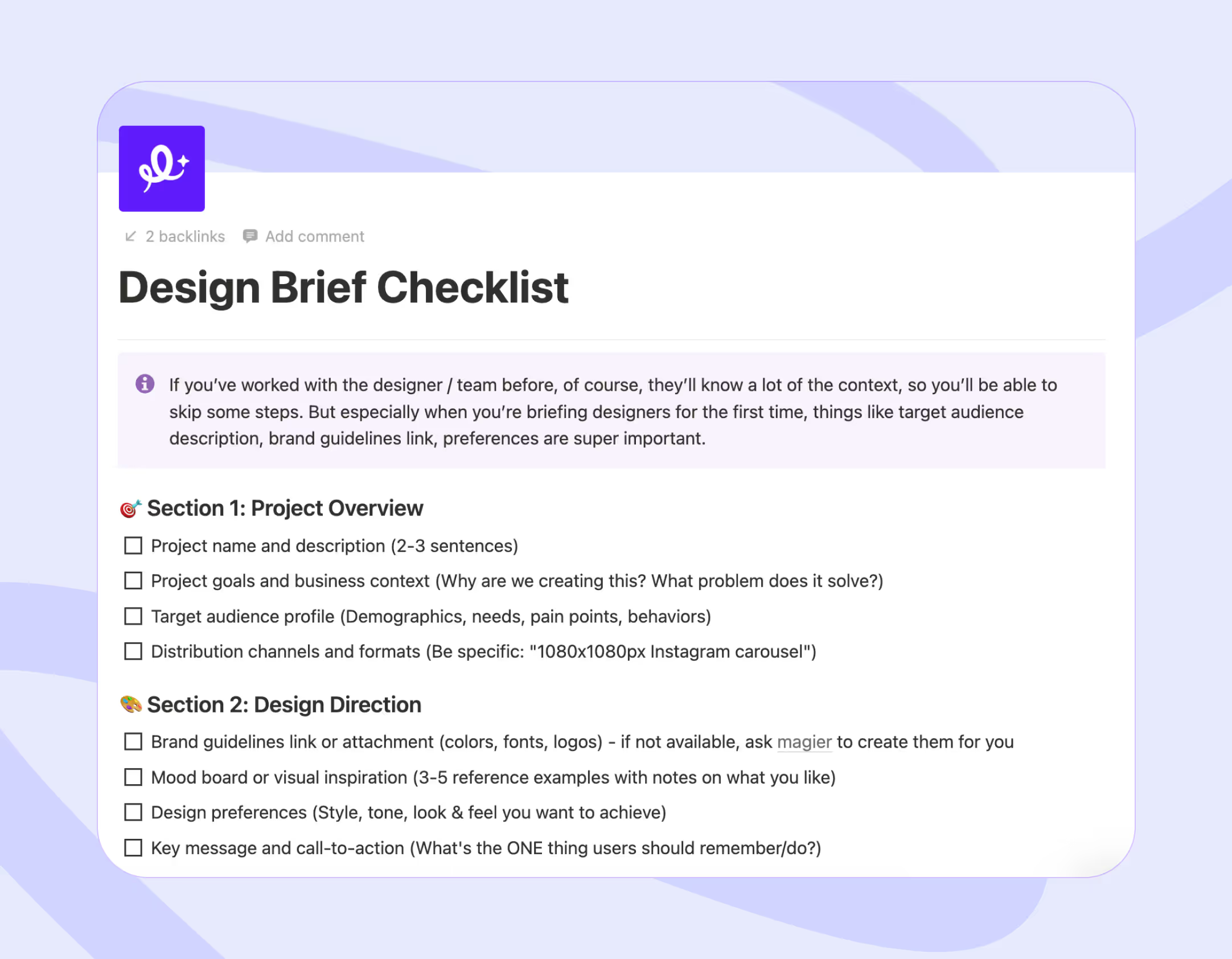
Before you reach out to anyone, get clear on what type of content you need (explainer video, social ads, brand animation, etc.), who the audience is, which platforms it will appear on, what your timeline looks like, and what your budget range is. If you can also gather two or three reference examples that show the visual style you're looking for, that will save hours of back-and-forth during the early conversations.
We've included a full brief template later in this guide that you can use for any motion design project. It covers everything a designer needs to give you an accurate quote and a realistic timeline.
"In our experience, 80% of revision pain comes from the brief, not the designer. When a client hands us a clear brief with references and specs, the first draft is almost always close. When the brief is vague, we're guessing, and guessing costs everyone time and money"

Step 2: Choose your hiring channel
Where you search for talent depends on your budget, timeline, and how much you value quality control. Each channel has strengths and limitations, and picking the right one for your situation makes a real difference.
Step 3: Evaluate portfolios like a pro
If you don't come from a design background, evaluating motion design portfolios can feel intimidating. But you don't need to be a designer to spot the difference between good and mediocre work. Here's a practical framework you can use.
- Look for work that's similar to what you need: A stunning 3D film title sequence is impressive, but it doesn't tell you whether the designer can create clean, on-brand SaaS product demos. Relevance to your project matters more than general impressiveness.
- Pay attention to pacing and storytelling: Does the animation guide your eye naturally from one element to the next? Does it build and release tension at the right moments? Or does everything move at the same speed with no sense of rhythm? Pacing is one of the clearest indicators of skill level, and you can feel the difference even if you can't articulate exactly why.
- Check for brand consistency: Can the designer work within an existing set of brand guidelines, or does everything in their portfolio look like their personal aesthetic? For B2B companies, this distinction is critical. You need someone who can adapt to your brand rather than impose their own style on every project.
- Ask what their specific role was on each project: Showreels frequently contain collaborative work, and it's important to know which parts the designer actually created. This tells you whether they're a strong individual contributor or whether they were one member of a larger production team.
- Look for consistency across multiple projects: One great piece in a portfolio could be an outlier. Five consistently well-executed projects across different styles and formats tell you the designer can deliver reliable quality over time.
Step 4: Ask the right questions
Once you've narrowed your list to a few strong candidates, the following questions will help you evaluate whether they're a good fit for your specific project and working style:
- What tools do you use for this type of project?
- Can you work from our brand files (Figma, Illustrator, etc.)?
- What does your revision process look like, and how many rounds are included?
- Do you provide source files at the end of the project?
- What's your realistic timeline for a project like ours?
- What's your rate structure (hourly, day rate, or project-based)?
- Have you worked with SaaS or B2B companies before?
- Can you share 3 to 5 examples that are most relevant to what we need?
The way someone answers these questions often tells you more about working with them than their showreel does. You're looking for clear communication, realistic expectations, and evidence of a structured process.
Step 5: Structure the engagement
Before any work begins, make sure you agree on deliverables, timeline, milestones, and payment terms in writing. This step prevents the most common sources of friction in creative projects, and both sides benefit from having clear documentation.
- Start with a small test project: Before committing to a larger engagement, test with a smaller one. A single 15-second animation is enough to evaluate the designer's quality, communication style, ability to follow brand guidelines, and reliability under a deadline. The cost of a test project is relatively small, and what you learn from it is worth far more than any portfolio review.
- Set up a feedback workflow from day one: Tools like Frame.io let you leave time-stamped comments directly on the animation, which is significantly more effective than trying to describe visual feedback in an email or chat message. Loom video recordings are another good option for sharing detailed notes on motion work.
- Clarify file ownership and source file handoff: This should be done before the project starts. You should receive the final exports in all required formats plus the original source files (After Effects project files, Illustrator assets, etc.) so you can make edits in the future if needed. If a designer is unwilling to provide source files, that's worth discussing upfront, because it could limit your flexibility down the line. For file transfer, Google Drive and Dropbox are the most commonly used solutions for sharing large motion design files. After Effects project folders, 4K renders, and full asset libraries can be several gigabytes in size, so make sure you agree on a file sharing method that both sides can use comfortably before the project starts.
How to write a motion graphics brief
The brief is the most important document in any motion design project, and it's also the one that gets the least attention. A well-written brief saves time, prevents misunderstandings, and consistently leads to better creative output. A vague or incomplete brief leads to misaligned deliverables, excessive revision rounds, and frustration on both sides.
Here's what every motion graphics brief should include:
Project overview
What are you making and why? Describe the content type (explainer video, social ad, brand animation, etc.) and the business goal behind it. The designer needs to understand not just what you want visually, but what the animation is supposed to accomplish.
Target audience
Who is going to watch this? A CFO evaluating your SaaS product during a buying decision has very different expectations than a consumer casually scrolling through Instagram. The audience shapes every creative decision.
Key message or CTA
What is the one thing the viewer should understand or do after watching? If you can't answer this in a single sentence, the brief isn't focused enough yet.
Tone and style references
Link 2 to 3 examples of animations you like and briefly explain what you like about each one. This gives the designer a concrete visual starting point instead of trying to interpret subjective descriptions like "modern" or "clean."
Brand guidelines
Share your brand colors, fonts, logos, and any rules about how they should and shouldn't be used. The more specific you are here, the less time you'll spend on revisions later.
Technical specs
Include the duration, aspect ratio, resolution, file format, and whether the animation needs sound or will play silently with captions. These details seem minor but they directly affect how the designer approaches the project.
Timeline and milestones
When do you need the first concept? When is the final deadline? Are there interim review dates? Being upfront about timing helps the designer plan their workflow and flag any potential scheduling conflicts early.
Budget range
Sharing at least a ballpark budget helps the designer scope the project appropriately. If your budget is $1,000, the designer needs to know that before proposing a concept that would cost $10,000 to execute properly. This isn't about negotiating against yourself. It's about making sure both sides are aligned before work begins.
Feedback and approval process
Who is reviewing the work? How many revision rounds are included? What tools will you use for giving feedback? Defining this in advance prevents the "can we just do one more small tweak" cycle that can stretch timelines indefinitely.
File delivery requirements
What export formats do you need? Do you want the source files? Where should the final assets be delivered?

The motion graphics production process
Understanding what happens after you hire a motion designer helps you set realistic timelines and give more effective feedback throughout the project. Here's how the process typically works, step by step.
1. Discovery and briefing
The designer reviews your brief, asks clarifying questions, and does their own research into your brand, your competitors, and the platforms where the content will appear. This phase typically takes 1 to 3 days, and the quality of this initial alignment directly affects everything that comes after.
2. Concept and scripting
If the project includes narration or on-screen text, the script gets written and approved first. The designer may also develop the overall visual concept during this phase, often creating mood boards or collecting visual references to establish direction. Depending on complexity, this stage takes 2 to 5 days.
3. Style frames and storyboarding
The designer creates static keyframes that show what the animation will look like at its most important moments. You can think of these as "screenshots" of the future animation. This is your most valuable feedback opportunity in the entire process, because changes at the style frame stage are fast and inexpensive. Once animation production begins, even small changes become time-consuming and costly.
Expect 3 to 5 days for this phase, plus additional time for your review and feedback.
4. Animation production
This is the longest and most labor-intensive phase. The designer builds the actual animation frame by frame, applying timing, easing curves, transitions, and effects. For a 60-second explainer video, this phase alone can take 5 to 15 working days depending on the complexity of the visuals and the style (2D work is generally faster to produce than 3D).
5. Sound design and music
Audio gets added during or after the animation phase. This might include background music, sound effects, voiceover recording, or a combination of all three. Some motion designers handle basic sound design themselves, while more complex audio requirements call for collaboration with a dedicated sound designer.
6. Review and revisions
Most projects include 2 to 3 structured revision rounds. Each round involves you reviewing the current version, providing consolidated feedback, and the designer implementing changes. The quality and specificity of your feedback has a direct impact on how smoothly this phase goes. "The pacing feels slow between the 8-second and 15-second mark" is feedback a designer can act on. "Can you make it feel more dynamic?" is not, and it usually leads to a cycle of guesswork and frustration.
7. Final delivery and handoff
The designer exports the final files in all required formats and delivers them along with the source files. For web animations, this might include Lottie JSON files. For video content, it's typically MP4 and MOV files in the correct resolution and aspect ratio.
Realistic total timelines: A 15-30 second social media animation can typically be completed in 1 to 2 weeks. A 60-90 second explainer video usually takes 3 to 6 weeks. A full brand animation package might take 6 to 10 weeks from start to finish. All of these timelines assume responsive feedback from your side, because slow approvals are the single most common reason motion projects run over schedule.
Is motion graphic design a good career in 2026?
Yes, and demand continues to grow. This section is primarily for people considering the career, but it's also useful if you're a hiring manager trying to understand the current talent market and what to expect.
Career outlook
The volume of video and animated content that businesses need to produce has increased significantly over the past few years, and there's no sign of it slowing down. Social media marketing, SaaS product launches, e-commerce, digital advertising, and the general shift toward always-on content publishing have all created steady, sustained demand for motion designers.
The demand extends beyond just tech and marketing, too. Fintech companies use motion graphics to simplify complex financial products and compliance information for their users. Gaming studios rely on motion designers for UI animation, menu transitions, trailer production, and promotional content. Film and television productions use motion graphics for title sequences, lower thirds, visual effects overlays, and broadcast graphics. And the education sector has increasingly adopted animated explainer content for online courses, training materials, and institutional marketing. The breadth of industries hiring motion designers today means the skill set is more transferable than most people realize.
In 2026 specifically, the need for modular and scalable animation assets has become a major factor. Companies don't just need one hero video for their homepage anymore. They need dozens of variations across platforms, aspect ratios, durations, and audience segments. Motion designers who can build template-based systems and deliver at that volume are especially well-positioned.
Remote work has also expanded the opportunity considerably. More than half of motion designers work as freelancers, and the entire tool stack (After Effects, Cinema 4D, Frame.io, cloud rendering services) supports remote collaboration effectively. This means designers can work for clients anywhere in the world regardless of where they're physically located.
How to become a motion graphics designer
There's no single path into this field. Some designers have university degrees in graphic design, animation, or fine arts. Others are entirely self-taught through online courses, YouTube tutorials, and personal projects.
The most respected online learning platforms for motion design include School of Motion (known for structured, instructor-led programs), Domestika (which offers affordable project-based courses), and a growing library of free content on YouTube from experienced designers who share professional-level techniques.
But let's be honest about what actually matters most. It's your portfolio. Hiring managers and clients evaluate your work, not your educational background. Building a portfolio of 5 to 10 strong projects that demonstrate range and the ability to work across different styles and formats is the most effective way to land your first opportunities. Personal passion projects absolutely count, especially when you're starting out.
Can motion graphic designers work from home?
Yes, and most of them do. More than half of motion designers work as freelancers, and the tools they rely on are fully compatible with remote workflows. Cloud rendering, Frame.io for async video review, and standard file transfer solutions make it entirely practical to work from anywhere with a reliable internet connection.
The one logistical consideration worth mentioning is file size. Motion design projects generate large files, and uploading or downloading heavy After Effects projects, 4K renders, and asset libraries requires decent bandwidth. But beyond that, remote motion design works well and has become the standard rather than the exception.
AI and the future of motion design
"Motion graphics designer AI" appears in Google's autocomplete suggestions, which tells us people are genuinely curious (and maybe a little concerned) about this. So let's address it directly.
AI tools like Runway, Pika, and Kaiber are becoming part of the motion design workflow. Designers are using them to generate initial visual concepts, create background elements, prototype ideas at speed, and automate certain repetitive tasks.
But AI has not reduced demand for motion designers. If anything, the opposite has happened. AI has made it easier to produce a higher volume of content, which in turn means companies need more creative direction, brand oversight, and strategic thinking to manage and refine that output. The human skills that matter most in this field, such as storytelling, brand sensitivity, audience psychology, and creative judgment, are precisely the skills that AI currently cannot replicate well.
If you're hiring, don't expect AI to eliminate your need for a motion designer. And if you're a motion designer reading this, the most practical thing you can do is learn to use AI tools as accelerators within your existing workflow. The designers who integrate AI into their process end up delivering better work faster, which makes them more valuable to clients, not less.
"AI hasn't replaced a single motion designer on our team. What it's done is eliminate about two hours of setup work per project. The creative decisions still take the same amount of time, and that's where all the value is."
Motion graphics for B2B SaaS companies
This section is specifically for the founders, marketers, and CMOs in our audience. If you're running a SaaS company, here's how motion design fits into your marketing and why it's worth taking seriously.
Types of motion content SaaS companies need
SaaS products are often complex and difficult to explain using static images alone. Motion graphics solve this problem by turning abstract features and workflows into visual stories that people can actually follow.
The most common motion design needs for SaaS companies include product demo videos that walk prospects through key features, feature explainer animations for landing pages, onboarding animations that guide new users through the first experience with your product, social ad creatives with animated product screenshots and value propositions, and investor pitch deck animations that make growth data and business metrics feel compelling rather than dry.
Why motion converts better for SaaS
Static screenshots of your product are functional, but they only go so far. An animated product demo that shows the actual user experience, with smooth transitions between screens and visual highlights on key features, communicates your product's value much faster. A viewer can understand what your product does in 30 seconds of well-designed animation instead of spending 3 minutes reading copy and trying to interpret static screenshots.
This is why motion content tends to outperform static alternatives on landing pages and in ad campaigns for SaaS companies. The format matches the complexity of what you're selling.
Scaling motion design without scaling your team
The challenge most SaaS marketing teams run into is that they need motion content consistently, but the volume doesn't justify a full-time hire. You might need two or three animated assets a month, not two or three a day. So the question becomes how to keep a steady output without building a team around it.
There are a few practical ways to do this. One is to invest in modular animation templates early on. If your motion designer builds a flexible system during the first project (consistent transitions, reusable brand elements, templated layouts), future projects become faster and cheaper because the foundation already exists. Another is to batch similar projects together. Commissioning five social ad variations in one brief costs less per asset than commissioning them individually across five separate engagements. And if you need motion graphics alongside other design work like landing pages, ad creatives, and brand materials, a design subscription can bundle all of it under one predictable monthly cost, which we cover in more detail later in this guide.
The key takeaway for SaaS teams is that scaling motion output is less about finding more designers and more about structuring your process so each engagement produces the maximum number of usable assets.
When a design subscription like magier makes more sense than hiring individual motion graphics designers
If your company needs motion graphics regularly but not daily, and you also need other design work like ad creatives, landing pages, social graphics, or brand materials, hiring a separate freelancer for each of those is expensive and time-consuming. A design subscription like magier gives you access to a team that handles all of it under one monthly fee with 48-hour turnaround per task. You don't manage multiple contracts, you don't vet new freelancers every time a project comes up, and your costs stay predictable.
This model works especially well for SaaS companies and startups with marketing teams of 3 to 5 people who need consistent design output but don't have the volume to justify a full-time motion specialist. If that sounds like your situation, here's how magier works.
Final thoughts
Hiring a motion graphics designer doesn't have to be overwhelming if you know what to look for, what to pay, and how to structure the engagement. Use the brief template, start with a small test project, and evaluate based on relevance to your needs rather than how impressive a showreel looks. Whether you go with a freelancer, a vetted network, or a design subscription, the right process will get you to the right person.
FAQ
A 15-30 second social media animation typically takes 1 to 2 weeks. A 60-90 second explainer video takes 3 to 6 weeks. Complex 3D animations or full brand motion packages can take 6 to 10 weeks. These timelines assume timely feedback from the client side.
Yes. More than half of motion designers work as freelancers, and the tools used in the field fully support remote collaboration. Cloud rendering, Frame.io for review, and standard file transfer solutions make it possible to work from anywhere with a reliable internet connection.
Motion graphics designers work primarily with graphic design elements in motion, including typography, icons, data visualization, and brand visuals. Animators focus more on character-driven storytelling and narrative animation. There is overlap, but the core specializations and typical deliverables are different.
Start with a clear brief that defines your project, audience, timeline, and budget. Choose a hiring channel (portfolio platforms, freelance marketplaces, vetted networks, niche communities, or design subscriptions). Evaluate portfolios for work relevant to your needs, ask candidates about their process and pricing, and start with a small test project before committing to a larger engagement.
The most common tools are Adobe After Effects (2D animation and compositing), Cinema 4D and Blender (3D), Adobe Illustrator and Photoshop (design assets), Rive and Lottie (web and mobile animations), and Premiere Pro (video editing and final assembly). AI tools like Runway are becoming part of the workflow for prototyping and concept exploration.
Yes. Demand for animated content continues to grow across SaaS, e-commerce, social media, and digital advertising. The field supports both full-time employment and freelance work, and remote work is the norm. AI tools are changing some workflows but have increased overall demand rather than reducing it.
In the US, full-time salaries range from about $55,000 for entry-level roles to $107,000+ for mid-to-senior positions (based on Robert Half's 2026 data). Freelancers typically charge between $30 and $175+ per hour depending on experience and specialization.
.avif)

.webp)