14 Best Claude Design Skills for Designers in 2026
If you have used Claude to build a landing page or a dashboard mockup, you have probably seen the following cascade:
The first prompt looks fine, the second prompt drifts, and by the fifth prompt the fonts, spacing, and button styles have all quietly gone their own way. Designers call this "AI slop," and an easy way to solve this is having the right Claude design skills installed.
A Claude design skill is a reusable set of instructions Claude loads automatically instead of you retyping your brand rules and layout preferences every single session. Anthropic's own official frontend-design skill has already passed 277,000 installs on its own, which is the clearest sign that skills specifically are getting real adoption. That's happening alongside a separate but related development: Anthropic launched Claude Design, a standalone visual design product, on April 17, 2026, a launch significant enough that Figma's stock dropped 7% that same week and Claude's search interest on Google Trends hit an all-time high. Claude design skills and Claude Design are two different tools, but together they show how much attention this whole space is getting. This is not a niche feature anymore.
However, there's a clear deficit when it comes to proper resources on which Claude design skills are currently publicly available, how you could build skills yourself, or which one is the right skill for your design use case. Our own designers ran into that exact problem when they first started adopting Claude. So we put together a doc to solve it for our team, and we're making that same doc public here.
In this guide, we cover the following.
- What a Claude design skill actually is and why a good prompt alone can't replace one
- Whether Claude Design or Claude Code is the better starting point for your project
- The real difference between official Anthropic skills and community-built ones
- A step-by-step walkthrough for installing your first skill
- 14 specific skills worth installing, with working links, split by official and community source
- How to group those skills into a stack based on the kind of design work you actually do
- Style-specific skills that lock a visual look before you even start building
- Where to find and download more skills once you have the basics covered
- How to tell whether a skill you downloaded is actually useful or just AI slop with extra steps
- The honest limitations you should plan around before you rely on any of this
{{freebie}}
What is a Claude design skill?
A Claude design skill (or a Claude designer skill) is a structured markdown file, usually named SKILL.md, that encodes design rules Claude reads and follows automatically. Instead of writing out your color tokens, spacing scale, and tone of voice in every new chat, you load the skill once and Claude applies it every time it builds something for that project. That's the core reason skills beat prompting alone, since a prompt only shapes one response while a skill shapes every response going forward.
Claude design skills are like instruction sets that push Claude past generic "AI-slop" aesthetics by forcing it to apply real typography, spacing, and visual judgment instead of defaulting to whatever layout shows up most often in its training data. That lines up with what practitioners report. A skill can ban cliché choices like Inter or Roboto as default fonts, require Claude to draft a plan before writing any code, or curate a whole library of layouts and color systems Claude pulls from instead of inventing its own on the fly.
Claude Design vs Claude Code: pick your environment before you pick a skill
Before you install anything, it helps to know where you are actually going to use it. Claude Design is Anthropic's dedicated visual creation product, launched April 17, 2026 and built on Claude Opus 4.7, and it is aimed at people who want to describe an idea in conversation and get a prototype, slide deck, or one-pager back without touching code. Claude Code is the terminal-based coding environment, and it is where skills like frontend-design actually live and run against a real codebase.
Here’s an interesting finding to consider: Fable 5 running inside Claude Code can produce stronger front-end results than Claude Design itself, because Claude Design is slower, less efficient with tokens, and does not account for an existing codebase's dependencies the way Claude Code does. However, this is a designer community opinion rather than an official benchmark, but it matches what other users describe when comparing the two environments.

If you are starting completely from scratch with no code yet, Claude Design is the easier on-ramp. If you already have a real project and want your output to respect what is already built, Claude Code paired with the right skill is the stronger choice.

{{cta}}
Official Claude skills vs community Claude skills: what's the difference and why it matters
Anthropic maintains its own public skills repository at github.com/anthropics/skills, and everything in it is reviewed, versioned, and kept current by Anthropic's own team. Community skills, by contrast, come from independent developers and designers, and they range from extremely well-maintained projects with thousands of stars to smaller repos that stop getting updates after a few months. Neither category is automatically better, but knowing which one you are pulling from changes how much you should trust a skill without checking it yourself first.
How to install a Claude design skill
- Open your skills settings: In Claude.ai, go to Settings, then Capabilities, then Skills. In Claude Code, you will typically install through a plugin marketplace command or by placing the skill folder in your project's .Claude/skills/ directory.
- Add the skill source: For an official Anthropic skill, you can register the repository as a Claude Code plugin marketplace and run an install command such as /plugin install frontend-design@anthropic-agent-skills. For a downloaded skill, upload the folder or .zip directly.
- Confirm it loaded: Ask Claude a simple question that should trigger the skill, like requesting a landing page section, and check whether the output reflects the skill's rules.
- Adjust as needed: Most skill files are just markdown, so you can open them and edit tokens, fonts, or rules to match your actual brand before relying on them for real work.
- Reuse across sessions: Once installed, the skill applies automatically in future sessions without you retyping your preferences.
Exact steps vary slightly depending on the specific skill and platform, so check the skill's own README before assuming this sequence applies exactly.
The 14 best Claude designer skills to install in 2026
We split this list into official Anthropic skills and vetted community skills, since knowing which bucket you are pulling from matters for how much upkeep to expect. Official skills stay current because Anthropic maintains them directly, while community skills vary, so we only included ones with real traction and recent activity.
Official Anthropic skills (github.com/anthropics/skills)
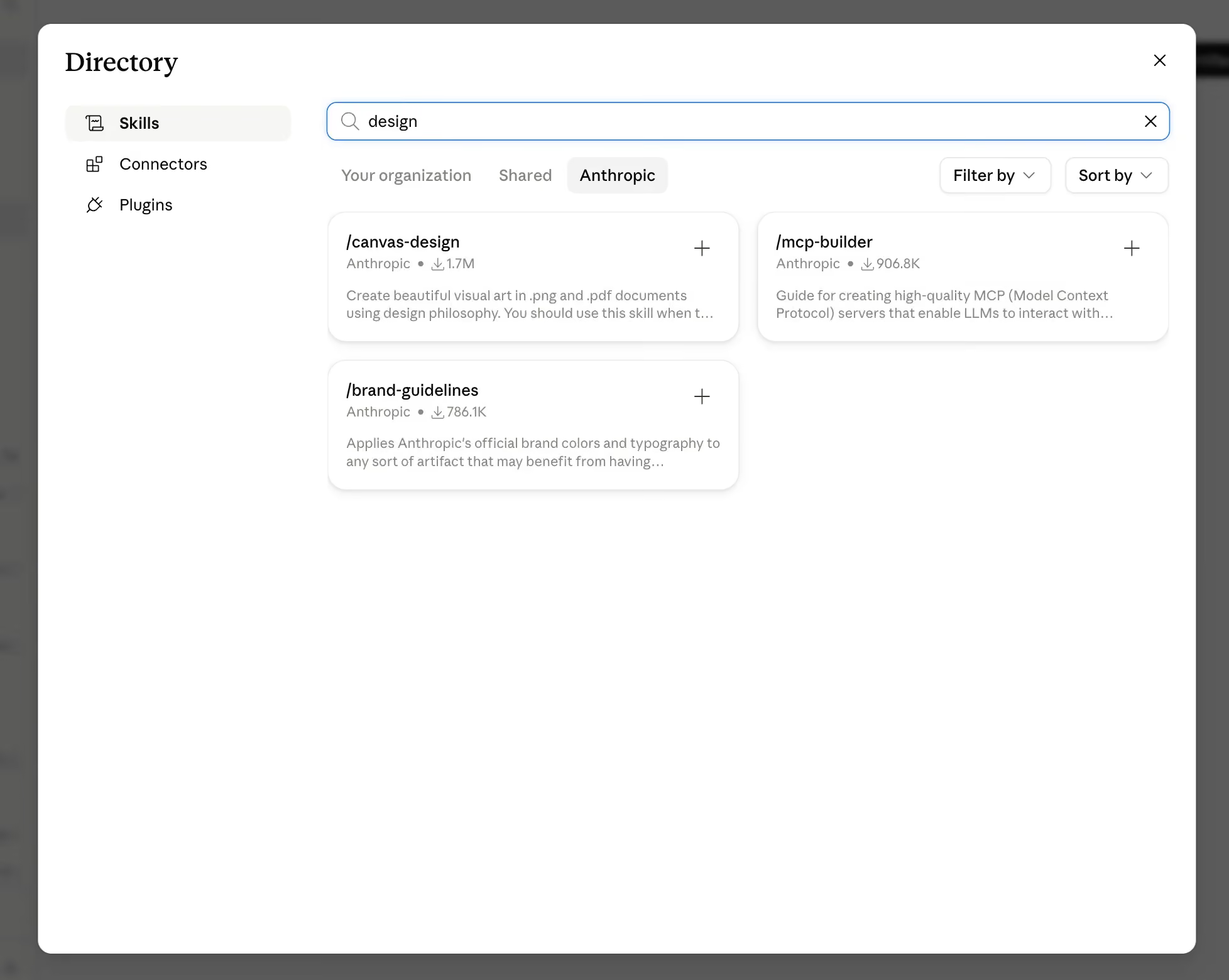
- Frontend design: Anthropic's own skill for visual hierarchy, spacing, and typography, and the specific skill behind the 277,000+ install count. It is the closest thing to a default starting point for anyone building UI with Claude.
- Brand guidelines: Part of the same official repository, alongside a related official skill called Theme Factory that generates a full visual theme from your brand inputs. Together they apply a consistent color palette and typography across everything Claude generates once you have defined those rules a single time.
- Canvas design: Also from anthropics/skills. It produces visual art in .png and .pdf formats using named design philosophies rather than falling back on a generic template.
- Artifacts builder: From the same repository. It builds complete, self-contained HTML artifacts using React, Tailwind CSS, and shadcn/ui, which matters if you need a working prototype rather than a static image.
- MCP builder: Also official. It guides Claude through building Model Context Protocol servers, useful once your design workflow needs to pull live data from Figma, Notion, or another external tool.
- Webapp testing: From anthropics/skills. It uses Playwright to test and verify a local web app's UI, which catches visual regressions before a design ever reaches handoff.
- Document skills (docx, pdf, pptx, xlsx): Chained together from the same repository. They matter when a design deliverable needs to leave Claude as an actual Word document, slide deck, or spreadsheet instead of staying in the chat window.
- Skill creator: The meta-skill Anthropic built specifically for making new skills. It sets up everything in the next section of this guide.
Community and third-party skills
- TypeUI design skill library: An open source CLI and registry of around 90 named style skills, including Apple, Stripe, Linear, Brutalist, and Glassmorphism, each pulled into Claude with a single command.
- Design with Blocks: A free skill that turns a plain-language app description into a labeled architecture diagram and a buildable design document before any visual work begins.
- Review with Blocks: Pairs directly with the skill above to critique an existing design against the same framework, flagging what is missing or over-engineered.
- borghei/Claude-Skills: A large, actively maintained community library covering hundreds of skills across many teams, including design-adjacent ones for product management and marketing that often sit right next to a design handoff.
- TypeUI basic and editorial style skills: Two specific, well-documented style files worth naming individually, since they show exactly how far a skill file can go, down to a named typeface and a single accent color.
- Community skill collections shared on Reddit: Like u/elwingo1's list of 48 design skill files, which passed 1.1K upvotes and 149 comments in r/ClaudeAI, and a separate 63-skill collection published on Substack. These aren't official products, but their traction shows real demand for curated, ready-to-use style skills over building from scratch.
We recommend checking each link at the time you install anything, since community projects update their structure more often than official ones. A five-second check before you install saves you from building on a skill that has already moved or been renamed.
Claude design skills worth building yourself (and how to start)
No downloaded skill will perfectly match your specific brand voice, your engineering team's handoff preferences, or the exact page structure that has worked for your past client projects. That's where Anthropic's own skill-creator skill comes in, since it exists specifically to help you turn your own rules into a reusable SKILL.md file instead of relying entirely on someone else's defaults.
Here are five custom skills worth building for your own team, each with the reasoning for why it beats a downloaded one.
- A brand voice and visual rules skill: Combine your tone of voice with your actual color tokens and spacing scale, so Claude stops reinventing your design system every session instead of following the one you already have.
- A PDF export and formatting skill: This directly addresses a recurring complaint from the Claude Design community about page breaks and spacing during PDF export, since a skill can set explicit margin and page-split rules that a generic prompt cannot.
- An accessibility audit skill mapped to WCAG 2.2: Generic accessibility checks catch obvious contrast issues, but a skill built around the actual WCAG 2.2 success criteria catches the specific things an auditor would flag.
- A developer handoff skill: Format spacing, states, and interactions the exact way your specific engineering team expects them, rather than a generic handoff structure that still needs translation on the other end.
- A landing page structure skill: Encode your own proven section order, such as hero, proof, features, objection handling, and CTA, instead of letting Claude default to whatever generic order it reaches for.
Skill stacks by role: what to install based on what you actually design
Instead of installing all 14 skills at once, it helps to group them by the kind of work you actually do most often. Each stack below builds on the skills already covered, so you can mix and match once you see how the groupings work.
For Webflow and B2B SaaS designers
Start with frontend design, brand guidelines, a Webflow-specific custom skill you build yourself using skill-creator, the landing page structure skill, and one TypeUI style skill that matches your product's visual tone. This combination covers the full path from layout to a consistent look across every page you ship.
For brand and agency designers
Lean on brand guidelines, canvas design, a TypeUI style skill for each client aesthetic you commonly work in, and your own custom brand voice skill so tone stays consistent across every deliverable. This stack works well when you are switching between client aesthetics often and need each one to stay distinct.
For product and UX designers
Combine Design with Blocks and Review with Blocks for architecture-level thinking, frontend design for the visual layer, webapp testing to catch regressions, and your own accessibility audit skill for WCAG 2.2 compliance. This grouping catches structural problems early, before they turn into a visual polish problem later.
"Most teams don't need thirteen skills. They need the two that actually match how their engineers already work."

Style-specific Claude designer skills: worth knowing before you build
Beyond functional skills like accessibility or handoff, there is a separate category built entirely around visual style. TypeUI's registry alone includes named styles like Apple, Material, Bento, Brutalist, Glassmorphism, Stripe, Linear, and Notion, and each one locks a specific typographic and color direction so your output does not drift between prompts. Locking a style before you start building saves the back-and-forth of describing the same aesthetic over and over, since the skill carries that description for you.
If you are not sure which style fits your product, start by matching the tone of your brand voice to the closest named style. From there, customize the tokens rather than starting from a blank file, since adjusting an existing direction is faster than building one from nothing.
Where to actually download Claude design skills
How to tell if a Claude design skill is actually good
Our favorite way to judge is by going through threads in Reddit communities like r/ClaudeAI and r/ClaudeDesign. These communities are full of people asking this exact question before they install anything, and it's a fair thing to check. A skill is worth keeping if it produces output that is clearly different from Claude's untouched default, if the repository shows recent commits rather than a project abandoned months ago, and if the rules inside actually match tools you use, like your real Tailwind config rather than a generic one. That scrutiny matches the tone of the community itself. r/ClaudeDesign alone draws 21,000 weekly visitors and 312 weekly contributions, and threads that question a specific skill routinely draw as much engagement as ones that just promote one, including a post condensing 8 years of product design experience into a skill that reached 871 upvotes.
- Does the output actually change? Ask Claude the same question with and without the skill loaded and compare the results side by side.
- Is it maintained? Check the last commit date on GitHub before trusting a community skill with real client work.
- Does it match your stack? A skill built for Tailwind won't help much if your team works in vanilla CSS.
- Can you read the whole file? If the SKILL.md is short enough to read start to finish in a few minutes, you can judge it yourself instead of taking someone else's word for it.
Installing a skill and never checking whether it changed anything is a bit like hiring a consultant and never reading their report. You paid for the input, but you never actually used it.

Claude design skills limitations to plan around
- PDF export can be rough: Several Claude Design users report page breaks landing in awkward places and spacing issues that require exporting as a single HTML file or manually adjusting after the fact.
- Claude can design a page but not generate custom images itself: One workaround the r/ClaudeDesign community describes is pairing Claude Code with a third-party plugin such as openai/codex-plugin-cc, letting Claude call it directly for the visuals it can't generate on its own.
- Claude Design is still a research preview: Since it launched in April 2026, expect the product itself, not just the skills built for it, to keep changing.
How to build a Claude skill
Every Claude skill, regardless of what it does, follows the same basic shape underneath. It's a folder with a file called SKILL.md inside it, and that file has two parts: a short description at the top that tells Claude when to use the skill, and a body underneath with the actual instructions. Once you understand that shape, you can build a skill for design work, customer support replies, code review, or anything else you do repeatedly.
Here's the general process that works for any skill:
- Name the specific problem you're solving: Before writing anything, get clear on the one repeated task this skill should handle, like applying your brand's tone of voice or following your team's code review checklist. A skill built around one clear job works better than one trying to cover everything at once.
- Write a precise trigger description: Claude reads this short description first, for every skill you have installed, to decide whether it's relevant to the current request. Vague descriptions get skipped, so describe exactly when this skill should activate.
- Write the instructions in the body: This is where you put your actual rules, examples, and constraints, in plain language, the same way you'd explain them to a new hire on their first day.
- Add supporting files if you need them: Templates, reference documents, or small scripts can live alongside SKILL.md and get pulled in only when the skill actually needs them, which keeps things fast.
- Test it against real requests: Ask Claude something that should trigger the skill and check whether the output actually follows your rules, not just whether the skill loaded.
- Refine based on what breaks: The first version rarely gets everything right, so treat early use as the actual test phase rather than a finished product.
Anthropic's own skill-creator skill is built specifically to walk you through this process, so you don't have to structure the file by hand. Whether you're building a design skill, a support-ticket skill, or something for an entirely different part of your work, this same six-step shape applies.
Final thoughts
A good Claude design skill setup turns Claude from a tool that guesses at your preferences into one that actually applies them, consistently, across every session. Getting there still takes some real trial and error, since the right stack depends on your specific tools, your brand, and how much you are willing to customize before you rely on any of it for client work.
If you would rather have a design team that already knows which of these skills hold up on real projects, check out magier's design services. With a 48-hour turnaround, a fixed monthly fee, unlimited revisions, and pre-qualified designers, we've already done the trial and error across 150+ brands so you don't have to.
If you're building your own stack today, start with the role-based grouping above and pick the section that matches what you actually design most often. That's a faster path than trying every skill on this list at once.
{{cta}}
FAQ
Compare Claude's output with and without the skill loaded, check whether the skill's repository has been updated recently, and confirm the rules inside actually match the tools your team already uses.
Yes, most skills, including Anthropic's official ones, are built to run inside Claude Code, and several, like frontend-design and webapp-testing, are specifically designed for that environment.
Anthropic's official frontend-design skill is the most widely adopted option, with over 277,000 installs, and it's a reasonable default starting point before layering in style-specific skills.
Anthropic's own github.com/anthropics/skills repository and TypeUI's design-skills library both offer browsable, working examples you can inspect before installing.
Most official Anthropic skills and many community skills, including TypeUI's registry and Design with Blocks, are free and open source, though some community marketplaces mix in paid or premium options.
You install a skill through your Claude settings under Capabilities and Skills, or in Claude Code by registering a plugin marketplace or placing the skill folder in your project's skills directory.
The two terms are typically used interchangeably by searchers, and both point to the same concept: reusable instruction sets that shape how Claude approaches design tasks.
.avif)