15 Best Interior Design Website Designs in 2026 (With Design Lessons to Copy)
We’re guilty. Guilty of pursuing the best website designs in every single niche. But if it allows us to present you with the best interior website designs in 2026, it’s our guilty pleasure!
Jokes aside, there are many interior designers that have a flourishing business offline. But when it comes to acquiring inbound leads through their website, the number often is next to zero. Core issue: a website that doesn’t convey your unique offerings.
More importantly, you cannot design an interior design website following generic webdesign rules. There are certain best practices and rules that you need to follow. But where would you find them?
That is what we tried to address with this blog of ours. Not only we have compiled the best interior design website design examples in 2026, but also we have derived what design lessons you can follow from each, so that after reading this blog you can straight jump into implementing.
Here’s what we cover
- 15 interior design website examples, with the design lessons to copy from each
- How to find the right design direction for your interior design business
- Anatomy of a well-designed interior design website
- Platform options for hosting and designing your website
- In-house vs template vs agency for designing your website
- Website pre-launch checklist
And many more intricate information that you won’t find anywhere else. So start reading!
{{freebie}}
15 interior design website examples, grouped by direction
Which direction fits your studio? Think of this list as interior design websites inspiration with a method attached, because each group starts with the decision that defines it and each profile ends with lessons you can copy. These interior design website ideas come from interior design firm websites, brand hubs, and two magazines, so you can compare very different answers to the same problem.
The following 3 sites trust the photography and keep everything else small. The decision that defines them is how few things they put between the visitor and the work.
1. Alwill
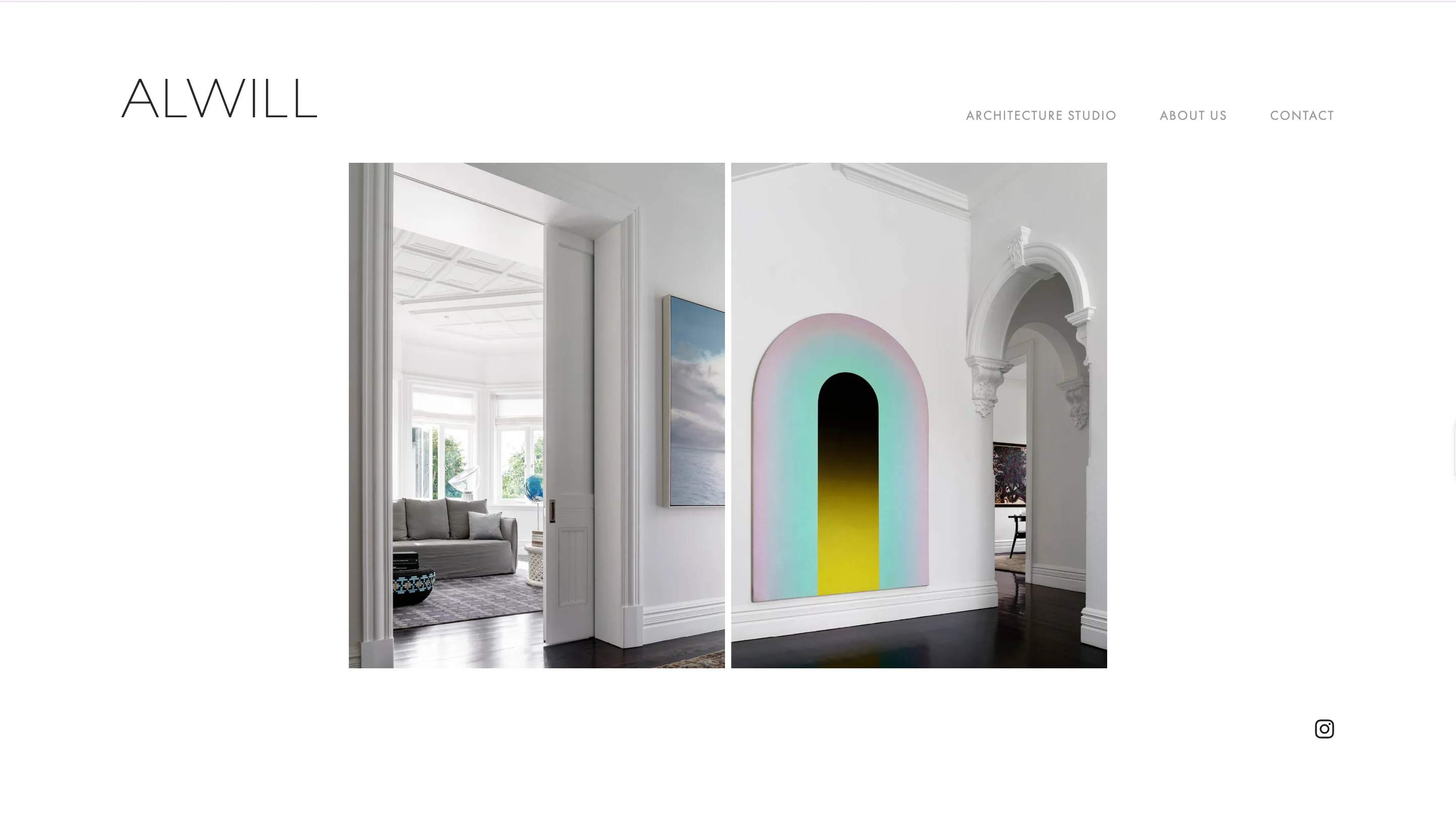
Alwill is an Australian studio whose website shows one centered photograph on a white page. A thin wordmark sits at the top left, and a three-item menu sits at the top right. An Instagram icon is the only other element on the screen.
Design lessons to copy
- Limit the menu to the pages a client needs, three here, so nothing competes with the image.
- Show one image at a time with generous white space, so each room gets full attention.
- Test pale grey menu text against the WCAG 4.5:1 contrast ratio before you copy the look, because quiet text is easy to miss.
Website: alwill.com.au
2. Norm Architects
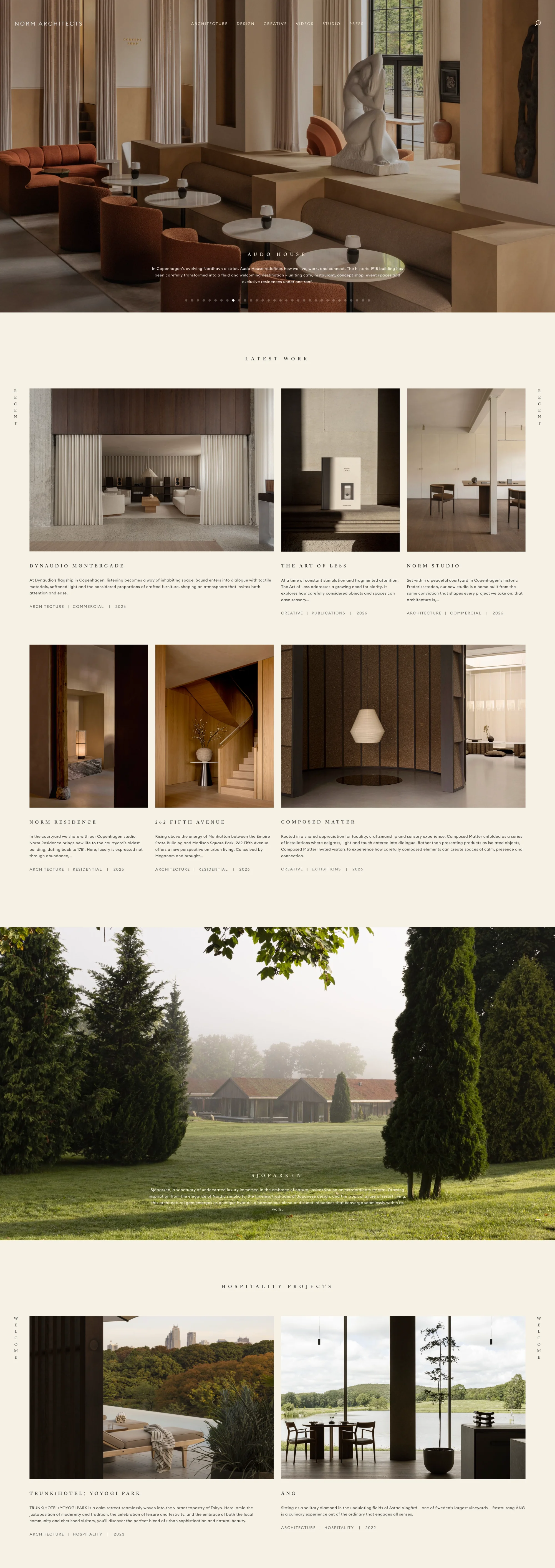
Norm Architects is a Copenhagen studio whose site uses a cream background and wide-spaced capital letters. Each project card has a short description and a tag line that lists the discipline, project type, and year. The header shows six menu items plus a search icon.
Design lessons to copy
- Add a tag line to every project card, such as discipline, type, and year, so visitors can scan the portfolio without opening each project.
- Use a warm cream background with spaced capitals to make a restrained look feel inviting.
- Keep the header visible as the page scrolls, so the menu stays one tap away on long pages.
Website: normcph.com
3. John Pawson
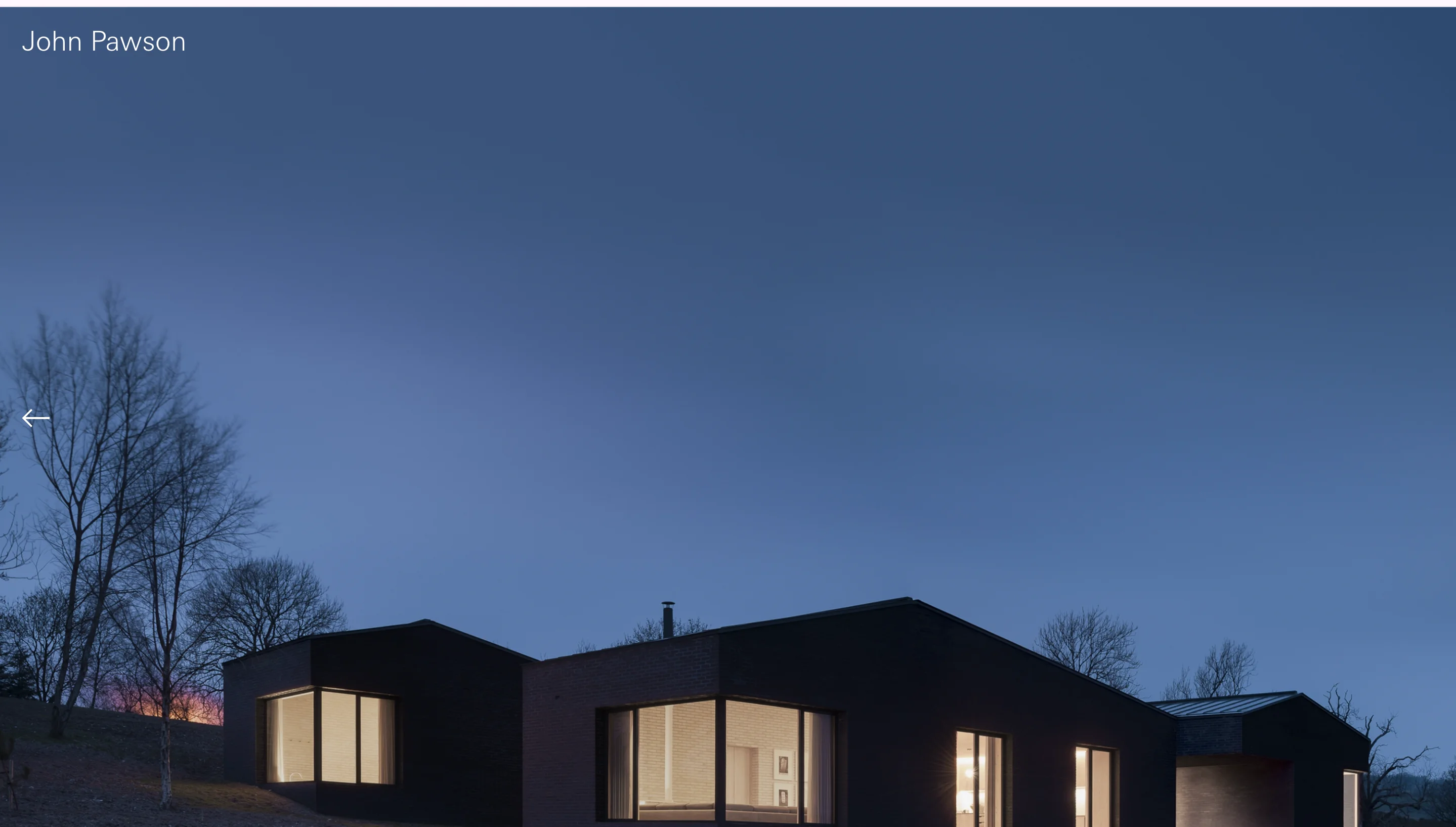
John Pawson is a London architect known for reduction, and his website follows the same rule with a white page, small sans-serif labels, and large photographs. Each click opens a bigger image with a line or two of context.
Design lessons to copy
- Let each project image open larger with only a short line of context, so the photograph does the explaining.
- Leave out popups and decorative effects, so nothing interrupts a visitor who is studying the work.
- Keep labels small and consistent, but check their contrast, because tiny text can be hard to read.
Website: johnpawson.com
The next two sites feel personal and make hiring easy. The decision that defines them is giving visitors a clear next step once they like the photographs.
4. Jessica Nelson Design
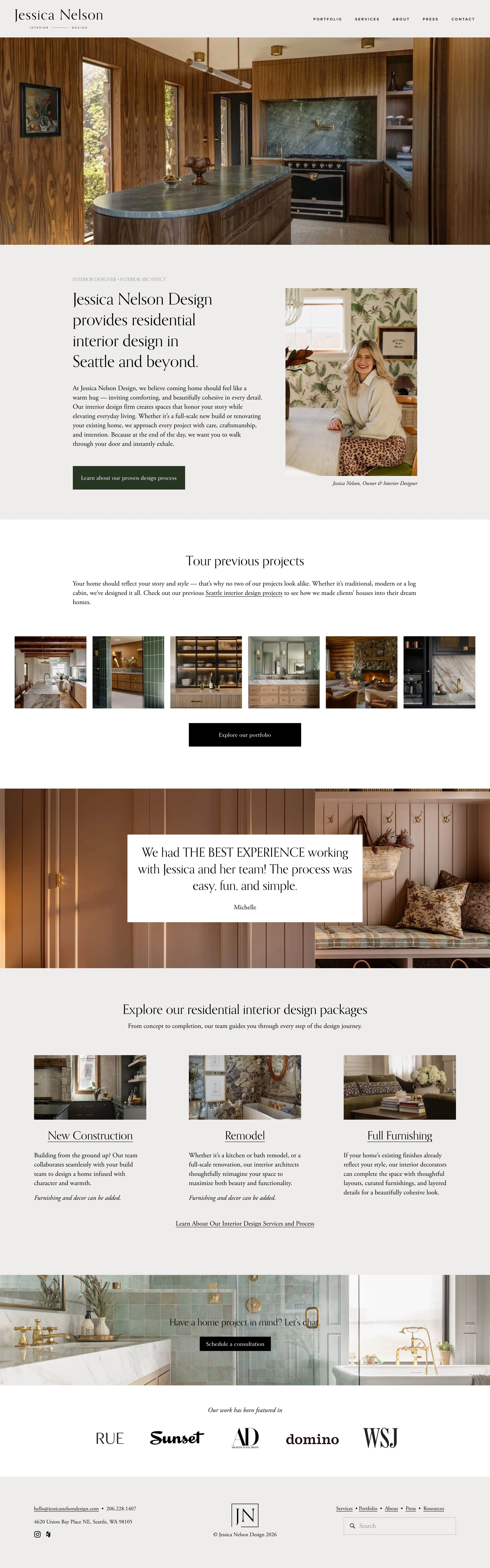
Jessica Nelson Design is a Seattle residential studio, and its homepage is the clearest hiring path of the 15. A hero photograph leads into a headline that names the city, a founder portrait, a project strip, a client testimonial, three service packages, a consultation band, and a row of press logos.
Design lessons to copy
- Put your city in the positioning headline and link to a local projects page, because clients search by location and want a studio near them.
- Show how clients can hire you with packages, such as New Construction, Remodel, and Full Furnishing, plus a link to your design process.
- Repeat the consultation call to action lower on the page and close with press logos, such as RUE, Sunset, AD, domino, and WSJ, as proof.
Website: jessicanelsondesign.com
5. Studio McGee
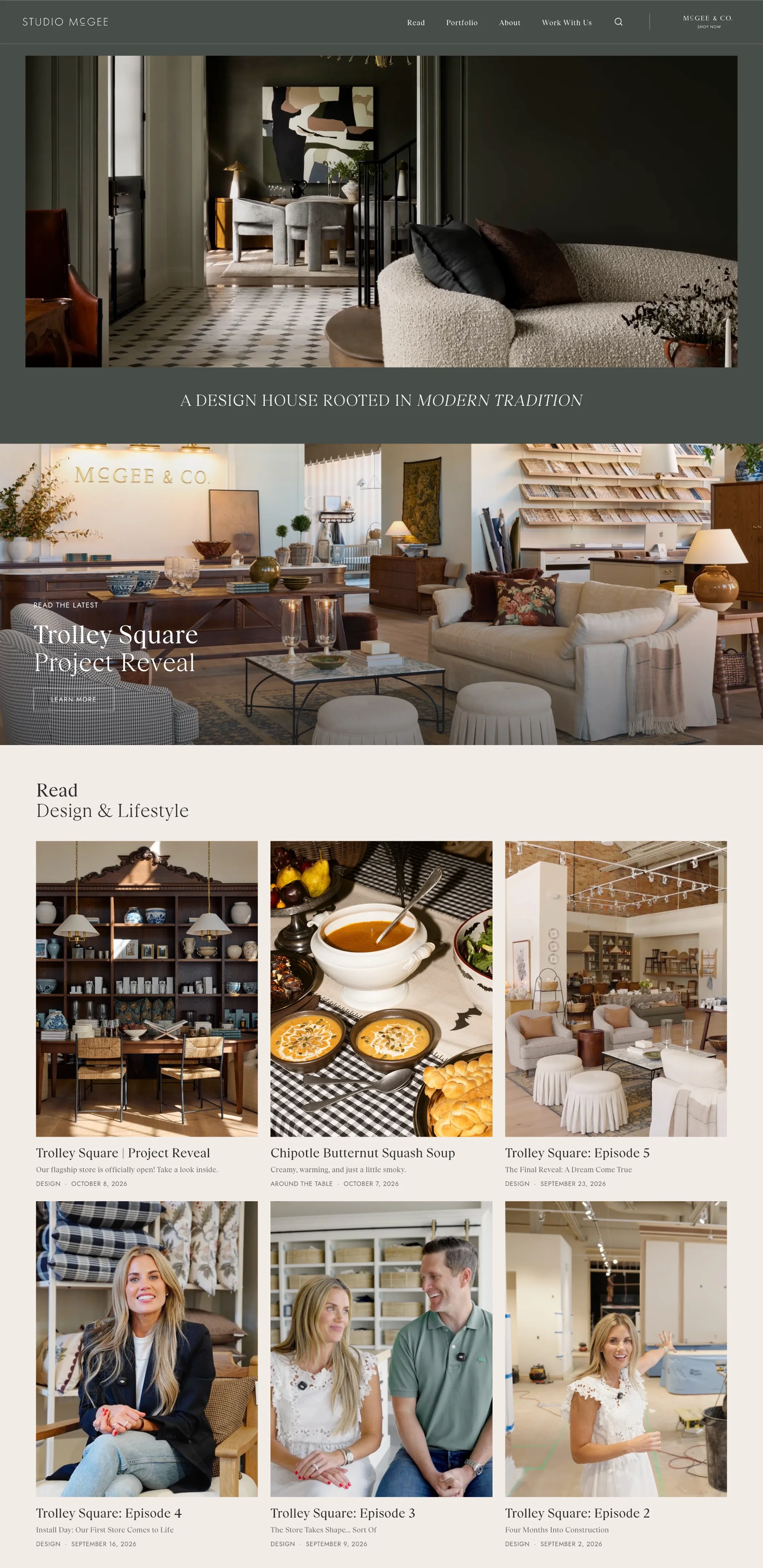
Studio McGee is a lifestyle design brand whose homepage leads with large, sunlit photographs and a trim menu. A grid of project thumbnails opens into story-style project pages with full-width images and a short design recap.
Design lessons to copy
- Turn each project into a short story with a design recap, so visitors understand your thinking and not only the finished room.
- Keep a trim menu above a clean thumbnail grid, so visitors reach projects in one click.
- Place social links in the footer, so they support the brand without crowding the page.
Website: studiomcgee.com
The next two sites use color and type to show personality before a single room appears. The decision that defines them is treating the brand as part of the design.
6. Studio Ashby
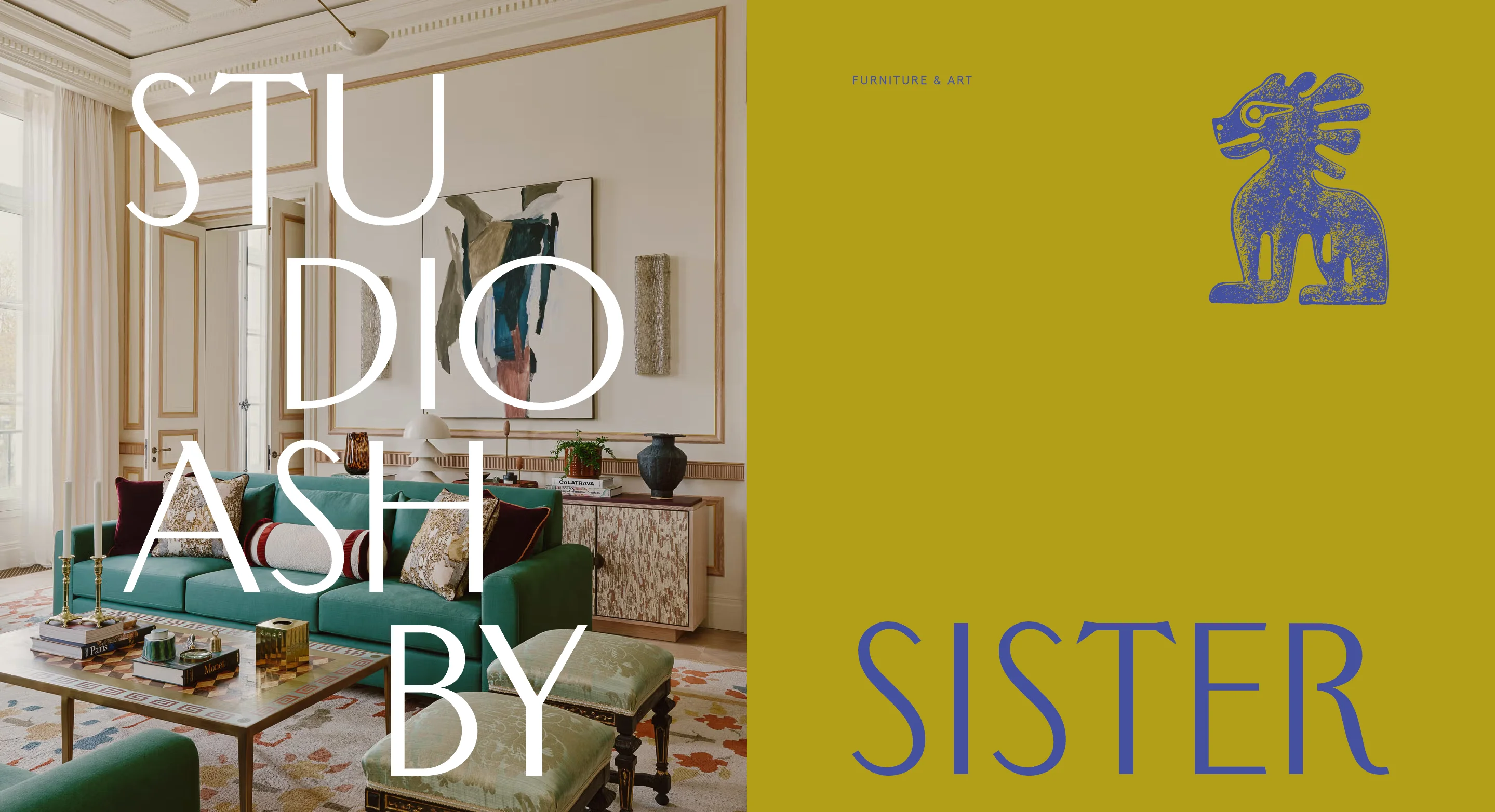
Studio Ashby is a London studio whose homepage opens with a split screen of two brands. The studio name sits in orange type on brown, and its sister brand, Sister, sits in blue type on olive. Below that, an olive statement band, a feature project panel, and a row of named projects lead into large photographs.
Design lessons to copy
- Use color and oversized type to show your brand personality before any photograph appears.
- Give projects memorable names, such as St Germain or Belgravia Jewel Box, and add a short story and an "Explore the project" button to the feature project.
- Offer separate newsletter checkboxes for each brand, so subscribers choose what they receive.
Website: studioashby.com
7. Masquespacio
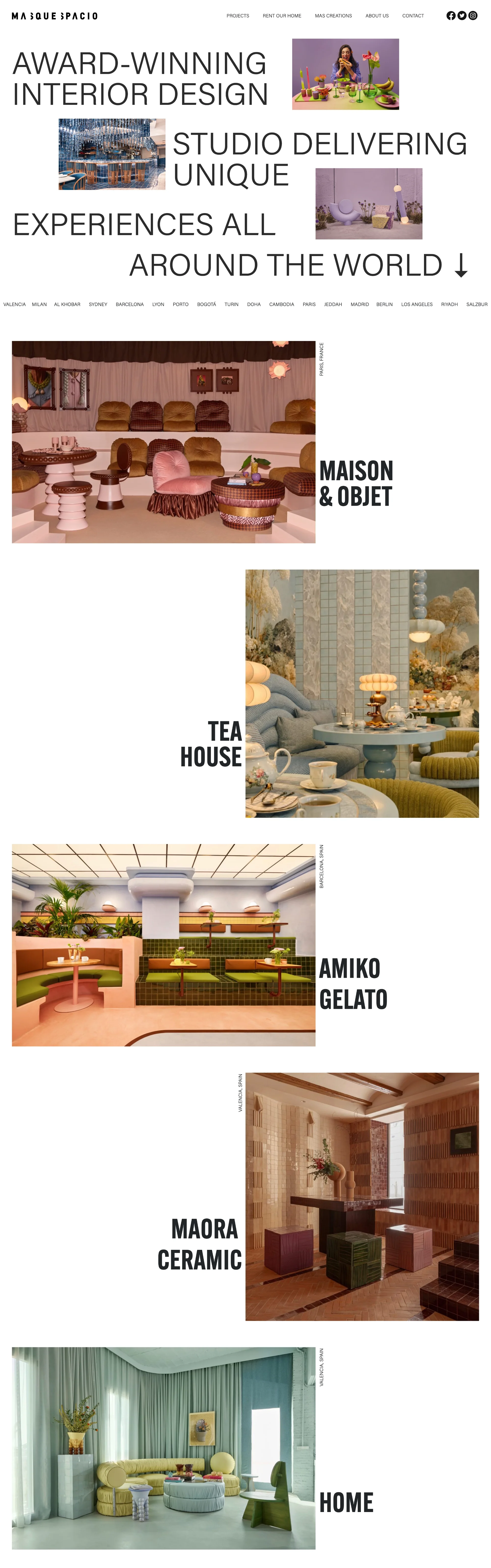
Masquespacio is a Valencia studio that pairs interior design with graphic flair for restaurants, hotels, and retail. The site uses vivid color blocks around high-contrast photographs and a smooth vertical scroll.
Design lessons to copy
- Frame photographs with bold color blocks, so the site reflects the studio's playful style.
- Put social icons in the main menu, so visitors can jump to behind-the-scenes content on Instagram or Behance.
- Keep the scroll vertical and simple, so lively visuals don't make the page hard to follow.
Website: masquespacio.com
The following two sites present interiors alongside products and collaborations. The decision that defines them is organizing a business that has several parts.
8. Kelly Wearstler

Kelly Wearstler is a Los Angeles designer whose website works as a brand hub. A dark, moody hero campaign leads into a four-part grid with Shop, Product Collaborations, Brand Campaigns, and Interior Projects, followed by large collaboration panels.
Design lessons to copy
- Use a grid with one tile for each part of your business, so visitors choose their own path.
- Rotate campaign panels in the hero when the studio sells products and runs collaborations, so the page always has something new.
- Place the newsletter signup in the footer with a clear consent checkbox, so it never covers the content.
Website: kellywearstler.com
9. Schoolhouse
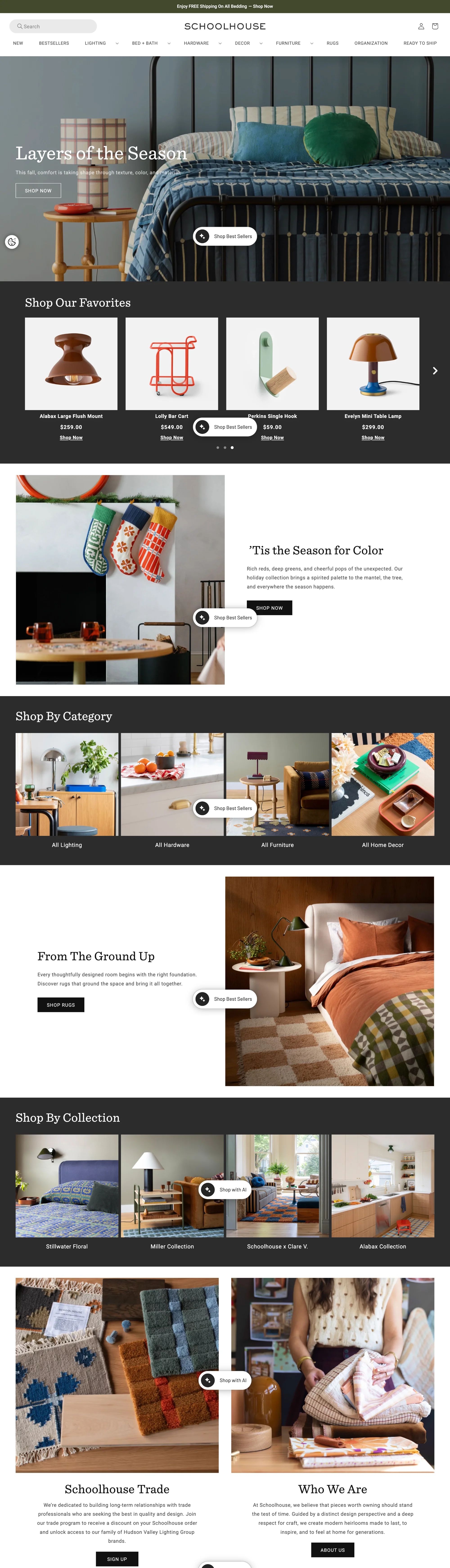
Schoolhouse is a lighting, furniture, and home goods brand, not a studio, so treat it as a reference for studios that sell products. Its homepage has a trade program banner, a seasonal hero, a favorites carousel with prices, and tiles for categories and collections.
Design lessons to copy
- Add a trade program banner and signup block, so designers and other professionals have their own entry point.
- Use category and collection tiles, so shoppers can browse by room or product line.
- Keep floating widgets from covering your photography, since a floating shopping button sits over several images on its homepage.
Website: schoolhouse.com
The next site uses motion. It can make a studio feel confident, as long as it loads quickly and never hides the menu. The decision that defines this direction is how little the film asks of the visitor.
10. Martin Brudnizki Design Studio
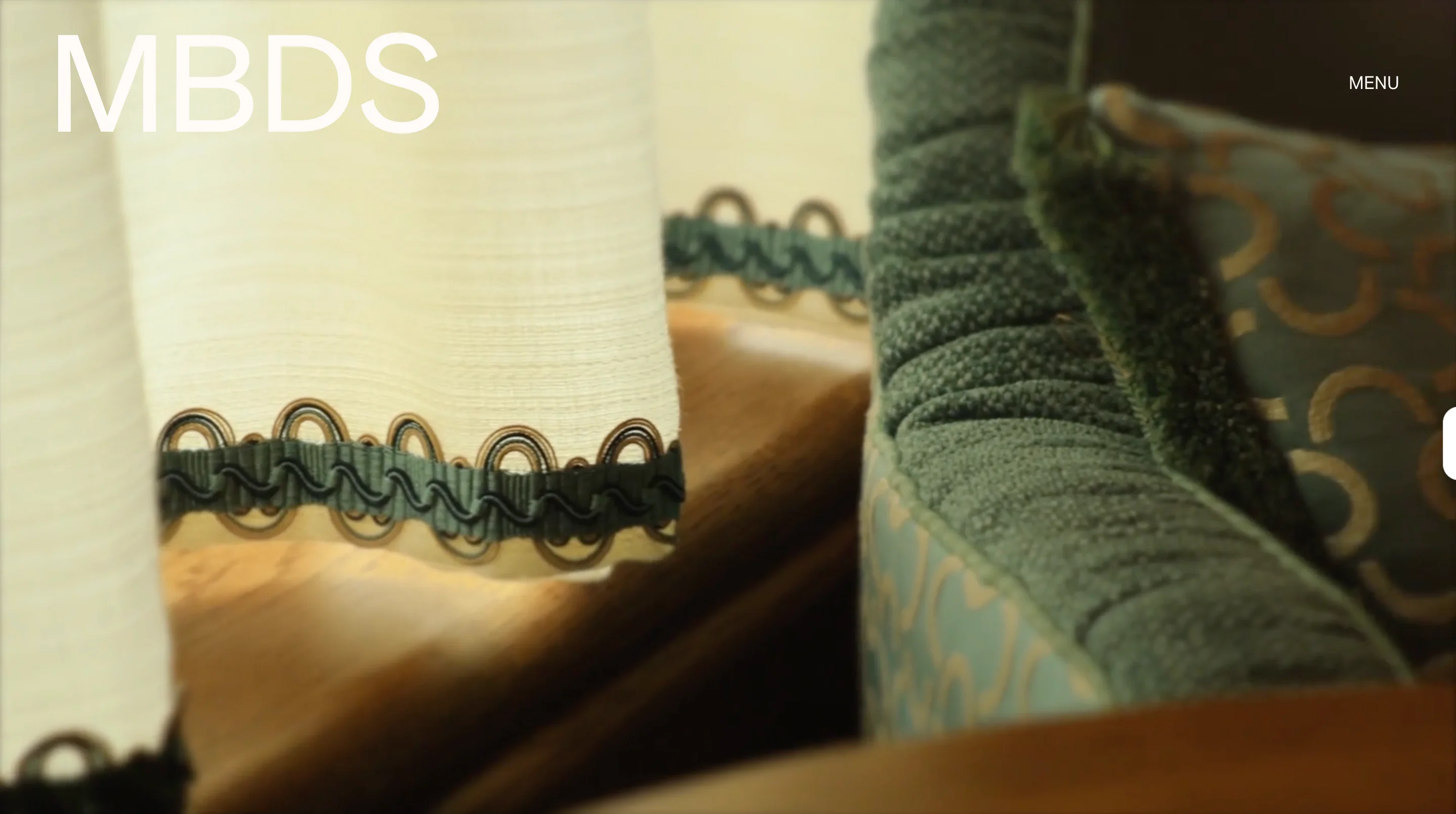
Martin Brudnizki Design Studio is a London and New York hospitality studio. Its homepage plays a looping film with a tagline over it and leaves only two links on screen, one for the menu and one for selected works.
Design lessons to copy
- Put a looping film in the hero only when the work is visual enough to carry the first screen, and keep the overlay to two prompts.
- Organize the portfolio by location, so visitors can find projects in places they care about.
- Compress the film and check Largest Contentful Paint, because a heavy hero video can slow the first screen.
Website: mbds.com
The next few sites each do one thing especially well, such as portfolio scanning, press, or price clarity.
11. Fogarty Finger
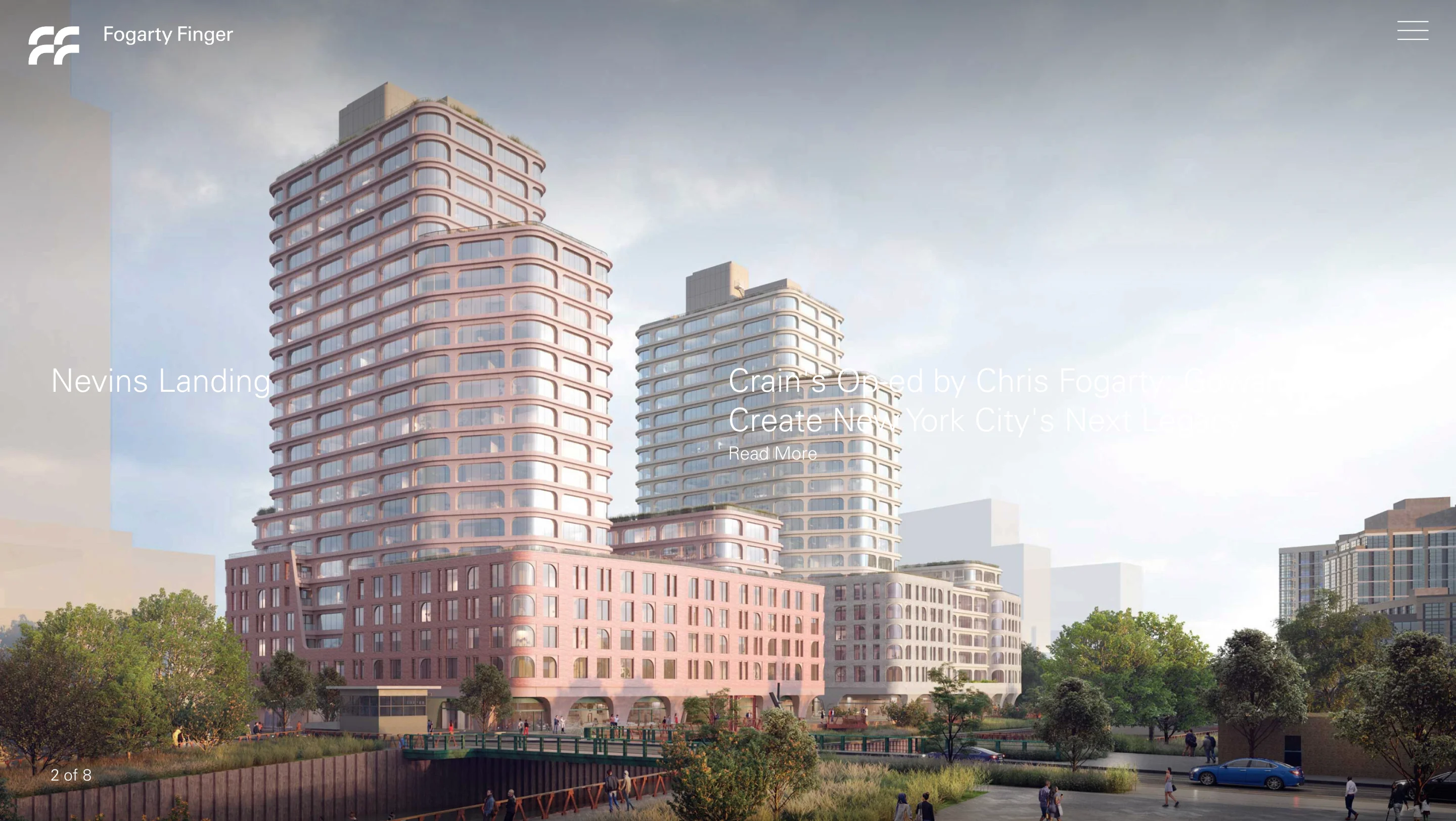
Fogarty Finger is a New York architecture and interiors studio. Its portfolio offers an index view, which lets visitors scan every project at a glance.
Design lessons to copy
- Offer an index view next to the image grid, so visitors can choose how they browse.
- Show the full list of projects in one place, which helps clients with a specific project type in mind.
Website: fogartyfinger.com
12. darci hether new york

darci hether new york is a residential studio that gives visitors three ways into its portfolio, which are Urban, Suburban, and Beach. Each project then appears as a tall cover image with a short location title.
Design lessons to copy
- Sort projects by setting or project type, so visitors find work similar to their own home.
- Use tall cover images and short titles, so a grid is easy to scan.
Website: darcihether.com
13. Cheshire Property Studio
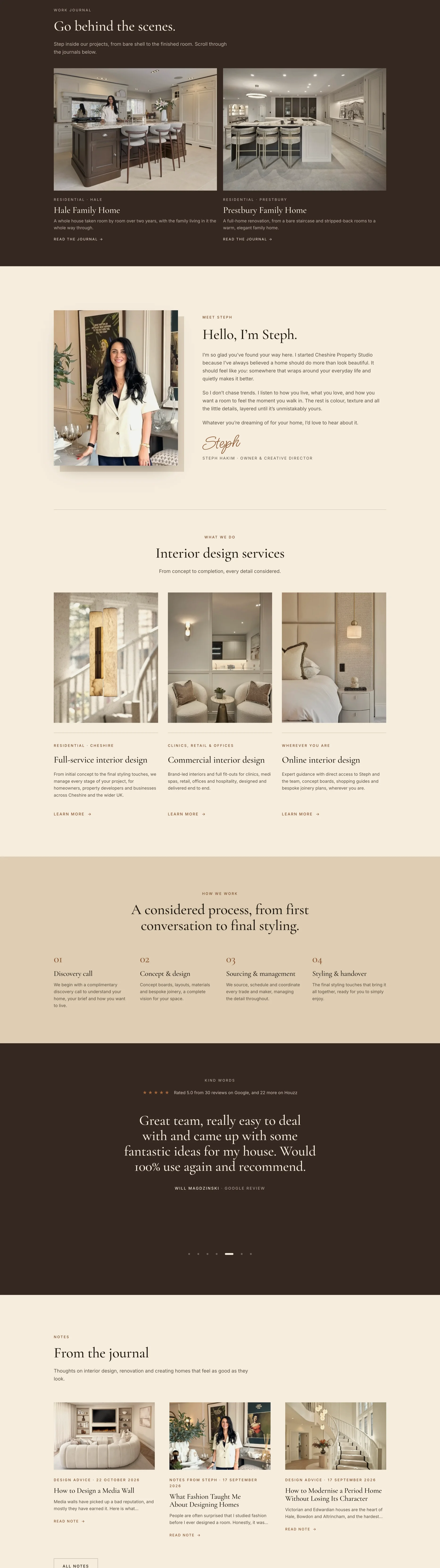
Cheshire Property Studio is a Greater Manchester studio, and its site is listed in Webflow's Made in Webflow showcase. Colorlib (2026) highlights that it explains prices and process stages by room or initial consultation.
Design lessons to copy
- Publish your process and pricing structure, such as stages or starting ranges, so clients can judge fit before they inquire.
- Organize prices by what clients actually buy, such as a room or an initial consultation.
- Consider Webflow when you want a custom design without writing a site from scratch.
Website: Cheshire Property Studio
The next two sites are magazines, not studios, so borrow their structure and leave the ads behind.
14. Interior Design
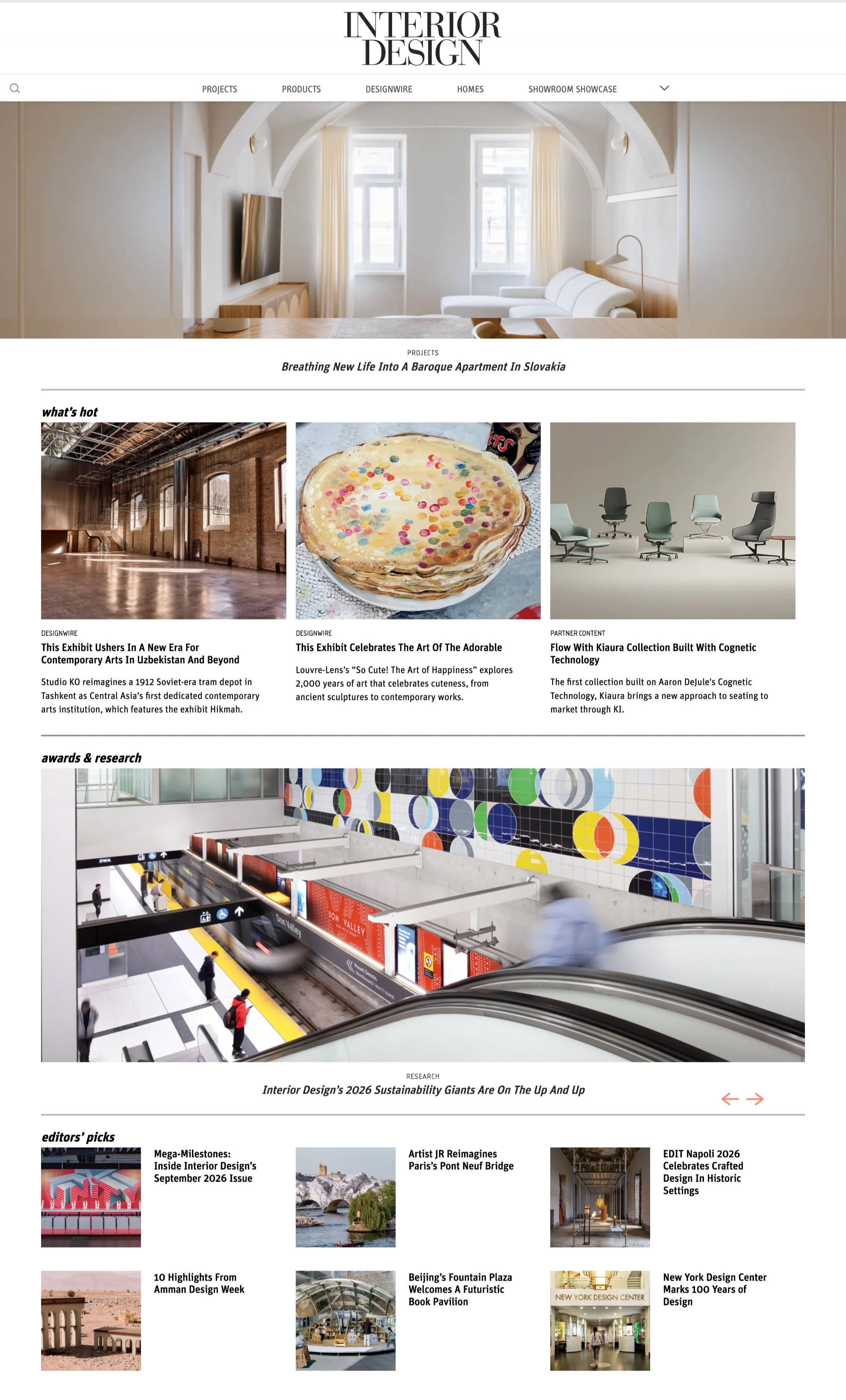
Interior Design is a trade magazine, so its homepage is built to help readers scan a lot of content. A serif masthead sits above a menu, a photographic hero, a "what's hot" row of three cards, and an editors' picks list.
Design lessons to copy
- Use a "what's hot" row to surface your newest or best projects without extra clicks.
- Add small labels above headlines, such as DesignWire or Partner Content, so visitors know what they are opening.
- Skip the advertising, since banner ads would compete with a studio's own work.
Website: interiordesign.net
15. The Design Files
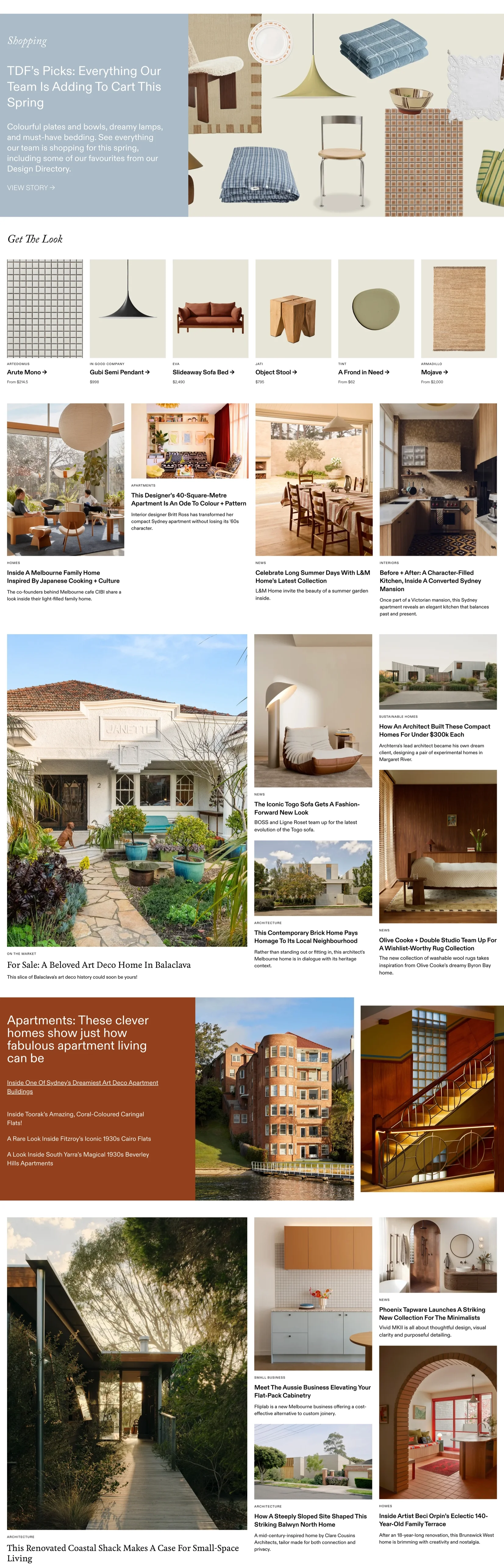
The Design Files is Australia's long-running online magazine about homes, architecture, and design. Its homepage centers a serif wordmark on cream, with a category menu that includes Homes, Architecture, Interiors, Apartments, Gardens, and Art, plus colored bands for the magazine, directory, and product search.
Design lessons to copy
- Use clear categories in the menu, so visitors browse by topic.
- Separate content types with colored bands, so a large archive stays easy to read.
- Lead with one large feature photograph, so the page has a clear focus.
Website: thedesignfiles.net

Find the direction that fits your studio
Which of the six directions should you start with? The answer depends on who hires you and how much explaining your work needs, as the table below shows.
Once you have a direction, the next question is what every good homepage includes, and the sites above share more than their styles suggest. The next section uses one live homepage to show that structure.
What makes interior design website design work in 2026
Most of the sites below look nothing alike, yet the best ones share a handful of decisions that have nothing to do with style. A studio website has two jobs, which are to make people love the work and to give them enough confidence to ask about a project. We judged each site against five criteria.
- Positioning clarity: A visitor should learn what the studio designs, where it works, and who it serves within the first screen, because they decide quickly whether the studio fits them.
- Portfolio presentation: Projects should have names, context, and a clear order, because unlabeled photographs tell a client little about scope or fit.
- Trust: Testimonials, press features, and process details show how the studio works, because a client about to spend a large budget wants to see the process.
- Inquiry path: Visitors should always know how to start a conversation, because a beautiful site without a clear next step loses warm leads.
- Usability: Menus, speed, and readable text keep visitors on the page long enough to see the work.
The table below groups the examples into six design directions, so you can see where each site sits before reading the profiles.
{{cta}}
Ideal homepage structure of an interior design website
The sites above look different from each other, but almost all of them have a common pattern: a pattern that only the successful interior design websites follow. Jessica Nelson Design is a useful walk-through, because its live homepage shows each step in a visible block. The table below pairs each section with the question it answers. These lessons apply to any interior designer website design, whether the studio is a team of two or twenty.
Hero and positioning
The hero answers the first question every visitor has, which is what this studio designs and for whom. Jessica Nelson Design opens with a hero photo, a headline that names Seattle, and a founder portrait. The location in the headline also helps local search, because clients often look for a designer in their own city.
- Lead with an outcome image: Show a finished room that matches your ideal client’s taste, because visitors judge style before they read a word.
- Name the place and project type in the headline: Say where you work and what you design, since a specific headline helps the right clients recognize themselves.
- Add a founder portrait: Put a face next to the promise, because clients hire a person for something as personal as their home.
A homepage can open in four ways, and each fits a different kind of studio. Pick the one that matches how visitors first meet your studio, because the first screen sets the tone for the rest of the visit.
- A single photograph: Alwill and Jessica Nelson Design lead with an image, which works when the work itself is the pitch.
- Type and color: Studio Ashby opens with a color-block layout, which works when the brand identity is distinctive.
- Campaign panels: Kelly Wearstler opens with a campaign image, which works when the studio sells products and collaborations.
- A looping film: Martin Brudnizki Design Studio opens with a film, which works when the footage is visual enough to hold the screen and light enough to load quickly.
Selected projects
This block answers whether the work matches the visitor’s taste. Jessica Nelson Design shows a project strip with an “Explore our portfolio” button, and it links to its own Seattle projects page from the intro text, which gives search engines and visitors a clear path to the portfolio. And let’s face it, most homeowners will not scroll through forty photographs to decide whether you design the kind of home they want.
- Show three to six projects: A short, curated set shows range without hiding your best work, because visitors tend to judge a portfolio by its weakest image.
- Name every project and link it: A project name or location makes the work feel real, and it gives search engines a page to index.
- Keep one image ratio and one caption style: A consistent strip looks deliberate, and it lets visitors compare projects at a glance.
Approach and services
This block answers how a visitor hires the studio. Jessica Nelson Design shows three packages and a link to its design process. Visitors who understand the steps and the options feel less risk about starting.
- Present two or three ways to work with you: Name the options by project size, since visitors can then picture where they fit instead of guessing.
- Link to a process page: Show the steps from first call to final install, because a clear path lowers the fear of an open-ended project.
- State what each option includes and how to begin: Say what the client receives and what the next step is, so visitors do not have to email you only to learn the basics.
Proof
This block answers whether visitors can trust the studio. Jessica Nelson Design places a client testimonial on the homepage, which reassures visitors before they reach the inquiry. Proof works best when it sounds like a real client describing a real result.
- Use named testimonials with a project reference: A name and a project make a quote believable, since anonymous praise is easy to ignore.
- Quote the outcome and not only the praise: Choose lines about the process or the result, because “we love it” tells a visitor very little.
- Place proof close to the inquiry: Put it right before the next step, where a visitor’s doubt is highest.
Inquiry
This block answers how to start. Jessica Nelson Design closes the homepage with a “Schedule a consultation” band, so the next step appears when interest is highest. The band should match the single primary action you chose for the whole site.
- Use one action label everywhere: Repeat the same button text in the menu, the hero, and this band, so visitors always know what the main step is.
- Say what happens after the click: Mention whether it is a call or a form and how soon you reply, because people often contact several studios and clear expectations help you stand out.
- Keep the form short: Ask for name, email, project type, and timeline first, since every extra field adds effort before the visitor trusts you.
Press and footer
This block answers who else has noticed the studio. Jessica Nelson Design lists press logos such as RUE, Sunset, AD, domino, and WSJ near the bottom, followed by contact details. The footer is the last thing a visitor reads, so it should reassure and make contact easy.
- Show only press you can back up: Use logos from features you can link or cite, because a verifiable mention builds more trust than a long list nobody can check.
- Repeat contact details and the primary action: Place your email, location, and main button in the footer, so visitors who reach the end can act without scrolling back.
- Keep social and newsletter links quiet: Give them less visual weight than the primary action, since they should not compete with the inquiry.
Project pages your website should ALSO have
Imagine a client scrolling through twenty unlabeled room photographs and being unable to tell a remodel from a new build. Good interior website design treats the project page as the place where a visitor decides whether you can handle their kind of project, so don't judge a studio by its cover shot. A useful layout has seven parts.
- Project hero: Show one strong image with the name, location, and project type, so visitors know what they are looking at.
- Overview: Summarize the client's brief and goals, because context explains the choices in the photographs.
- Design concept: Describe the materials, lighting, and key ideas, since this shows expertise a photograph cannot.
- Image sequence: Order the gallery so it tells a spatial story, because a random order makes rooms harder to understand.
- Project details: List scope, services, and collaborators, which helps clients judge whether you do their kind of work.
- Outcome: Add a client comment when you have one, because a real voice builds trust.
- Next step: Finish with a clear inquiry button and links to related projects, so interested visitors have somewhere to go.
Small labels also help visitors scan. Norm Architects tags each card with the discipline, project type, and year, and Fogarty Finger offers an index view for the whole portfolio. Both features let a visitor judge your range without opening every project.
Menus, popups, and the inquiry path
A newsletter popup over your hero is like a salesperson stepping in front of the painting you came to see. The decisions below cover how many menu items to show, where popups belong, and how the inquiry form should work.
How many menu items to show
Menu size should follow how the business works, as the table shows. We checked the live menus on October 23, 2026.
A short menu keeps attention on the work, while a longer one helps visitors who already know what they want. Pick the size that matches the question your visitors ask first.
Popups, newsletters, and cookie banners
Studio Ashby shows how much space overlays can take. In our review, a newsletter modal opens over the content and a cookie banner runs along the bottom, so they cover part of the work. Kelly Wearstler places its newsletter signup in the footer with a consent checkbox, which keeps the main page clear.
A few habits keep these elements useful.
- Delay popups: Wait until a visitor has seen the work, because an early popup interrupts the first impression.
- Make them easy to close: A small or hidden close button frustrates visitors, especially on phones.
- Keep consent clear: Use a visible checkbox and link to your privacy policy, so visitors know what they agree to.
- Test on mobile: A modal that fits a desktop screen can cover most of a phone screen.
The inquiry form and price guidance
You might be thinking that showing prices will scare clients away. Colorlib (2026) notes that Cheshire Property Studio explains prices and process stages, which helps visitors decide before they inquire. A "projects start from" range or a process page filters fit early, while a budget field in the form filters during the inquiry, so the two are separate decisions.
For the form itself, start small and add a field only when it helps you prepare. Four fields work well as a starting point.
- Name and email: The minimum you need to reply.
- Project type and location: Tells you whether the project fits your work and your service area.
- Where you are in the process: Shows whether the client is planning, working with an architect, or ready to start.
- Budget range (optional): Helps you qualify, but an optional field avoids pushing away clients who are not ready to share it.
Explain what happens after submission and offer an email address for visitors who dislike forms. Small, pale text is one more thing worth a second look, and the next section shows how to check it.
Photography, speed, and accessibility
Picture a visitor on a train with a weak signal, waiting for a full-screen photograph that never finishes loading. Photography is the main design element on these sites, so protecting its quality and its speed protects the whole experience. A few image habits help.
- Mix image types: Combine wide room shots, medium views, and close-ups of materials, because clients judge both the space and the craft.
- Protect color accuracy: Avoid heavy filters and inconsistent white balance, since clients evaluate finishes and materials.
- Use responsive images: Serve smaller files to phones and use modern formats such as WebP or AVIF where supported.
- Set dimensions: Reserve space for each image so the layout does not jump while loading.
- Prioritize the hero: Load the first image first and lazy-load the gallery below it.
Google measures page experience with Core Web Vitals. The table below shows the thresholds listed on web.dev (2025).
Google assesses these at the 75th percentile of visits, so most visitors, not only the fastest ones, need a good experience. You can test your own pages with PageSpeed Insights.
Accessibility needs the same care on minimal sites. The W3C's WCAG 2.2 guidance asks for a contrast ratio of at least 4.5:1 for normal text and 3:1 for large text. Minimal sites can fail these checks more easily, because quiet design often means small, pale text on a light background.
We did not measure contrast on the sites above, so check pale text before you copy the look. That includes the light grey menu on Alwill, the small tag lines on Norm Architects, and the small label above Jessica Nelson Design's headline.
When to break the rules
Several of the sites above break the usual advice on purpose, and the table below shows why each one gets away with it. Treat the last column as the test for your own studio.
Less is more, until it hides the contact link. Each of these sites pairs its rule-breaking with a reason, so copy the reason first and the layout second.
"Breaking a rule on purpose is a design decision, and breaking it by accident is a bug. The test is whether you can say who the choice helps."

Step-by-step approach of designing an interior design website
Writing project descriptions after the layout is like captioning a gallery wall that is already hung, because the words have to fit gaps they were never designed to fill. If you are working out how to create a website for interior design, this nine-step workflow puts writing before layout and explains why each step comes where it does.
Step 1: Define your positioning
Write one sentence that says what you design, where you work, and who you design for, such as warm, modern family homes in a single city. This sentence becomes the filter for every later choice, from which projects you show to which words appear in your headline. A clear position also helps the right clients recognize themselves quickly, while a studio that tries to appeal to everyone often reads as generic.
Step 2: Choose one primary action
Pick the one action you want most visitors to take, such as booking a consultation or requesting a project estimate. Use the same label on the menu button, the homepage hero, every project page, and the footer, so visitors always know the next step. Secondary options like a newsletter signup can stay on the page with a quieter style, because a site with several equal goals splits attention and makes results harder to measure.
Step 3: Select your projects
Choose a small set of projects that look like the work you want next, not everything you have ever finished. For each one, gather the best photos, the client’s brief, your approach, and the outcome, since a project page works best as a story and not only a gallery. Visitors tend to judge a portfolio by its weakest image, so leaving out average work protects the strong pieces.
Step 4: Write before you design
Draft the homepage headline, the project stories, the process page, and the about page before anyone opens a design tool. Real words show you early how long a headline runs, how many steps your process has, and what each page needs to prove. Placeholder text hides these problems until late in the build, and it often leads to vague copy that nobody rewrites.

Step 5: Sketch a wireframe
Sketch the homepage, a project page, the inquiry page, and the mobile layout with simple boxes and labels on paper or in Figma. Decide the order of sections, where the main button sits, and how many images each page needs. Start with the phone view, because Statista (2025) reports that mobile devices generate 58.5% of website traffic worldwide, and a layout that works small is easier to scale up. Changes at this stage cost very little, since there are no colors, fonts, or photos to rework.
Step 6: Design the visual system
Set the typography, color palette, spacing, and image treatment before you design individual pages. Keep the system quiet, because interior photography already brings color and texture, and a busy interface competes with it. A written system also lets anyone who updates the site later add pages that match.
- Type: One heading font and one text font, with clear sizes for each level.
- Color: A small palette with a single accent reserved for buttons and links.
- Spacing: A consistent scale, so sections have the same breathing room on every page.
- Images: Fixed aspect ratios, short captions, and one editing style across all photos.
Step 7: Build on the right platform
Match the platform to who will update the site and how custom the design needs to be. Template tools such as Squarespace suit studios that want a quick launch and simple edits, while WordPress offers more flexibility but needs plugin updates over time. Webflow suits studios that want a custom layout with a CMS for project pages and animation without plugins. Whichever you choose, store each project as a CMS entry, so adding a new one takes minutes and does not require a designer.
Step 8: Design the inquiry path
Build the whole path from first click to first reply, including the inquiry form, the confirmation page, and an automatic email that arrives right after submission. Ask only for what helps you judge fit, so each field earns its place.
- Contact details: Name and email.
- Project details: Project type, location, and timeline.
- Budget: A range, kept optional.
Say what happens next and when the visitor will hear back, because people may contact several studios, and the one that responds clearly feels easier to hire.
Step 9: Test and launch
Test the site on real phones, with only a keyboard, on a slow connection, and against text contrast guidelines before you go live. Large photos can slow a portfolio site a lot, so compress them and check how quickly the project pages load. After launch, read your first inquiries and your analytics, since they show which pages bring good leads and which questions the site left unanswered.
Step seven depends on a choice many studios make too early, which is the platform. The next section compares the main options and what each one asks of you.
Which platform to use for an interior design website
The right platform depends on who will maintain the site, how custom the design needs to be, and how many projects you will publish. The table below is general guidance, so confirm current features before you commit.
Cheshire Property Studio shows that Webflow works for studio sites, since its site is listed in Webflow's Made in Webflow showcase. If you are asking what websites interior designers use, or which is the best website for interior designers, the answer is a mix of all five, so match the tool to your skills and your plans.
Should you build it yourself, use a template, or hire a designer?
If you are weighing an interior design website designer against a template, the choice comes down to time, skills, and how often the site will change. Too many options can paralyze the decision, so the table below narrows them to four routes.
Choosing a template before your positioning is like choosing the frame before the painting, and it often leads to a site that looks like everyone else's. And let's face it, few studios have a designer and a Webflow developer on staff. That's where magier comes in.
magier offers design and Webflow development under one subscription, with expert designers, UX/UI designers, Webflow developers, and a dedicated project manager. If you are comparing web design for interior designers, you can see how magier covers both on the combined design and Webflow subscription page. The experience is in design and Webflow work for 150+ brands, and the same skills carry over to portfolio sites like the ones above.
You might be thinking a subscription sounds expensive, so here is how it compares with other routes. A freelancer gives you one person's skills, while a subscription gives you a team on demand. Design starts from €2,750 per month and Webflow service from €890 per month, with a 48-hour turnaround per task, unlimited revisions, and the option to cancel or pause anytime.
Studio sites often rely on scroll effects and subtle motion, like the looping hero film on Martin Brudnizki Design Studio's homepage. magier's team includes GSAP animation specialists who build that kind of motion, and the Webflow work covers Figma-to-Webflow conversion, integrations, and technical SEO. For plancraft, magier developed 30+ pages and migrated 200+ URLs, and combined design and Webflow work led to a 20% conversion increase. You can see how magier handles Webflow development if you need that depth.
Pre-launch checklist for an interior design website
Use this checklist before you publish. Each group maps to a section above, so you can jump back to the explanation when an item fails.
- Strategy: The positioning is clear on the first screen, services and service areas are explicit, and the best projects are curated.
- Projects: Each project has a name, a short story, and a next step, and the gallery tells a spatial story.
- Visual design: Type, color, and image treatment are consistent, and the design direction matches the studio's clients.
- Trust: Testimonials and press features are real, and the process or pricing structure is easy to find.
- Menu and inquiry: The menu is short and clear, contact is easy to find, and the form asks only for needed information.
- Popups and banners: Popups appear late, close easily, and do not cover the work on a phone.
- Speed: The hero image loads first, images are responsive, and Core Web Vitals pass on mobile and desktop.
- Accessibility: Text meets the WCAG contrast ratios, the site works with a keyboard, and every informative image has alt text.
Final thoughts
The best interior design website design makes the studio's style recognizable and then makes the next step easy. These 15 sites show that you can pick almost any direction, as long as you know what rule you are breaking and why. The decision that settles most debates is to write your positioning and project stories before you choose a layout.
Execution takes time, especially when you are also running client projects. You might worry that handing the site to an outside team will cost you your studio's voice, but a team with a dedicated project manager and a 48-hour turnaround per task keeps feedback loops short.
If you want help, that's where magier comes in. See how magier covers both design and Webflow, or book a free demo with magier to talk through your site. If you would rather start alone, pick the direction closest to your studio and apply one design lesson this week.
{{cta}}
FAQ
Define your positioning, choose one primary action, curate your projects, write the content, then wireframe, design, build, and test. The nine-step workflow earlier in this guide explains the reason for each step.
A good site makes the studio's positioning clear, presents projects with context, shows proof of trust, and gives visitors an easy way to inquire. It also loads quickly and stays readable on a phone.
Interior designers commonly use Webflow, Squarespace, WordPress, Framer, or a custom build. The best choice depends on who will maintain the site and how custom the design needs to be.
There is no single best builder, because the right one depends on your skills, budget, and need for custom design. Squarespace suits quick launches, while Webflow suits studios that want precise design control.
Show a curated set of your strongest projects instead of everything you have done. Each project should have context, such as the brief, the concept, and the outcome.
Showing a starting range or a process page can help visitors decide before they inquire. A budget field in the inquiry form is a separate decision, and keeping it optional avoids discouraging clients who are not ready to share it.
Video can work when it loads quickly, has a fallback, and does not hide the menu. Martin Brudnizki Design Studio uses a looping hero film with only two prompts, which keeps the screen simple.
Make the next step clear on every important page, add a consultation button to your project pages, and keep the form short. Press features and testimonials also give visitors a reason to trust you.
Use responsive images, modern formats such as WebP or AVIF, and set image dimensions so the layout does not jump. Prioritize the hero image and aim for the Core Web Vitals good thresholds.
.avif)

.avif)