The Startup's Guide to Claude Design: How Founders and Marketers Can Use It in 2026
Imagine the following situations (any or both):
- Your investor meeting is in 48 hours and your designer is fully booked.
- Your marketing team needs five campaign assets by Friday and the design backlog is almost two week long.
If you could relate to either of that (too bad if both), you're not alone, and it's exactly the kind of bottleneck that Claude Design was built to address.
Claude Design is Anthropic's AI-powered design tool that lets you create interactive prototypes, pitch decks, landing pages, and marketing assets from plain-language text prompts. You describe what you need, and Claude builds a working visual on a canvas, right next to your conversation. No Figma, no design degree, no waiting.
When Anthropic launched Claude Design on April 17, 2026, Figma's stock dropped roughly 7% within hours. That's not a coincidence. It signals a real change in what's possible for startups that need to move from idea to visual without a full design team.
You might think a design agency would find this threatening. We don't. We've been building AI into our workflow for a while now, and we've seen firsthand what happens when strong design skills and the right AI tools work together, especially for startups with lean teams. The results are faster, cheaper, and better than either approach alone. But a lot of founders and CMOs are still figuring out where AI design tools fit into their process and where they don't. That's exactly what this guide is for.
Here's what you'll learn:
- What Claude Design is and how it works
- How to set up your brand design system the right way, so you get on-brand output instead of generic results
- Founder-specific use cases mapped to each stage of the startup journey
- Marketer workflows that go well beyond creating social graphics
- Five real prompts you can copy and use in your first session
- How Claude Design compares to Figma, Canva, Google Stitch, and other tools in your stack
- How to manage your messaging quota so you don't burn through it in two sessions
- An honest breakdown of when Claude Design is enough and when you still need a professional designer
What is Claude Design?
Claude Design is Anthropic's AI-powered design workspace, launched on April 17, 2026 under Anthropic Labs, the company's division for specialized products. Anthropic Labs is co-led by Mike Krieger, the co-founder of Instagram, which gives you a sense of the design and product ambition behind it.
The tool runs on Claude Opus 4.7, Anthropic's most capable vision model, which has a vision resolution of 2,576 pixels (3.75 megapixels). That's a meaningful technical upgrade over previous models and directly improves the tool's ability to interpret reference images and produce higher-quality design output.
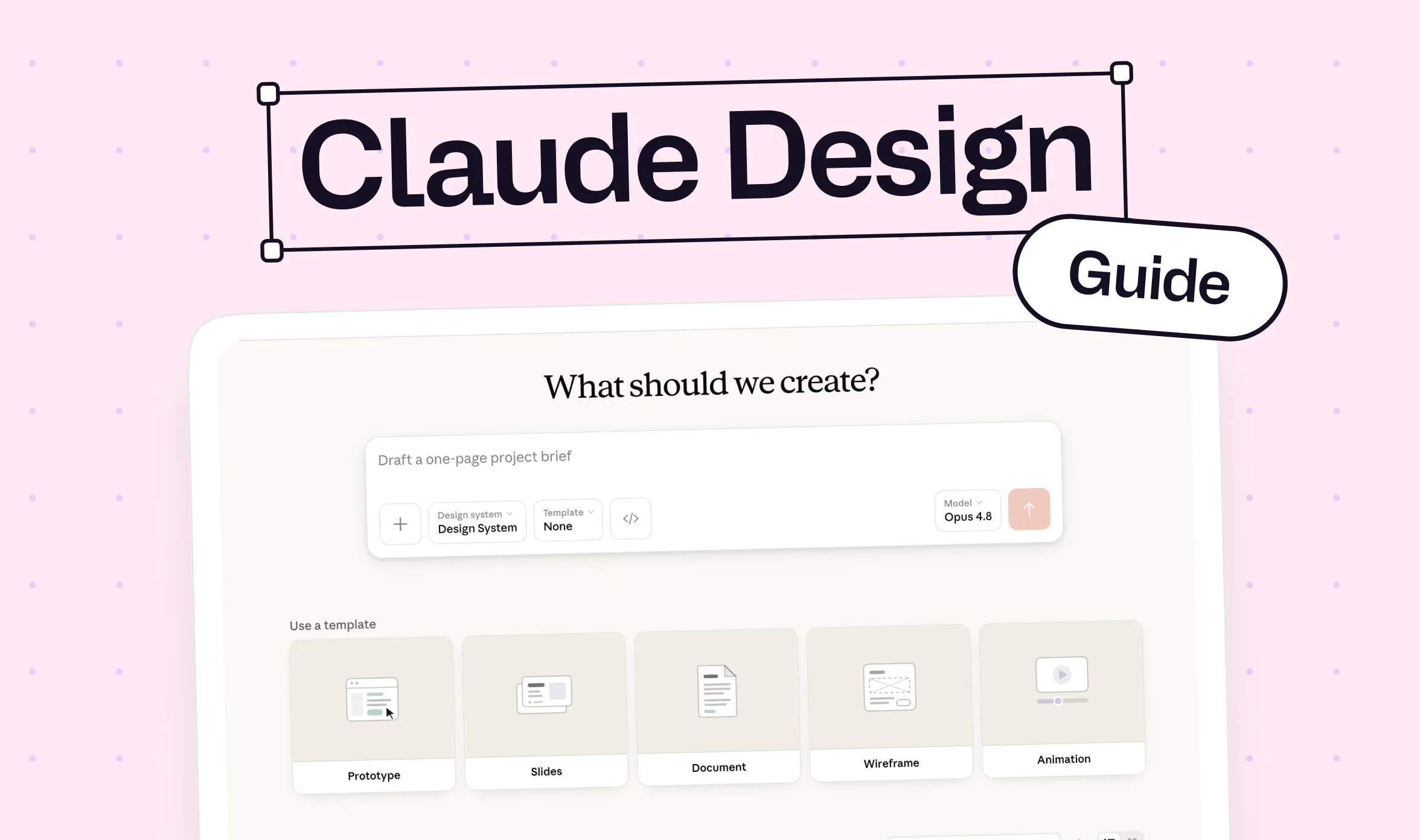
You access it at claude.ai/design. The interface is a chat-and-canvas layout: you type instructions on the left, and the design appears on the right. Under the hood, Claude Design builds on the same Artifacts system that lets Claude render code and documents inline in regular conversations. Critically, the output is not a static image. It's live HTML, which means it's clickable, testable, and exportable without any additional steps.
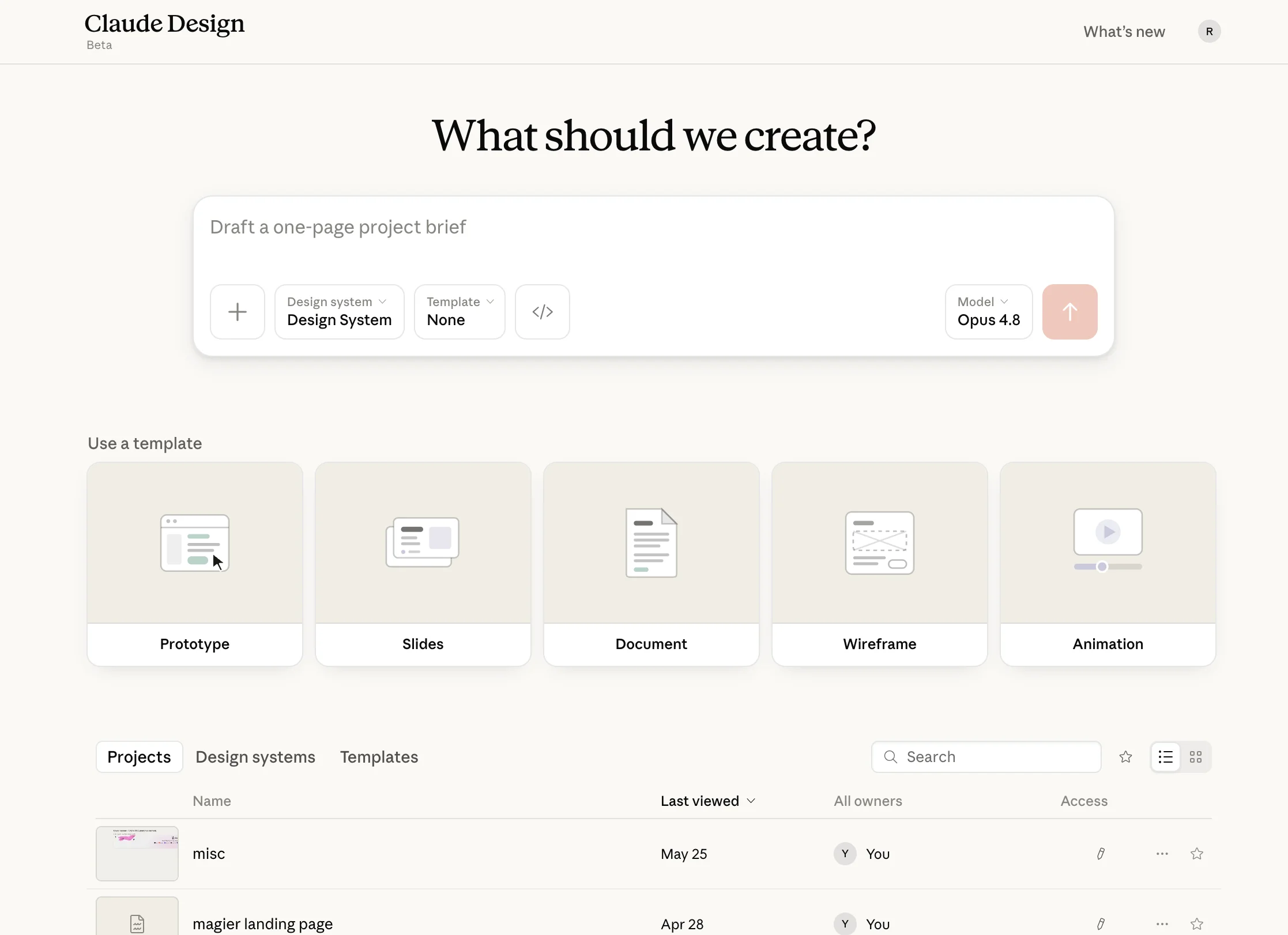
Once you're done, you can export your design in several ways:
- PDF (for sharing or printing)
- PowerPoint/PPTX (for presentations and final polish in Google Slides)
- Canva (for further editing with templates and brand tools)
- Standalone HTML (for web use or developer handoff)
- Claude Code (for turning the design into a working product)
That last export path, the direct handoff to Claude Code, is one of the things that makes Claude Design different from every other AI design tool available today. It's the only tool with a complete design-to-code pipeline built in.
Claude Design is available on Claude Pro ($20/month), Max, Team, and Enterprise plans. It is currently in research preview, which means features will shift and usage limits may change, but the core functionality is stable.

Who is Claude Design built for?
The clearest description of who Claude Design is for comes from Anthropic itself: people who need to go from an idea to something visual before they open a traditional design tool. That's a much larger group than professional designers.
Startup founders
Particularly solo founders or small teams that haven't hired a designer yet, can use Claude Design to create pitch decks, product mockups, and landing pages in hours rather than weeks. A solo founder in 2026 can now produce the visual and narrative assets of a seed-stage startup in an afternoon. That same output used to require a designer, a prototyping subscription, a brand kit, and several evenings of coordination.
Marketing teams
They can use it to produce campaign assets, landing pages, social graphics, and sales enablement materials without waiting on a design backlog. For teams with no designer at all, or a designer stretched across competing priorities, Claude Design fills a meaningful gap.
Product managers
PMs can use it to sketch feature wireframes, user flows, and shareable prototypes before design reviews, compressing what used to be a week-long brief-to-mockup cycle into an afternoon.
Agencies and freelancers
Even design agencies and freelancers can use it to produce first-concept visuals for clients quickly, then refine in Figma or Canva for final delivery.
How to set up Claude Design the right way
This is the step most people rush through, and it's the one that determines whether you get great output or generic results. The setup takes 20 to 30 minutes but pays off across every project you do afterward.
Step 1: Access Claude Design
Log into your paid Claude account and go to claude.ai/design, or click the palette icon in the left sidebar. Claude Design is not available on the free plan, and it's only accessible via the browser, not the desktop app, as of July 2026.
When you open it for the first time, Claude will ask you to select your role. The options include Design, Engineering, Product, Sales, Data, Marketing, and Other. Your choice shapes the default settings for your workspace, so pick the one that best matches how you'll be using the tool.
Step 2: Set up your brand design system (don't skip this)
This is the most important step in the entire guide. Go to Design Systems, click Create Design System, and upload your brand assets. Every future project you create will automatically inherit what you set up here.
Here's what to upload, and why the quality of your upload matters so much:
| Good upload | Bad upload |
|---|---|
| Logo as SVG or PNG | Logo as low-res JPEG |
| 3 to 5 hex codes with usage context (primary, secondary, accent) | A screenshot of a color palette with no labels |
| Font files uploaded directly (TTF or OTF) | Writing "we use Inter" with no file attached |
| 2 to 3 screenshots of your live site or best marketing assets | Nothing beyond the logo |
| A short written description of your visual rules ("rounded corners, no drop shadows, pill-shaped buttons") | No written guidelines at all |
The single most important thing to understand here is that Claude Design responds to examples much better than to specifications alone. A screenshot of your best-performing landing page tells Claude more about your brand's feel than a color palette ever will. Upload real, finished assets alongside your brand guidelines, not just specs.
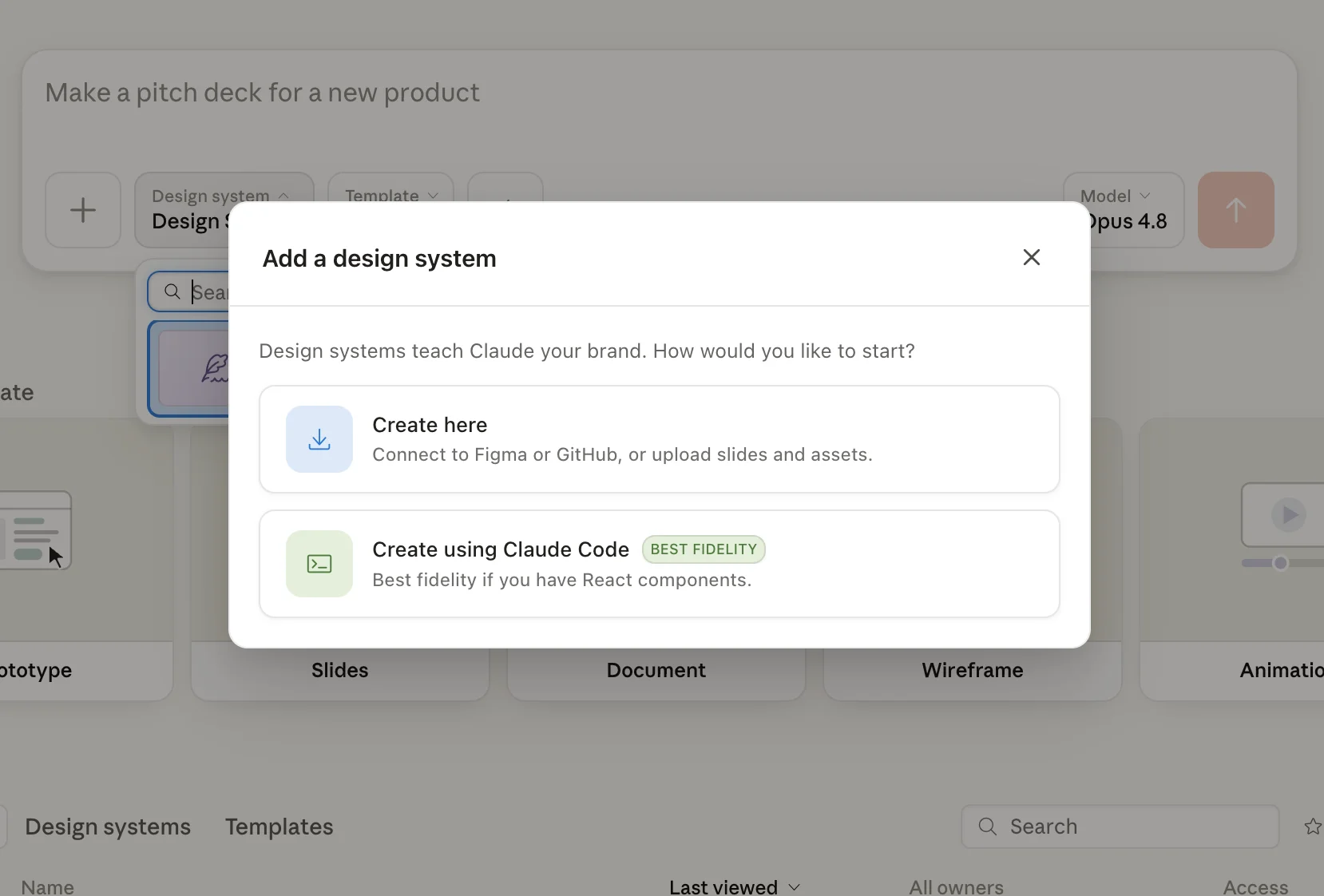
If you have a Figma file, a GitHub repository with your front-end code, or a live website URL, those are worth providing too. Claude's web capture tool can pull visual elements, colors, and typography directly from a live URL, which saves a significant amount of manual uploading.
If you skip this step or provide minimal assets, Claude Design defaults to a recognizable "modern SaaS" look that thousands of other users are also getting. That's the fastest way to end up with output that feels AI-generated rather than on-brand.
Step 3: Create your first project
Click New Project. Claude Design will ask you to choose a mode:
- Prototype (Wireframe or High-Fidelity): for app screens, dashboards, and interactive product designs
- Slide Deck: for pitch decks, presentations, and investor materials
- From Template: for working from a pre-built starting point
- Other: for landing pages, marketing collateral, one-pagers, and anything else
Write your first prompt in the chat on the left and watch Claude generate the design on the right. Keep the first prompt focused on structure and format rather than trying to get the final version in one go.
Step 4: Iterate and refine
Claude Design is built for iteration, and the quality of your output improves as you refine. There are three ways to do it:
- Inline comments: click directly on an element in the canvas and leave a comment, like "make this button larger" or "change this heading to match the hero font"
- Markup tool: select specific elements and edit them directly on the canvas
- Tweaks panel: custom sliders for spacing, padding, margins, and colors that let you adjust without re-prompting
The right mindset for Claude Design is treating it as a rough-draft partner that produces the first 70 to 80% of what you need, and then using iteration to close the gap.
Claude Design for founders: use cases by startup stage
Most Claude Design guides give you a generic list of what the tool can produce. This section maps specific outputs to specific startup milestones so you can find your current situation and apply it directly.
| Startup stage | What you need | What to create in Claude Design |
|---|---|---|
| Idea validation | Test whether people understand your concept | Product mockups, app screens, or dashboard visuals for user interviews |
| Pre-seed / fundraising | Convince investors your idea has legs | Pitch deck (10 to 12 slides), product screenshots, market diagrams |
| MVP | Give developers a clear starting point | Wireframes, high-fidelity UI screens, user flows, empty states, error screens |
| Launch | Drive signups and early traction | Landing page, onboarding screens, social media launch graphics |
| Growth | Scale marketing without scaling headcount | Campaign assets, LinkedIn carousels, one-pagers, sales presentations |
| Scale | Maintain brand consistency across a growing team | Design system that keeps every output on-brand |
Idea validation: show it, don't just describe it
When you're validating an idea, the fastest way to get useful feedback from potential users or co-founders is to show them something visual. A written description generates questions. A prototype generates reactions.
You can prompt Claude Design to create mobile app mockups, SaaS dashboards, customer portals, or AI chatbot interfaces in a single session. Use these outputs in user interviews before you've written a single line of code. The feedback you get from a visual prototype is structurally different from what you get from a slide or a paragraph, because people respond to what they can actually see and interact with.

Design an AI-powered CRM dashboard for real estate agents. Include an onboarding screen, a main dashboard with lead pipeline, a lead detail view, and a simple analytics page. Use a clean B2B SaaS style with a light color scheme. Label all navigation items clearly.
Fundraising: build investor materials in hours, not weeks
A pre-seed deck that used to take a week of coordinating with a designer can now be a first draft in an afternoon. Claude Design generates pitch decks with structured layouts for problem, solution, market size, business model, competitive landscape, go-to-market strategy, and financial projections. You describe the slide structure and content, and Claude handles the visual formatting and hierarchy.
Create a 10-slide investor pitch deck for a B2B SaaS startup that helps e-commerce brands automate their returns process. The slides should cover: Problem, Solution, How It Works, Market Size, Business Model, Traction, Team, Competitive Landscape, Go-to-Market, and Fundraising Ask. Use a dark background with white and blue accents. Professional and modern style.
Export to PPTX for final polish in PowerPoint or Google Slides, then share the link for feedback before your meeting.
For context on what's possible here: Mercury, the business banking startup, used Claude Design to infer 90% of its component library from its existing codebase in just 10 minutes. That's a useful data point for how fast the tool can work when it has a strong brand system to draw from.
{{freebie}}
MVP design: give your developers a clear visual brief
Before your team writes production code, Claude Design can provide the visual spec they work from. This reduces the guesswork developers face when interpreting a written brief and significantly reduces back-and-forth between design and engineering.
Useful outputs at this stage include wireframes, high-fidelity UI screens, user onboarding sequences, empty states (what the UI looks like before data is populated), and error screens. The last two are almost always forgotten until late in development and tend to create a lot of last-minute design debt when they finally come up.
Once you're ready to move from design to code, Claude Design's direct handoff to Claude Code is the most efficient path available. You package your design from Claude Design, and Claude Code receives it as a structured starting point for implementation. Datadog described their experience with this design-to-engineering handoff as going from "a week of back-and-forth" between teams to "a single conversation."
Launch and growth: create marketing assets without a design queue
At launch and into growth, the volume of assets you need scales faster than a design team can typically keep up with. Landing pages, onboarding screens, social launch graphics, and lead magnets are all well within Claude Design's range.
One particularly useful workflow: upload a transcript of a customer call or rough notes from a strategy session, ask Claude to extract the key themes, and then generate a branded PDF or one-pager from those themes. It compresses a research-to-asset process that often takes days into a single session.
"The founders we work with get the most from Claude Design when they treat it as a brief-generating tool, not a final-output tool. The prompts they put in are essentially creative briefs, and the output gives them something concrete to react to. That reaction is where the real design thinking happens."

Claude Design for marketers: workflows beyond asset creation
Most Claude Design guides for marketers stop at "create social graphics and landing pages." That's table stakes. This section covers the workflows that make a real difference for B2B marketing teams.
Campaign planning and landing pages
Claude Design is useful even before you open the canvas. Start by describing your campaign goal, your target audience, and the action you want people to take. Claude can help you structure the messaging, value propositions, and creative concepts before generating the visual layout, which means the design and the strategy develop together rather than sequentially.
For landing pages specifically, Claude Design is particularly strong when you need to test a new positioning angle quickly. Speed matters more than polish at the testing stage, and you can go from a positioning hypothesis to a live HTML landing page in a single session.
Design a lead generation landing page for a B2B SaaS product that helps HR teams automate employee onboarding. The page should include a hero section with a clear headline and CTA, a features section with three benefits, social proof (logos and a customer quote), a short FAQ, and a final CTA. Target audience is HR directors at companies with 200 to 1,000 employees. Clean, modern style with a blue and white color scheme.
If you're building pages in Webflow or Framer, Claude Design fits naturally as a design-first step. Design the layout and structure in Claude Design, then use those decisions as your brief when building in your website tool.
Social media and content assets
LinkedIn carousels, product announcements, event promotions, infographics, blog post visuals, whitepaper layouts, case study graphics. These are the assets that consistently pile up in a design backlog because individually they feel small but collectively they take real time.
Claude Design shortens the time from concept to first draft because you don't need to switch between tools. You describe the carousel structure, the visual tone, and the content of each slide, and Claude generates a complete first version you can refine in a few minutes.
Sales enablement materials
Sales enablement is one of the highest-value places for Claude Design in a B2B marketing team, and it's almost never mentioned in guides. The materials sales teams need on a regular basis include:
- One-pagers and battlecards
- Product comparison sheets
- Sales presentation decks
- ROI calculator layouts
- Customer success visuals
These assets sit in a design backlog for weeks because they feel lower priority than campaign work. Claude Design lets marketing produce them without waiting on a designer, which means sales has what they need when they need it.
Stakeholder and client presentations
For internal alignment decks, board updates, quarterly reviews, and client proposals, Claude Design produces polished presentation structures quickly. Export to PPTX for final speaker notes and last-minute edits.
Create a 5-slide sales one-pager for a cybersecurity SaaS product targeting CFOs at mid-market financial services firms. Include: the business problem (data breach cost and compliance risk), our solution overview, key metrics and ROI data, a customer testimonials section, and a contact/CTA. Professional, trust-focused visual style with dark navy and white.
Maintaining brand consistency across campaigns
One of the most underused capabilities in Claude Design is the design system as a consistency engine. Upload your brand kit once, and every new project you create automatically inherits your colors, typography, and visual rules. For marketing teams producing assets across channels, this removes the "restyle each piece manually" problem that slows down high-volume campaigns.
The cleaner and more complete your design system upload, the more consistent your outputs will be across campaigns. This connects directly to the setup section earlier in this guide: the 20 minutes you spend building a thorough brand kit saves hours of manual adjustments across every future asset.
5 Claude Design prompts you can use today
These five prompts are structured to work well on first use. Each one follows the same order: format first, audience second, content third, constraints last. That order matters because Claude uses the format to set the layout and structure before generating anything.
Prompt 1: Investor pitch deck (founder use case)
Create a 10-slide investor pitch deck for a B2B SaaS startup that helps e-commerce brands automate their returns process. Slides: Problem, Solution, How It Works, Market Size, Business Model, Traction, Team, Competitive Landscape, Go-to-Market, Fundraising Ask. Dark background, white and blue accents. Professional and modern. Each slide should have a clear headline and no more than 40 words of body text.
Prompt 2: Conversion-focused landing page (marketer use case)
Design a lead generation landing page for a B2B SaaS product that automates employee onboarding for HR teams. Include a hero section with headline and CTA, a three-benefit features section, a social proof section with logos and one customer quote, a short FAQ with three questions, and a final CTA. Target audience is HR directors at companies with 200 to 1,000 employees. Blue and white color scheme, modern and clean.
Prompt 3: LinkedIn carousel (marketer use case)
Design a 7-slide LinkedIn carousel summarizing a case study. Slide 1: hook with a bold result ("How [Company] reduced customer churn by 40%"). Slides 2 to 5: the problem, the approach, the results, and one supporting metric each. Slide 6: a customer quote. Slide 7: CTA with company name and link. Professional style, dark teal and white, large readable text optimized for mobile.
Prompt 4: Mobile app onboarding flow (founder and PM use case)
Design a 4-screen mobile app onboarding flow for a fitness tracking app targeting recreational runners. Screen 1: welcome screen with value proposition. Screen 2: goal selection with three options. Screen 3: connect a wearable device. Screen 4: personalized dashboard preview. iOS-style design, clean white background, orange accent color. Include a progress indicator across all screens.
Prompt 5: Sales one-pager (marketer use case)
Create a one-page PDF layout for a cybersecurity SaaS product targeting CFOs at mid-market financial services firms. Include: the core business problem (data breach cost and compliance risk), solution overview in three bullet points, key ROI metrics, one customer testimonial, and a CTA with contact information. Professional, trust-focused visual style in dark navy and white.
A note on prompting technique: the first version won't be perfect, and it doesn't need to be. Once Claude generates the initial design, use inline comments to refine specific elements rather than rewriting the entire prompt. Asking Claude to "adjust the hero headline to be more specific to enterprise buyers" is faster and more quota-efficient than regenerating the whole page from scratch.
How to choose your export path
Claude Design offers five export options plus a shareable URL. Here's how to match the right export to the right use case:
| You want to... | Use this export |
|---|---|
| Share a draft with stakeholders for early feedback | Shareable URL (they can view and comment without a Claude account) |
| Present to investors or clients | PPTX (open in PowerPoint or Google Slides for speaker notes and last-minute edits) |
| Print the design or attach it to an email | |
| Continue editing with templates, images, and brand tools | Canva export (designs become fully editable in Canva) |
| Turn the design into a working product | Claude Code handoff (the design becomes the starting point for implementation) |
| Get the design into Figma | No direct export path exists as of July 2026. The current workaround is to export as HTML and use Figma's Code to Canvas feature, or export to Canva and bring assets into Figma manually |
The Figma gap is worth addressing directly. Claude Design does not export to Figma, and Anthropic has not announced a Figma export path. This is a deliberate positioning choice: Anthropic built Claude Design as a replacement for certain Figma workflows, not as a tool that feeds into them. If your production workflow ends in Figma, the HTML export combined with Figma's Code to Canvas feature is the cleanest workaround currently available.
How Claude Design compares to other tools
This section gives you an honest read on where each tool wins and where it falls short. The goal is to help you decide what to use for what, not to declare a single winner.
| Tool | Best for | Not ideal for | Pricing (2026) |
|---|---|---|---|
| Claude Design | Rapid prototyping, pitch decks, branded assets from prompts, design-to-code pipeline | Pixel-level production work, real-time team collaboration, complex design systems | Included with Claude Pro ($20/mo) |
| Figma | Production UI/UX design, team collaboration, component libraries, developer handoff via Dev Mode | Non-designers who need quick outputs, solo founders without prior design tool experience | $15 to $16/editor/mo (Professional plan) |
| Canva | Marketing graphics, social media assets, presentations, template-based workflows | Complex interactive prototypes, code output, production UI | $15/mo (Pro) |
| Google Stitch | Free AI-native design canvas with clean React/Tailwind code output | Brand system application, deck creation, visual polish | Free |
| Lovable | Full-stack web apps from prompts, including backend, authentication, and databases | Static design assets, pitch decks, non-code visual outputs | Varies |
| v0 by Vercel | React and Next.js UI component generation for front-end developers | Non-technical users, presentation decks, marketing assets | Free tier available |
A few things worth noting beyond the table:
In independent testing by Davies Meyer, which ran all three major tools through the same brief (pitch deck, landing page hero, Instagram carousel, sales one-pager), Claude Design was five times faster than Figma. Figma remained unbeatable when a maintained component library was already in place. Figma Make, Figma's AI prototyping feature (which runs on Claude Sonnet under the hood), is worth knowing about if your team already lives in Figma and wants AI generation inside existing files rather than in a separate workspace. The conclusion their team reached was that there's no single-tool winner, and the most productive teams combine tools by workflow type.
Canva AI 2.0, launched one day before Claude Design on April 16, 2026, is built around layered editable output and six agentic workflows connecting Slack, Notion, Gmail, HubSpot, Google Drive, and Zoom. It serves 265 million monthly active users and is the strongest choice for high-volume social media and template-based marketing work. Claude Design and Canva are complementary rather than competing: Claude Design exports directly to Canva, so a workflow where you generate the first draft in Claude Design and finish in Canva is smooth and practical.
For startups on a tight budget, Google Stitch (free) combined with Canva's free tier is the most cost-effective stack available. Claude Design at $20/month covers prototypes, pitch decks, and marketing assets in one subscription, which makes it the better value for teams already using other Claude tools.
Lovable and v0 are worth knowing about, but they serve a different need. Lovable builds full-stack applications with working backends from prompts, which is closer to what Claude Code does than what Claude Design does. v0 generates React and Next.js components for front-end developers specifically. Neither is a substitute for Claude Design's visual prototyping and presentation work.
How to manage your Claude Design quota
Claude Design runs on Claude Opus 4.7, which is the most capable and resource-intensive model in the Claude lineup. Two detailed design sessions can consume roughly 58% of your weekly messaging quota, which makes quota management a practical skill if you plan to use Claude Design regularly.
Here are the strategies that make the biggest difference:
- Plan before you open Claude Design: Write out exactly what you want to create in a notes app before starting a session. A clear brief going in means fewer exploratory prompts, which preserves quota for the actual design work.
- Batch related tasks into a single session: Creating your pitch deck, landing page, and social graphics in one sitting uses significantly less quota than three separate sessions, because you're not re-establishing brand context each time.
- Use the iteration tools rather than re-prompting: The Tweaks panel, inline comments, and the Markup tool are all low-cost ways to refine a design. Asking Claude to regenerate the entire design because you want the headline slightly larger is a quota-heavy way to accomplish something the Tweaks panel handles in seconds.
- Save your design system before your first session: If your brand system is already loaded, you don't need to re-describe your brand in every prompt. That alone can cut your prompt length considerably.
- Keep text-heavy tasks in regular Claude chat: If you're drafting copy, writing headlines, or working through messaging strategy, you don't need Claude Design for that. Regular Claude chat is far more quota-efficient for text work, and you can bring the finished copy into Claude Design once you're ready to use it visually.
How to avoid the "Claude Design aesthetic"
The New Yorker published a piece in 2026 noting the emergence of a recognizable AI design look, and Claude Design is one of the tools cited. The look in question is clean, modern, slightly rounded, pleasantly blue, and thoroughly generic. You've probably seen it on dozens of new SaaS landing pages without realizing that many of them share the same creative origin.
This happens for a predictable reason. When users skip the brand design system setup, provide minimal assets, or write vague prompts, Claude Design falls back on its defaults. And its defaults reflect the aggregate of a massive training dataset of existing web design. That aggregate has a look, and it's not distinctive.
For a startup trying to build a recognizable brand, this is a real risk. Your visual identity is one of the few things that actually differentiates you in a crowded market, and looking like every other AI-generated landing page works against that. Hiring a motion designer for brand strategy work is like asking a chef to make your coffee. The expertise is real, but it's not pointed at the right problem.
The solutions are the same ones covered in the setup section, but they're worth reinforcing here. Build a thorough brand design system before you start creating anything, and upload real examples rather than just specs. Include reference screenshots from sites you admire alongside your prompts. Tools like Mobbin and ReallyGoodEmails are good sources for collecting references you can screenshot and upload. Be specific about visual rules in your prompts: "pill-shaped buttons, no drop shadows, dark background, photography-based hero images" tells Claude far more than "make it look professional."
This is also where professional designers add the most value. They bring creative judgment and distinctiveness that AI tools can't yet replicate consistently, and that leads naturally to the next question.
When Claude Design is enough and when you still need a designer
This is the question every competitor guide avoids. Most Claude Design content is either a booster that overstates what the tool can do, or a skeptic piece that undersells it. Neither is particularly useful when you're a founder or marketer trying to make a practical resource decision.
Here's an honest breakdown:
| Situation | Recommendation |
|---|---|
| You need a pitch deck for an investor meeting next week | Claude Design — fast, and good enough for early conversations |
| You need a landing page to test a new positioning angle | Claude Design — speed matters more than polish at the testing stage |
| You need 10 social media graphics for a campaign launch | Claude Design for first drafts, Canva for final polish |
| You need a brand identity from scratch (logo, visual system, brand guidelines) | Hire a designer — Claude Design can't replace creative strategy and original identity work |
| You need your SaaS product redesigned for better conversion | Hire a designer — this requires UX research, user testing, and conversion expertise |
| You need an accessibility review of your product | Hire a designer — Claude Design does not audit for WCAG compliance |
| You need to scale marketing asset production across a growing team | Claude Design for volume, a designer for quality control and master templates |
| You need to stand out visually in a crowded market | Hire a designer — AI tools tend toward similar aesthetics under similar conditions |
| You need internal prototypes to align your team on a feature | Claude Design — speed and cost efficiency make sense here |
| You need production-ready UI for your shipped product | Hire a designer or use Figma — Claude Design is a draft tool, not a production tool |
The pattern here is consistent. Claude Design performs best when speed matters more than polish, when the audience is internal or early-stage, and when you're testing rather than shipping. Professional designers perform best when the work requires distinctiveness, conversion optimization, accessibility compliance, or production-quality polish for external-facing work.
The smartest setup for most startups is a combination: use Claude Design for the first 80% (the ideation, the drafts, the volume) and bring in a professional designer for the last 20%. Brilliant, an interactive learning platform, described their experience after adopting Claude Design this way: the number of prompts needed to recreate a page dropped from 20 or more down to 2, which freed their design team to focus on the work that actually requires human creative judgment.
That last 20% (brand identity, conversion-focused landing pages, production UI, and anything meant to represent your company at its best) is exactly what magier's design team handles for startups. We work with 150+ brands on a fixed monthly fee with a 48-hour turnaround and unlimited revisions. See how magier works.
Claude Design pricing: is it worth it for your startup?
Claude Design is not available for free. It requires a paid Claude subscription, with Claude Pro ($20/month) as the minimum tier. Here's what that actually means for a startup budget.
| Option | Monthly cost | What you get |
|---|---|---|
| Claude Pro | $20/mo | Claude Design + Claude chat + Claude Code, all in one subscription |
| Figma Professional | $15/editor/mo | Full design tool with collaboration, component libraries, and Dev Mode — steep learning curve for non-designers |
| Canva Pro | $15/mo | Templates, brand kit, AI features — no interactive prototyping or code output |
| Google Stitch | Free | AI-native canvas with clean React/Tailwind code output — no brand system application, limited visual polish |
| Freelance designer | $500 to $5,000/project | Custom work and creative strategy — slower and more expensive for early-stage volume |
For startups already using Claude for coding work through Claude Code, or for general AI tasks through Claude chat, Claude Design is a free addition to what you're already paying for. That's the most relevant cost comparison for most early-stage teams.
For startups not yet using Claude, the $20/month question is whether the combination of Claude chat, Claude Code, and Claude Design together is worth it. For most startups with real design needs and no design team, the answer is yes. The alternative, a separate Figma subscription, a separate Canva subscription, and piecemeal freelance work, costs significantly more for significantly less speed.
Final thoughts
Claude Design is a real advancement in what's possible for startups and marketing teams that need to work quickly with limited resources. It compresses weeks of early-stage design work into hours, which changes how quickly you can get from idea to something you can show investors, users, or teammates.
But it only works as well as the inputs you give it. The quality of your brand design system upload, the specificity of your prompts, and your willingness to iterate rather than expect perfection on the first try: these are the variables that separate useful output from generic output.
Pick the section in this guide that's most relevant to your current stage, try one of the prompts, and run your first session. You'll know quickly whether Claude Design covers what you need right now or whether your work has reached the stage where professional design makes the difference.
If it's the latter, that's the work magier's design team does every week for startups and growth brands, on a fixed monthly fee with a 48-hour turnaround and unlimited revisions.
FAQ
For early-stage work like pitch decks, internal prototypes, and campaign assets, Claude Design can take on tasks that previously required a designer. For brand identity creation, complex UX research, accessibility audits, conversion optimization, and production-quality UI design, professional designers remain the stronger choice.
Claude Design is powered by Claude Opus 4.7, Anthropic's most capable vision model as of April 2026. It operates at a vision resolution of 2,576 pixels (3.75 megapixels), which improves the tool's ability to interpret reference images and produce higher-quality design output compared to previous Claude models.
Yes. Claude Design has a direct handoff to Claude Code, which lets you turn a visual design into working code without rebuilding it from scratch. This is the only complete design-to-code pipeline in the AI tool space as of 2026. You can also export designs manually and pass the files to Claude Code as a starting point.
Claude Design generates designs through a conversational interface and produces interactive prototypes and live HTML output. Canva is template-based and stronger for high-volume social media graphics, brand kit management, and print-ready exports. Claude Design exports directly to Canva, so many teams use the two tools together rather than choosing between them.
Claude Design is faster for creating first drafts, prototypes, and pitch decks from text prompts, roughly five times faster than Figma in independent testing. Figma is stronger for production-quality UI/UX design, real-time team collaboration, component libraries, and developer handoff. Most teams benefit from using both: Claude Design for ideation and Figma for production polish.
There is no direct export from Claude Design to Figma as of July 2026. The two current workarounds are exporting as HTML and using Figma's Code to Canvas feature, or exporting to Canva and then bringing assets into Figma manually. Anthropic has not announced a Figma export path.
Claude Design is not available for free. It requires a paid Claude subscription, with Claude Pro at $20 per month as the entry point. If you're already paying for Claude Pro for chat or Claude Code, Claude Design is included in your existing subscription at no extra cost.
Log into your paid Claude account and go to claude.ai/design, or click the palette icon in the left sidebar. Claude Design is available on Pro ($20/month), Max, Team, and Enterprise plans. It is not available on the free plan, and it's currently browser-only, not available through the desktop app, as of July 2026.
.avif)