How to Design a Lead Capture Landing Page That Converts: Guide + Examples for B2B SaaS Teams
A lead capture landing page, also called a lead generation landing page, is a single-purpose page that trades something useful for a visitor's contact details.
According to Unbounce (2024), the median landing page converts at 6.6% across 41,000 pages, while the median SaaS page converts at 3.8%.
That is the single most important reason of having one in your website. But what if, after putting all that effort into design and development, your lead capture landing page fails to generate any leads?
This problem is more common than you think. Which is why our team of designers and CRO experts at magier has composed a single source of truth that we are now giving away to everyone. This guide is for SaaS and B2B marketing leads and founders without an in-house designer who want to turn paid traffic into qualified leads.
Here is what it covers:
- What a lead capture landing page is
- The right design order of a lead generation landing page
- Layout you can use as a lead capture landing page template
- When to use a form in the hero and when to avoid
- How to design a thank-you page
- How to connect your lead capture page to qualification, routing, and tracking
- Types of lead generation pages and when to choose what
- Page builder vs AI tool vs Webflow and design team to build your landing page
- Common mistakes to avoid
- Pre-launch QA checklist
Let’s get into it
{{freebie}}
What is a lead capture landing page
A page can look polished and still not do its job, and the fastest way for diagnosis is to compare it with the pages around it. A lead capture landing page is not your homepage, a product page, or a portfolio. Its purpose is to turn an anonymous visitor into a lead by offering something specific, such as a guide, a demo, or a quote, in exchange for contact details.
The terms "lead capture page," "lead generation page," and "landing page for lead capture" describe the same page type, so you can use whichever one your team prefers.
For B2B and SaaS teams, the design has to balance three things, which are conversion, lead quality, and user experience. The page with the most form submissions is not always the best page, because it may fill your CRM with people who will never buy. The best page produces the most valuable leads at a cost your team is happy to pay.
How to design a lead capture page in the right order
The right order starts with the offer and the message, and the visuals come last, because a layout built before the message forces your words into boxes that were never designed for them. This tool-neutral workflow answers the question of how to create a lead generation landing page, and it works the same way for any lead page, whether it offers a guide download or a demo request. Each step includes the reason it comes where it does.
- Define one conversion goal: Choose the single action you want, such as booking a demo, because a page with two goals splits attention and makes results hard to read.
- Understand the audience: Note the traffic source, the visitor's intent, and their main objections, because a page for cold paid traffic needs more proof than a page for people who already know you. Also plan for message match, which means the headline repeats the promise from the ad or email so visitors know they are in the right place.
- Define the offer: Write down what visitors get, what they give, and what happens next, because unclear exchanges are one of the main reasons visitors hesitate at a form.
- Write the messaging: Draft the headline, subheadline, benefits, CTA, proof points, and FAQs before any visual work, because designing around real words removes most rework later.
- Sketch a low-fidelity wireframe: Decide the section order, form placement, and mobile behavior on paper or in Figma, because layout problems are cheap to fix before colors and images exist.
- Design the visual system: Set typography, spacing, colors, buttons, and form controls in Figma, because a consistent system keeps the page clear and speeds up future pages.
- Build and connect the page: Link the form to your CRM or email tool, decide who receives each lead and how quickly, and design the confirmation step. Routing by deal size, region, or urgency keeps leads from waiting in one shared inbox, and a page that does not record submissions wastes every click you pay for.
- Test before launch: Check submissions, analytics, mobile layouts, accessibility, and speed, because small technical failures can erase the work from the earlier steps. Submit test leads through every qualification path, and confirm each one reaches the CRM, notifies your team, and triggers the auto-reply.
- Improve with data: Find the biggest bottleneck, form one hypothesis, and test it, because changing five things at once teaches you nothing.
If you only have time for one habit from this list, write the messaging before you design the layout. Doing so also gives your designer or page builder real words to work with instead of placeholder text.

{{cta}}
The anatomy of an effective lead capture landing page
Here’s the order that makes sure that the visitors move across the entire landing page effectively and eventually turn into a lead:
This is a starting frame, not a mandatory layout. A short lead magnet page might need only a hero, a few benefit bullets, a form, and a privacy note, while an expensive B2B service needs more evidence and qualification.
A simple lead capture landing page template
The anatomy of a lead capture landing page changes with the size of the commitment you ask for. Use these three versions as a starting point when you pick from the many lead capture landing page templates that builders offer.
- Low commitment (checklist, template, newsletter): a hero with an offer preview, three benefit bullets, a short form, and a privacy note.
- Medium commitment (webinar, ebook, demo for a well-known tool): the low version plus customer logos, one testimonial, and a short explanation of the process.
- High commitment (agency project, enterprise demo): the medium version plus a case study, deliverables, a timeline, pricing guidance where possible, and FAQs.
Making the page longer for its own sake does not help. Make it long enough to answer the questions that stop your audience from converting.
In the next few sections, we will go deep into the best practices for each section mentioned in the table above.
Design a hero section that makes you read, and then scroll
Imagine a visitor reading the headline "Transform Your Digital Presence" and still not knowing what the company sells, because that is the moment most hero sections lose the click. The hero decides whether the rest of the page gets read, so it has to answer three questions fast. Visitors want to know if the page is relevant to them, what they will get, and what to do next.
These five elements do that work.
- Headline: Sell the specific outcome, and keep it short, since Perspective (2024) suggests staying within about 10 to 12 words so visitors can read it at a glance.
- Subheadline: Explain how you deliver the outcome, and add new information instead of repeating the headline.
- Visual: Show the offer itself, such as an ebook cover, a product screenshot, or an annotated sample of an audit. A graphic for a landing page lead capture offer should explain what visitors receive, which generic stock photos cannot do.
- CTA: Describe what happens after the click, for example "Get my website audit," because specific labels set expectations that "Submit" does not.
- Trust cue: Add a small reassurance near the button, such as "Takes about two minutes" or "No credit card required," and only promise what you can keep. This is called risk reversal, because it lowers the visitor's perceived risk.
The table below shows how weak headlines become stronger ones.
Plain language also helps conversions. According to Unbounce (2024), pages with copy at a fifth-to-seventh grade reading level had an 11.1% median conversion rate, compared with 5.3% for college-level copy. Visitors scan before they read, so simple words let them understand the offer before they decide to leave.

Decide where the form goes and what it should ask for
Asking for a phone number before you have explained the offer is like asking for someone's home address before they have sat down at the table, and visitors react the way a dinner guest would. A form earns each field by giving something back first. The decisions below cover where the landing page lead capture form sits and what it asks.
Form in the hero or CTA first?
A form in the hero works best for high-intent traffic, simple offers, and demo requests, because visitors already know what they want and can act right away. A CTA first, with the form further down, works better for expensive services and complex decisions, because those visitors need more explanation before they commit.
A third option is a CTA button that scrolls to a form lower on the page. It keeps the hero clean while making the path to the form obvious.
How many fields to ask for
Start with the minimum information needed for the next step, and add a field only when it helps you qualify, personalize, or route the lead. These are starting points to test, not universal benchmarks.
And let's face it, sales teams rarely thank marketing for a list of 500 unqualified email addresses. You might be thinking that fewer fields always win, but for a B2B demo a few qualifying questions protect your sales team's time. Visitors expect a question or two when they ask for someone's time, and Leadfeeder (2026) notes that Aircall asks for four fields on its demo page, which is a reasonable balance for a B2B company.
Condair offers a useful example on the lead magnet side. According to Unbounce (2025), Condair asks extra qualifying questions on its free hygrometer offer and still reported an 83% conversion rate. That figure comes from a very attractive free product, so treat it as proof that relevant questions can work and not as a target.
This answers which fields are worth the friction. A field is worth asking for when the answer changes what you do next with the lead, such as who contacts them, what you send, or how you prepare for the call.
A common best practice is to define what a qualified lead means for your team before you pick any field, such as the company size, budget range, or need that sales can act on. Write those criteria first, and add a field only if it helps you spot that lead. A form built this way collects fewer questions and more useful answers.
Morning Brew shows progressive profiling in practice, because it asks for an email first and follows up with optional questions after signup (Unbounce, 2024). That lets you collect richer data later without adding friction before the first yes.
Labels, errors, and privacy microcopy
Small form details decide whether interested visitors finish the form. These choices cost little to build and remove common reasons for abandonment.
- Visible labels: Use persistent labels such as "Work email" instead of placeholder text that disappears when visitors start typing, so they never forget what a field asks for.
- Mobile-friendly inputs: Use the right keyboard for email and phone fields, and give fields enough space to tap, because most visitors will arrive on a phone.
- Privacy microcopy: Explain how you will use the data and link your privacy policy, which supports GDPR and CCPA compliance and builds visitor trust. Do not bundle unrelated marketing consent into a misleading checkbox.
- Helpful errors: Mark the problem field inline and keep the information visitors already entered, so one typo does not force them to start over.
Multi-step forms
A multi-step form can help when a long qualification process would otherwise create a wall of fields. For example, step one could ask what the visitor needs, step two could ask about their company, and step three could ask where to reach them. Show progress and test the full completion rate and lead quality, because splitting a form into steps does not automatically raise conversions.
Some teams add conditional branching, which means the next question depends on an earlier answer, such as sending visitors with a small budget to a resource and larger companies to sales. Every branch is another path to test before launch.
Add proof where visitors drop
Proof works best in two places, and the second one is easy to forget. The first is just below the hero, where logos and a rating answer the question of whether the company is trustworthy. The second is right next to the form, because that is the moment when visitors decide whether to share their contact details, and doubt is at its peak.
Pick the proof types that fit your offer.
- Customer logos: Show real customers where you have permission, because recognizable names transfer trust quickly.
- Review platforms like G2, Capterra, and Trustpilot: Display the score and the number of reviews, because specific numbers are easier to judge than vague praise.
- Case studies: Place one mid-page for high-commitment offers, and explain the context behind any result so visitors can compare it with their own situation.
- User or student counts: Marie Forleo's B-School waitlist page mentions 14 years and 80,000 students, according to Unbounce (2024), which tells visitors the offer has a long track record.
- Privacy and security notes: Place them beside the form, since they answer the last doubt before the click.
magier uses the same approach on its own client work. After magier relaunched a landing page for Jupus, the team booked 40+ demo calls in the first two days. For plancraft, combined design and Webflow work led to a 20% conversion increase, and magier holds a 4.9 rating across 100+ reviews on Trustpilot.
Make visual design choices that support conversion
Mobile deserves the first design pass, and the numbers explain why. According to Statista, using StatCounter data (2025), mobile devices accounted for 58.5% of global website traffic. According to Colorlib (2026), mobile landing pages convert at 4.1% compared with 6.3% on desktop, and Unbounce (2024) also reports a desktop edge of 12.1% against 11.2%. The size of the gap varies by dataset, but it points the same way, so test your form on a phone before you ship.
Hierarchy, spacing, and CTA prominence
Visual hierarchy means the order in which the eye reads the page, and you control it with size, weight, spacing, and contrast. The headline should draw attention first, then the supporting message, then the CTA.
- Contrast and consistency: Give the primary CTA one recognizable style that contrasts with its surroundings, so visitors always know where to click.
- Spacing and alignment: Use consistent spacing and group related elements, because white space helps visitors separate the main message from supporting details.
- One primary action: Supporting links are fine, but equal visual weight on several actions makes the choice harder.
- Encapsulation: Place the form in a box with a contrasting background, so the eye finds it first, as Unbounce (2024) recommends in its conversion-centered design guidance.
Site menu: remove it or keep it?
For a dedicated campaign page, consider removing the full site menu. Mailchimp (2026) explains that removing menus and limiting exit points keeps visitors focused on one action, since every extra link is a way to leave.
Removing the menu is not a universal rule, though. Leadfeeder (2026) points out that Workato and Ahrefs keep their menu bars on lead generation pages. Visitors researching an expensive B2B purchase may need to read case studies or service details before they share their details, so keep a logo and any legal links, and decide on the rest by buying stage.
Mobile, accessibility, and speed
Treat these as design requirements from the start, because fixing them after launch costs more time. The W3C WCAG guidelines give you a checkable standard for accessibility.
- Contrast and focus: Use sufficient text contrast and visible keyboard focus states, so every visitor can read and use the form.
- Touch targets: Make buttons and fields large enough to tap without zooming.
- Page speed: Track Core Web Vitals, which include LCP (how fast the main content loads), INP (how quickly the page responds to taps and clicks), and CLS (how much the layout jumps while loading).
- Restrained motion: Avoid full-screen pop-ups, autoplay video, and animations that delay access to the form.
Design the thank-you page as part of the page
Picture a lead who has just downloaded your guide and lands on your homepage with no confirmation, no next step, and a full site menu. That visitor was interested a moment ago, and the page that follows the form decides whether that interest continues. A thank-you page is part of the design, not an afterthought.
A good confirmation page includes these elements.
- Clear confirmation: Tell visitors their request worked, so they do not wonder whether the form submitted.
- What happens next: State when the email will arrive or when your team will reply, because clear expectations build trust.
- A next best action: Offer one useful step, such as reading a related guide or booking a call, because the visitor is at peak interest right now.
- Immediate delivery: If the offer is a download, give access on the page and by email.
FluentCRM (2026) advises that the first follow-up message should feel like a continuation of the page, not a reset. Matching the tone and promise of the page in that first email keeps the relationship moving.
How to connect your lead capture page to qualification, routing, and tracking
The thank-you page is what your visitor sees, and this setup is what happens behind it. If your team is already stretched across ads, content, and launches, this part is easy to postpone, and that is how good leads end up waiting in a spreadsheet. The nine steps below cover the behind-the-scenes setup for a single landing page, from defining a qualified lead to testing the full path before you send traffic.
Define a qualified lead before you design the form
Write down what counts as a qualified lead, what information you need to spot one, what disqualifies a prospect, and what happens after someone submits. Decide this first, because the answers tell you which fields to ask for and which rules to run behind the page. A page built without them captures contacts but not pipeline.
Plan the path from page to next step
A landing page does not have to ask for everything in one leap from headline to contact form. Many pages work better as a short path, such as landing page, then a qualification step, then a booking or confirmation step. Plan the path early, since adding steps after launch means rebuilding the form and the tracking, and asking easy questions first lets visitors commit before you ask harder ones.
Use multi-step forms with branching when the offer needs qualification
A multi-step form can make several questions feel lighter, and branching lets earlier answers decide what comes next. For example, a visitor below your budget minimum can be sent to a guide, while a larger company goes straight to a sales call. Test completion rate and lead quality for each version, because splitting a form into steps does not automatically raise conversions.
Process every submission the same way
Behind the form, each submission should be checked for valid entries, tagged by what the visitor told you, sent to the right CRM pipeline, and announced to the right person. It should also start the follow-up, such as an auto-reply or a nurture sequence. Many landing pages fall short here, because they capture contacts and leave the sorting to someone with a spreadsheet.
Connect your CRM and email tools
Send lead data straight into your sales pipeline, email automation, and scoring tools, so nobody exports a file by hand. Direct connections shorten the time between a submission and the first reply, and leads that wait lose momentum. Routing rules also keep leads from piling up in one shared inbox, as the table below shows.
Match friction to intent, field by field
Cut every question that does not help you qualify or route a lead, and keep the ones that do, because each field should earn its place (see the section on form fields above). Place the easier questions first and the contact details last, so visitors have already committed by the time you ask for them.
Track the whole path
Tag every traffic source, and record each step and field in the form, so you can see where visitors leave and which sources send qualified leads. Set tracking up before you send traffic, because without it, more traffic only raises your spend without telling you why.
Check speed and mobile behavior
Test how fast the form submits and responds on a phone connection, not only on office Wi-Fi, because a slow or fiddly form frustrates visitors at the last step. Simplify mobile inputs, for example by using the right keyboard for email and phone fields.
Test the full path, then improve with data
Before launch, submit test leads through every qualification path, and confirm each one reaches the CRM, notifies your team, and triggers the auto-reply. After launch, use the diagnostic table later in this guide to find the biggest leak, then change one thing at a time. A broken pipeline costs leads from the first click, so this check is worth the time.
These example rules show how a signal from the form can decide where a lead goes. Adjust them to your own team and pipeline.
None of this changes how the page looks, but it changes whether a good page produces pipeline. With the path in place, the thank-you page becomes the first visible step of a sequence and not a dead end.
"The first version of a page is a question you ask your visitors, and their behavior is the answer. We would rather launch a clear page this week and learn from real visitors than polish it for a month."

Should you build it yourself, use AI, or hire a design team?
The right answer depends on how many pages you need, how much design judgment the page requires, and who owns the work after launch. Too many tools can spoil the page, so choose one build route before you open any editor. If you are comparing the best landing page builders for lead capture, remember that they differ mostly in how much design and writing judgment they leave to you. The table below puts landing page and lead capture tools next to the other build routes.
So, can ChatGPT build a landing page? It can draft headlines, benefit bullets, and even rough page code, but it does not know your audience, brand, or proof unless you tell it. Asking an AI tool for a landing page without a brief is like asking a caterer to cook dinner without telling them how many guests are coming. You will get food, but probably the wrong amount.
Most teams do not have a designer, a Webflow developer, and a copywriter sitting idle, and that's where magier comes in. magier offers design and Webflow development under one subscription, with expert designers, UX/UI designers, and Webflow developers plus a dedicated project manager. If you are comparing lead capture landing page design services, you can see how magier covers both on the combined design and Webflow subscription page.
You might be thinking a subscription sounds expensive, so here is how it compares with hiring in-house. An in-house hire gives you one person's skills, while a subscription gives you a team on demand. Design starts from €2,750 per month and Webflow service from €890 per month, with a 48-hour turnaround per task, unlimited revisions, and the option to cancel or pause anytime.
Webflow work adds another layer of value for lead pages, since it covers Figma-to-Webflow conversion, integrations, and technical SEO. For plancraft, magier developed 30+ pages and migrated 200+ URLs, and you can see how magier handles Webflow development if your page needs that depth.
How to test and diagnose your page after launch
What should you measure first? Start with the numbers that show where visitors leave, because a single conversion rate cannot tell you which part of the page to fix. Landing page analytics work best when you track the whole path from first visit to qualified lead.
Tools such as Google Analytics, Hotjar, and Microsoft Clarity show where visitors click and drop off, and VWO supports testing. Define your denominator the same way in every report, for example unique eligible visitors, so your numbers stay comparable over time. Use the Unbounce (2024) medians of 6.6% overall and 3.8% for SaaS as reference points, since they describe a middle value and not a target.
The table below connects common symptoms to likely causes.
When you run landing page A/B testing, prioritize the biggest likely obstacle first.
- Offer and headline: Test whether the value is clear within seconds.
- Form friction: Test whether you ask for information you do not need yet.
- CTA and conversion path: Test whether the next step is obvious and consistent.
- Proof: Test whether visitors have enough evidence to trust the offer.
- Page structure and visuals: Test whether the layout helps visitors understand the value.
- Microcopy and styling: Test whether small details create uncertainty.
Unbounce (2024) recommends running each test for at least a week and aiming for 95% statistical significance, so that results reflect real behavior and not chance. Change one meaningful element at a time, and judge each test on lead quality as well as submissions.
You can also check clarity before launch with a five-second test. Show the page to someone who has not seen it, take it away after five seconds, and ask what it offers, because if they cannot answer, the headline is not clear enough (Unbounce, 2024).
Types of lead capture pages and how to pick the right one for your goal
Which page should you build first? That depends on what you ask visitors to do, because the main landing page types each need a different amount of proof and a different form. The table gives you the short version, and the subsections below explain what each lead generation landing page needs and where it tends to go wrong.
The offer decides how much persuasion the page needs. A free checklist needs very little explanation, while a high-priced project such as a website redesign needs a lot more trust before a visitor shares an email address. Matching the page to the visitor’s stage is also the simplest way to pick the best landing pages for lead generation in your own funnel, since cold visitors respond to educational offers and warm visitors respond to demos.
Lead magnet pages
A lead magnet landing page trades something useful, such as an ebook, template, checklist, or report, for an email address. It works best for cold traffic, because those visitors do not know you yet and are more willing to take a resource than to book a call. Show what is inside, because a vague teaser gives people little to judge the offer by.
- Headline: Name the outcome the visitor gets, because “Download our guide” does not say why the guide is worth an email address.
- Preview: Show the cover and a short summary of what is inside, so visitors can judge the value before they commit.
- Form: Ask for an email, plus a name only if you will use it.
- Proof: Add a short testimonial, or a download count once it is large enough to impress.
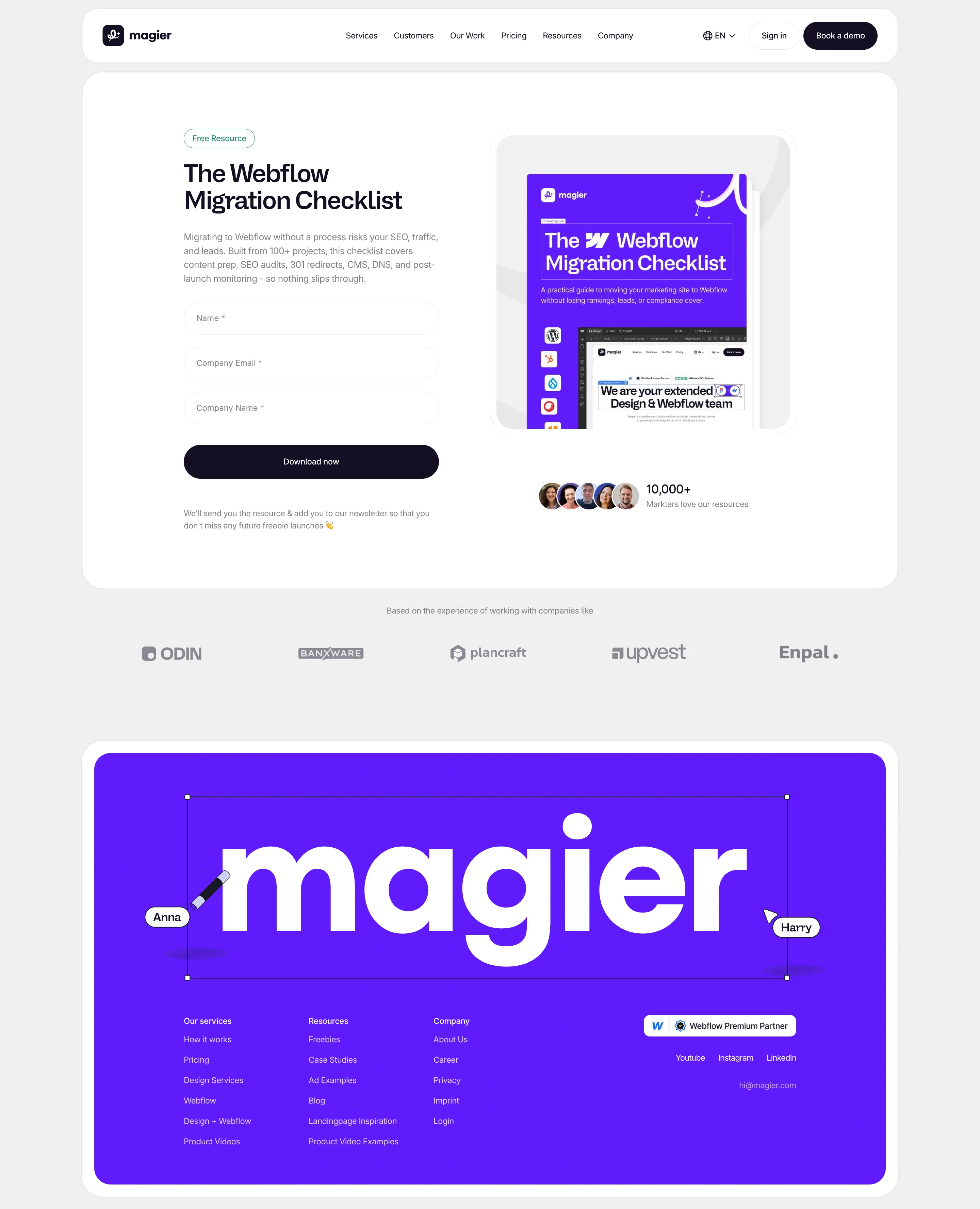
Webinar registration pages
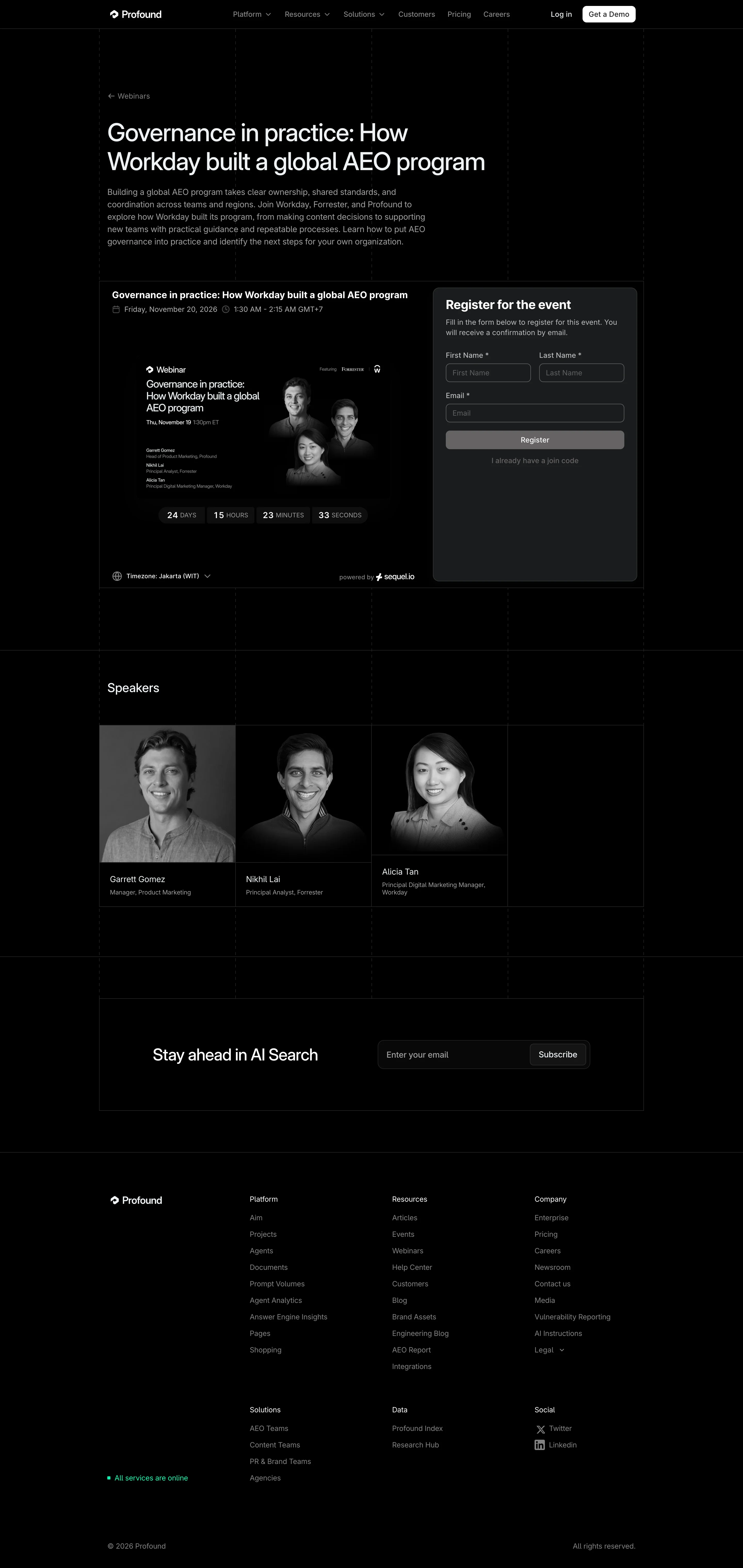
A webinar page needs the date, time, and topic near the top, because visitors check their calendar before they read your pitch. Urgency plays a bigger role here than on other page types, since a live session has a fixed deadline. Speaker credentials work like a trust badge for a session that visitors cannot preview.
- Details up front: State the date, time, and topic in the first screen, so visitors know right away whether the session fits.
- Speakers: Show names and credentials near the form.
- Form: Keep it short, usually a name and work email, because interest in a topic does not always mean willingness to share much.
- Reminders: Send reminders after signup, because a registration only helps if the person shows up.
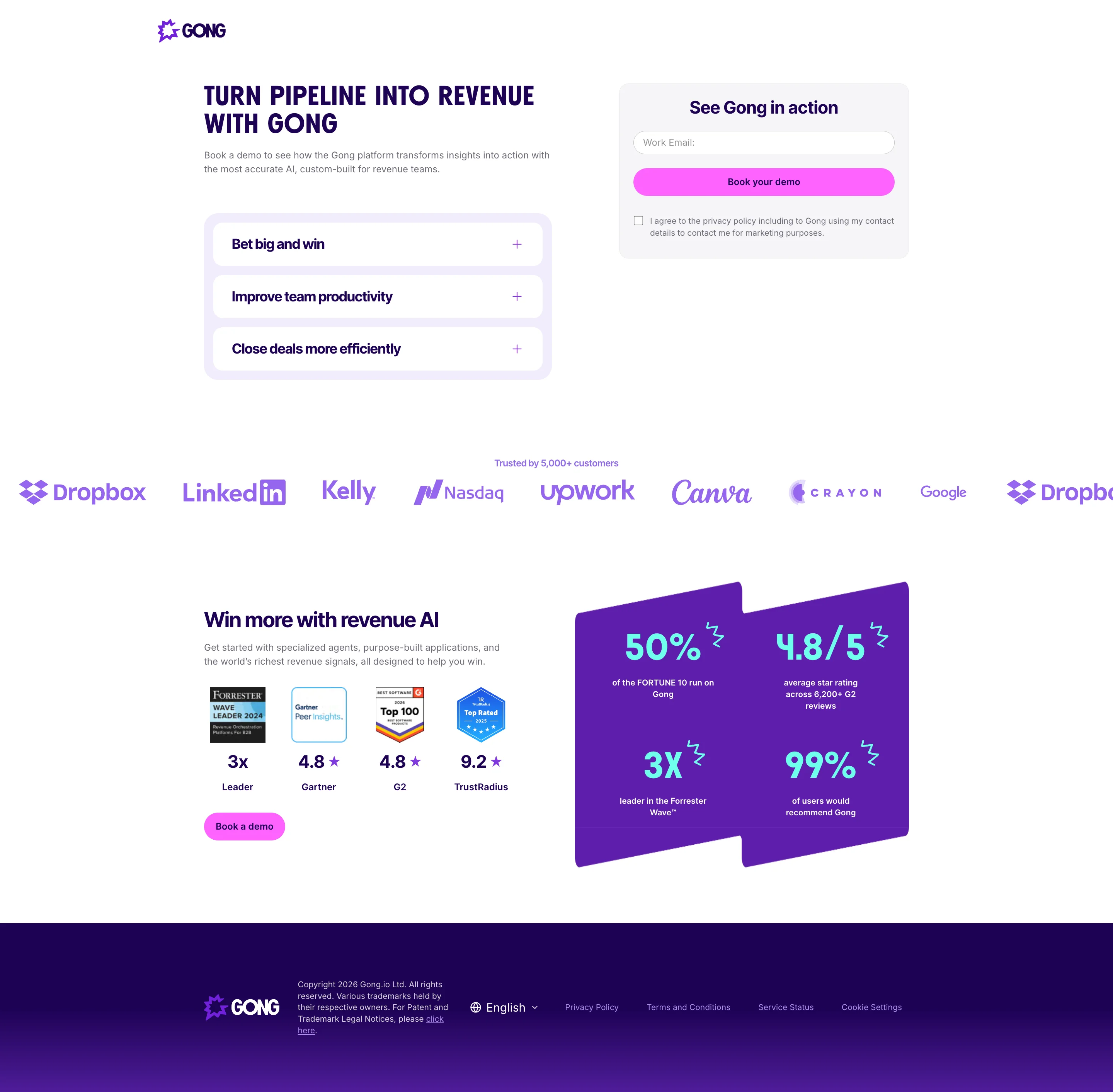
Demo or sales call pages
A demo page serves visitors who are comparing tools and are ready to talk. The biggest source of hesitation is not knowing whether the call is a short walkthrough or a hard sales pitch. Say what happens on the call, how long it takes, and what the visitor will see.
A short qualifying form is reasonable here, since people expect a question or two when they ask for someone’s time.
- Call outline: Explain what happens on the call and how long it takes, so visitors know what they are agreeing to.
- Proof: Show product screenshots and customer logos near the form.
- Form: Ask for work email, name, company, and role if needed, because those answers help sales prepare.
- Next step: Confirm what happens after submission, such as a calendar link or a reply within a set time.
Free trial or signup pages
Trial pages work best with minimal friction, since a visitor ready to try a product wants a fast path and not a long form. Show the product in action, because screenshots or a short video close the gap between interest and signup. Say whether a credit card is required, since billing uncertainty is a common reason to hesitate.
Pipedrive’s homepage call to action shows how light this can be, pairing a review score with a button and no form at all (lemlist, 2026).
- Product visual: Show screenshots or a short video of the product in action, so visitors see what they will use.
- Billing note: State plainly whether a card is needed, and what happens when the trial ends.
- Form: Ask for only what the signup needs.
- First step: Plan what visitors see right after they create the account, because the page’s job continues into the product.

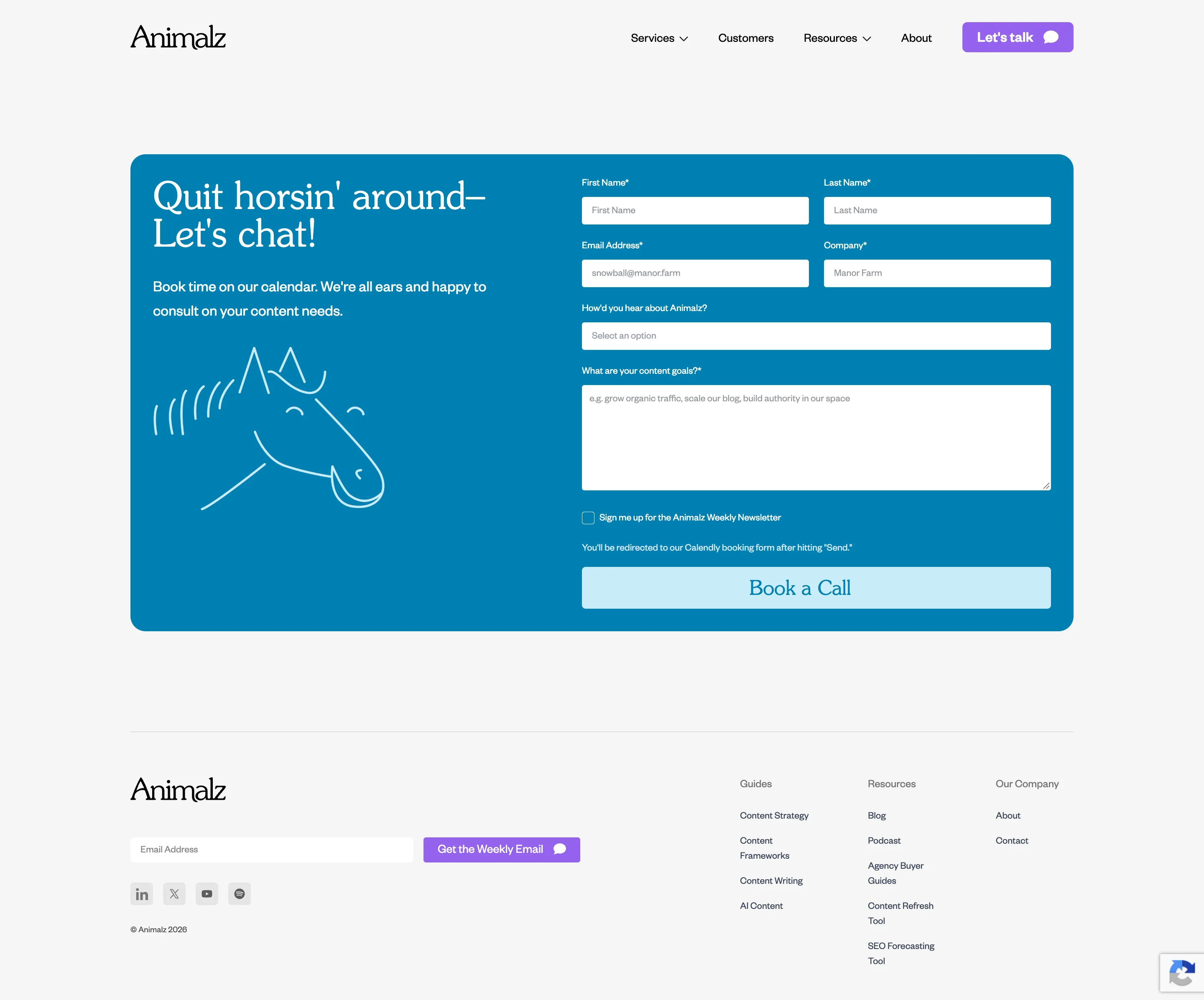
Quote or consultation pages
Service businesses and agencies need a page that feels like a structured next step and not a pitch. Show relevant work and expertise, and explain what the visitor receives, such as an estimate, a report, a call, or both. A medium-length form works here, because project details help your team prepare for the conversation.
Explain why you ask each question, and offer an alternative contact route for visitors who dislike forms.
- Deliverable: Say what the visitor gets and what happens next.
- Relevant work: Show projects or results that match the request, because visitors look for someone who has solved a similar problem.
- Form: Ask for name, work email, company, and project need, with an optional budget range.
- Response time: State when the visitor will hear back, and only promise what your team can keep.
Newsletter signup pages
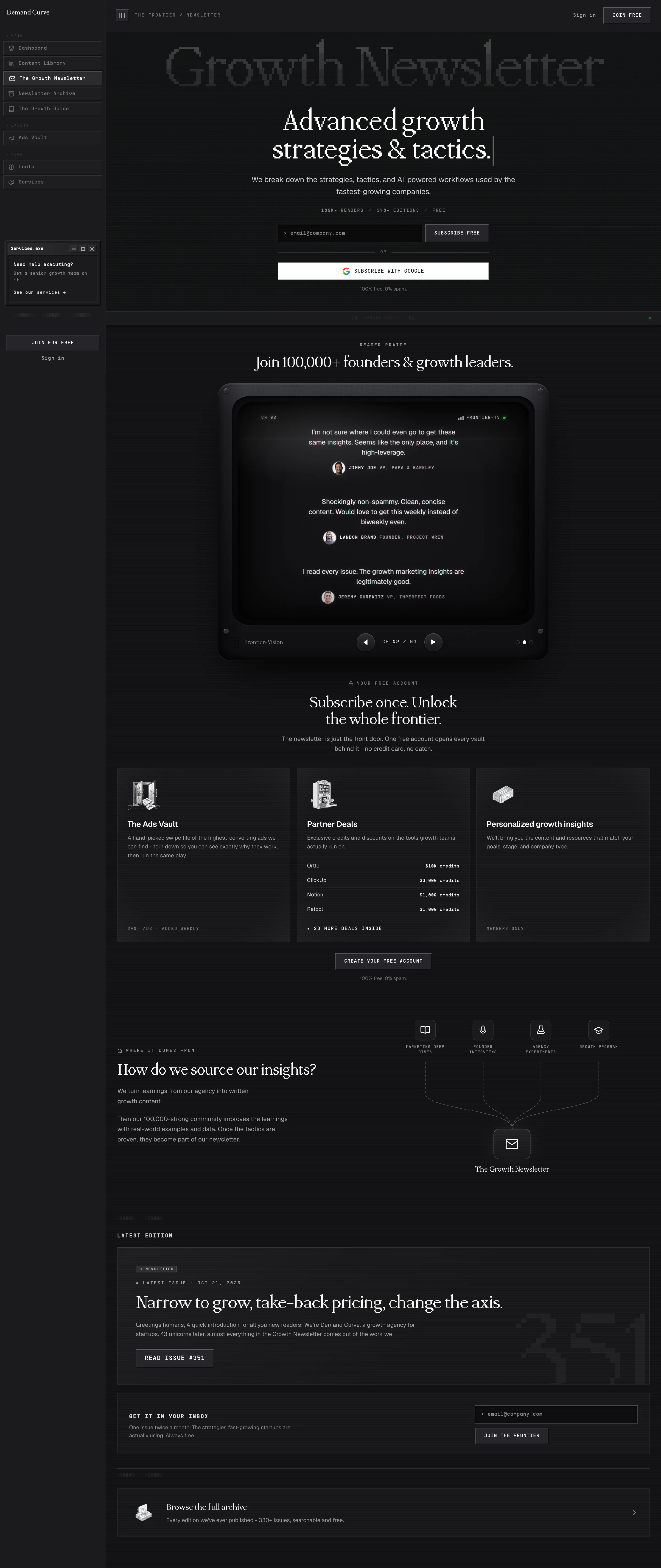
Newsletter pages ask for the lowest commitment of any type, so the form should stay extremely short, often just an email field. The offer carries little value by itself, which means the page has to show what subscribers will get. A sample issue or a few past headlines works better than a general promise.
- Promise: Say what subscribers receive and how often.
- Sample: Show a past issue or a few headlines, so visitors know what lands in their inbox.
- Form: Ask for an email only, and ask follow-up questions after signup.
- Privacy note: Place a short line beside the field to say how you will use the address.
Waitlist and pre-launch pages
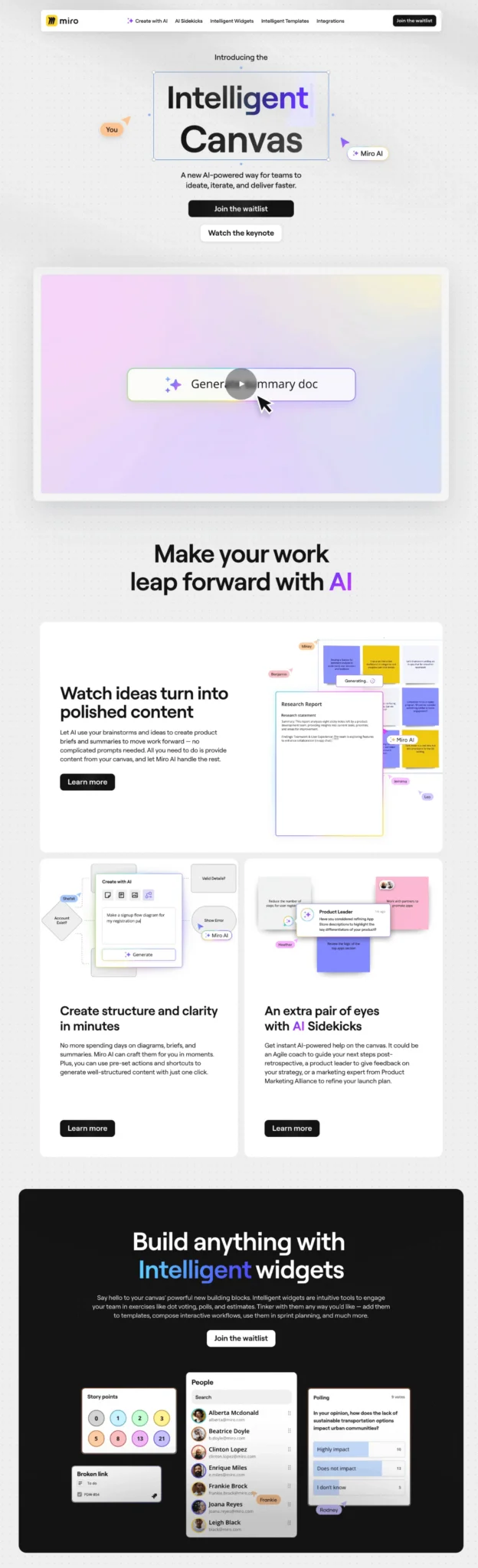
A waitlist page builds interest before a product, course, or service exists, so it has to make the offer feel worth waiting for with very little to show. Say who it is for, what is coming, and why early access helps. Keep the form to an email address, since visitors are committing to a promise and not a product.
- Audience: Name who the offer is for in the headline or subheadline.
- Reason to wait: Describe what is coming and why early access is worth having.
- Form: Ask for an email only.
- Update plan: Tell people what to expect next, such as a launch date or a first email.
Once you know the page type, the next decision is what to design first, and most teams pick the wrong starting point.
Lead capture landing page mistakes to avoid
Testing a lead form only on your desktop is like testing an umbrella indoors, because the conditions that break it never appear. So what is the biggest mistake in lead generation? Most often it is asking for commitment before the page has shown relevance and value. The mistakes below fall into two groups, those visitors can see on the page and those that only show up between a submission and a sale.
Mistakes on the page
- A vague offer or headline: Sell a specific outcome so visitors understand the page within seconds, because a visitor who has to guess what you offer leaves.
- Asking for too much too early: Remove fields that do not change what you do next with the lead, and put the easier questions first, because each extra field adds effort before the visitor has seen the value.
- Putting all the friction in one place: Ask easy questions first, keep the qualification questions that protect your sales team’s time, and ask for contact details last, because too many questions up front drive visitors away and too few fill your pipeline with leads sales cannot use.
- A CTA that does not match what happens next: Unbounce (2025) points out that ckbk’s “Claim your free membership” button leads to another form, so describe the real next step.
- Missing or unverified proof: Add real logos, ratings, or results, because visitors discount claims they cannot check.
- Ignoring mobile: Design and test on a phone connection first, since most traffic arrives there and a fiddly form frustrates visitors at the last step.
Mistakes behind the page
- Counting submissions instead of qualified leads: Define a qualified lead before you design the form, and connect your page data to your CRM so you can see which leads become customers, because a high count of unusable leads costs your sales team time.
- Showing every visitor the same questions: Use branching when the offer needs qualification, because a static form over-asks small prospects and under-asks large ones.
- Treating the CRM connection as an afterthought: Connect the form to your CRM and email tools before launch so nobody exports files by hand, because leads that wait for a reply lose momentum.
- Sending every lead to the same place: Route leads by deal size, region, or urgency, because one shared inbox slows down the replies that need to be fast.
- Skipping step and field tracking: Record each step, each field, and each traffic source, because tracking only the final submission hides where visitors leave and which sources send qualified leads.
- No designed step after submission: Build the thank-you page and the first follow-up email, because the page that follows the form decides whether the visitor’s interest continues.
- Launching without testing the full path: Submit test leads through every qualification path and confirm each one reaches the CRM, notifies your team, and triggers the auto-reply, because a broken pipeline costs leads from the first click.
Most mistakes in the second group never show up in a design review, which is why teams miss them. They show up as leads that go cold, so the fixes are worth making before you send traffic.
A pre-launch checklist for your lead capture landing page
Use this checklist of lead capture landing page best practices before you publish, and run it again after any big change. Each group maps to a section above, so you can jump back to the explanation when an item fails.
Offer and messaging
- The headline names a specific outcome.
- The offer is clear above the fold.
- The page has one primary action.
- The CTA describes what happens next and matches the form.
Form
- Every field changes what you do next with the lead.
- Easy questions come first and contact details come last.
- Labels and error messages are clear.
- A privacy note sits beside the form.
- A multi-step form has been tested for completion rate and lead quality.
- Every branch in a branching form has been tested.
Trust
- Testimonials, ratings, and results are real and can be checked.
- Proof appears near the hero and near the form.
- Logos are used only where you have permission.
Qualification and routing
- You have written down what counts as a qualified lead and what disqualifies a prospect.
- The next step for each type of lead is defined.
- Routing rules exist for budget, company size, region, or urgency, whichever apply to your team.
- Each rule has been tested with a sample lead.
- Each type of lead has a named owner.
CRM and follow-up
- The form is connected to your CRM and email tools without manual exports.
- The right person is notified when a lead arrives.
- The auto-reply sends right after submission and names what the visitor asked for.
- The thank-you page confirms the request and states what happens next.
Tracking
- Every traffic source is tagged.
- Step completion and field abandonment are recorded for multi-step forms.
- Submissions are recorded correctly, and the numbers match your CRM.
- You can see qualified lead rate and lead-to-customer rate.
Design and technical
- The CTA stands apart visually from the rest of the page.
- Mobile layouts work without zooming, and the form has been tested on a phone connection.
- Images load quickly, and Core Web Vitals pass on mobile.
- Text contrast, labels, and keyboard use meet accessibility basics.
Final test
- Test leads have gone through every qualification path.
- Each one reached the CRM, notified your team, and triggered the auto-reply.
- The thank-you page appeared, and your analytics recorded the submission.
Fixing the mistakes is only half the job, and the closing section covers who should own the fixes after launch. Without an owner, small problems pile up between launches.
Final thoughts
A good lead capture landing page gives visitors a clear offer, a form that respects their time, and proof that you are worth trusting. Designing it in the right order, with the message before the visuals, is what makes the sections work together. Fixing that order also settles the question from the introduction, because the page you design first should be the words and the offer, and the layout should follow.
Execution still takes work, especially if your team is already stretched across ads, content, and product launches. You might be worried that handing page work to an outside team will take too long or lose your brand voice, but a team with a dedicated project manager and a 48-hour turnaround per task keeps feedback loops short. The last decision is ownership, so decide whether someone on your team will run a regular test cycle or whether a team that handles design and Webflow changes will do it for you.
If you want help, that's where magier comes in. See how magier covers both design and Webflow, or book a free demo with magier to talk through your page. If you prefer to start on your own, pick the section of this guide closest to your current page, apply it this week, and compare your results after a full test cycle.
{{cta}}
FAQ
Start with one goal and one offer, write the messaging, then wireframe, design, build, and test the page. The nine-step workflow earlier in this guide covers each stage and the reason for its order.
The best page is the one that matches your offer and your visitor's buying stage. Lead magnet pages suit cold traffic, while demo and quote pages suit visitors who already compare options.
ChatGPT can draft headlines, benefits, and rough code, but it needs a detailed brief to produce useful work. Design decisions such as hierarchy, proof, and form placement still need human judgment.
Asking visitors for a commitment before the page shows why the offer is relevant to them. A vague headline and a long form are the two most common versions of this mistake.
It is a single-purpose page that exchanges something valuable, such as a guide, demo, or quote, for a visitor's contact details. Unlike a homepage, it focuses on one action.
There is no practical difference, because both terms describe a page built to collect contact details. Teams use them interchangeably.
Start with the fewest fields needed for the next step, usually an email address for low-commitment offers. Add fields for demos or quotes only when they help you qualify or prepare for the conversation.
According to HubSpot (as cited by Leadfeeder, 2026), companies that grew from 10 to 15 landing pages saw about 55% more leads. More pages let you match more offers to more audiences.
Test the offer and headline first, then the form, then the CTA, proof, and layout. Track qualified leads as well as submissions so a rise in volume does not hide a drop in quality.
.avif)