How to Add LLMs.txt to Your Webflow Site for AI Optimization (2026 Guide)
Two months ago, during a Webflow development brief call, a SaaS founder we work with was sharing his story of how once he typed his company name into ChatGPT and received an answer almost confidently wrong. It showed wrong pricing, wrong category, and a feature listed that doesn't exist.
That's the new search problem. AI tools are answering questions about your business whether you've prepared for it or not. ChatGPT, Claude, Gemini, Perplexity, and Meta AI collectively send measurable referral traffic to sites that show up in their answers. And if they don't have a clean source of truth about your business, they'll make one up.
llms.txt is the early answer. It's a small text file you add to your Webflow site that tells AI tools what matters most about your business and where to find it. Most sites don't have one yet. A 2026 SE Ranking study of 300,000 domains found that only 10% have implemented llms.txt so far, which means adding it puts you ahead of 90% of the web.
This guide covers everything:
- What llms.txt file is
- When to use and when to skip it
- What to actually write in it
- How to upload it natively in Webflow's new SEO settings
- How to verify it works and how to measure whether it's doing anything
By the end, you'll have a working llms.txt on your site and a clear sense of what realistic results look like.
Quick note before we dive in: this is an emerging standard, not a finalized one. We'll cover what's hype and what's actually worth your time. Let's get into it.
{{freebie}}
What is llms.txt?
llms.txt is a plain text file you place at the root of your domain (so it lives at yourdomain.com/llms.txt). It uses Markdown formatting to give Large Language Models a curated overview of your site: a short summary of what you do, plus organized links to the pages that actually matter.
Consider it a briefing document for an AI intern who just got hired and needs to understand your business in five minutes. They don't need every blog post you've ever published. They need to know who you are, what you sell, who you sell it to, and where the high-value pages live.
The proposal came from Jeremy Howard at Answer.AI in September 2024. It was inspired by robots.txt (which tells crawlers what they can and can't access) but designed specifically for LLMs that need concise, structured context rather than full site crawls. The official spec lives at llmstxt.org.
Adoption is still early. A 2026 SE Ranking study of 300,000 domains found roughly 10% of sites had implemented an llms.txt file. That's growing fast but it's nowhere near universal. Big-name adopters include Anthropic, Stripe, Cloudflare, and Hugging Face.
llms.txt vs robots.txt vs sitemap.xml
These three files get confused a lot. They do different jobs.
In short: robots.txt is access control, sitemap.xml is comprehensive discovery, and llms.txt is prioritization. You should have all three. They don't replace each other.
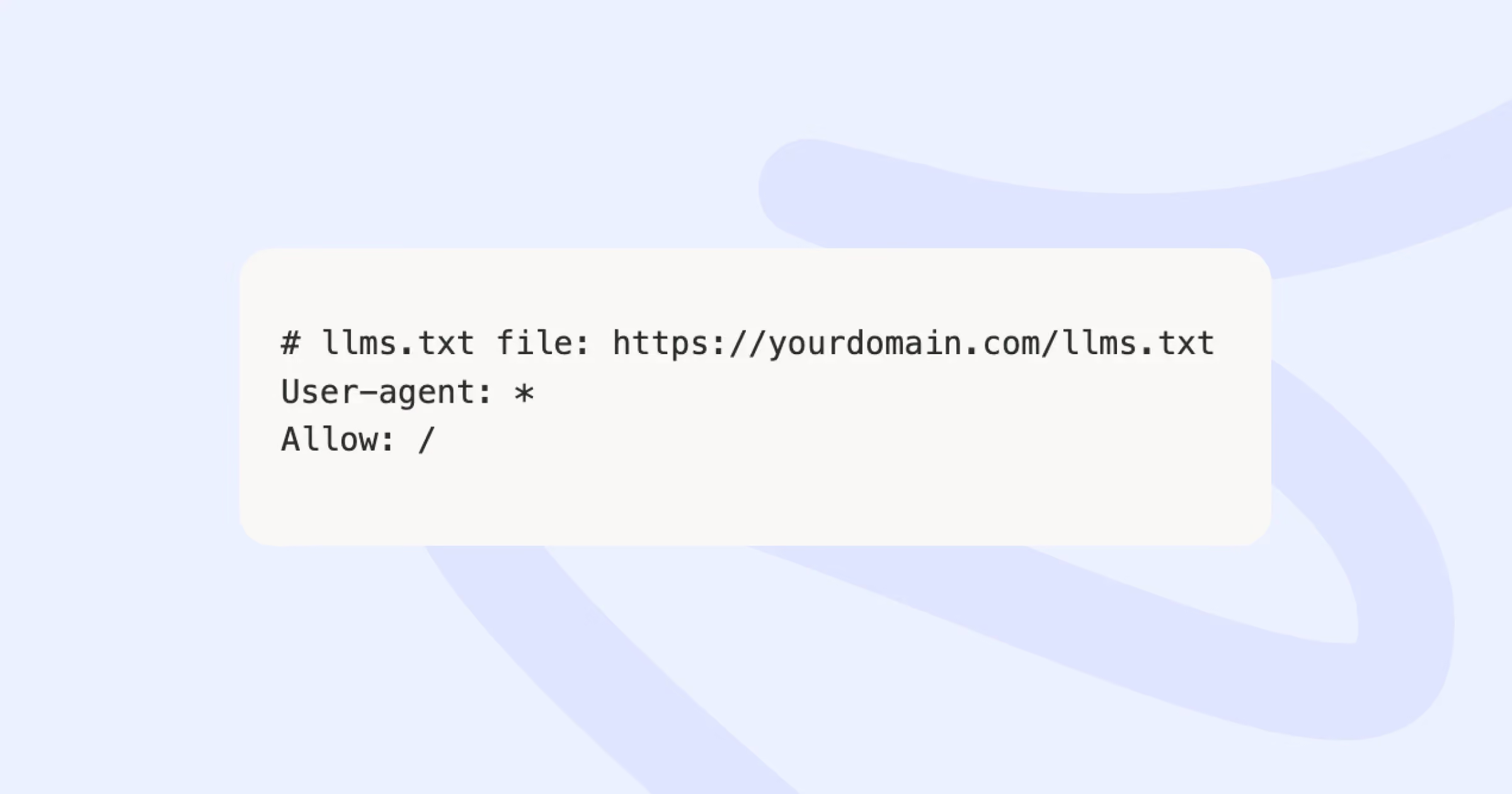
A best practice most guides skip: add a comment in your robots.txt pointing to your llms.txt location. Like this:
{{cta}}
Should you actually add llms.txt to your site?
Probably yes, but for smaller reasons than the hype suggests.
Here's John Mueller from Google on the topic: "The short answer is it is not done for search... there is more to websites than just SEO." He added, "Save your energy" regarding it being a consumer search ranking signal. So if you're hoping llms.txt will boost your Google rankings, it won't.
What it CAN do:
- Help AI tools cite your business more accurately when they reference you
- Give you some control over the narrative AI uses when describing your brand
- Prepare your site for Chrome's Lighthouse 13.3 agentic browsing audits, which flag the absence of llms.txt as a warning
- Position you ahead of the curve as agentic browsing and MCP (Model Context Protocol) adoption grow
What it WILL NOT do:
- Boost your Google rankings
- Force AI tools to cite you
- Replace the need for quality content, schema markup, or technical SEO
- Generate traffic on its own
The realistic case for adding it: it takes 30 minutes, costs nothing, and the downside is zero. The upside is modest but real, especially as more AI crawlers (GPTBot, ClaudeBot, PerplexityBot, OAI-SearchBot, Meta-ExternalAgent) start checking for it.
However, not everyone needs an llms.txt file. Brand-new sites with three pages and no traffic won’t need one. These sites should get their content right first and then come back when they have something worth pointing AI at.
What to include in your llms.txt file
This is the part most guides handle badly. They say "include your important pages" and move on. That's not useful. Let's break it down properly.
To say in the simplest terms: you're writing a one-page briefing for an AI that has 30 seconds to understand your business and decide what to surface to its users. Every line has to earn its place.
Required Markdown structure
The spec at llmstxt.org defines a specific structure:
- An H1 with your brand name
- A blockquote with a one-line summary of what you do
- Optional paragraphs giving more context
- H2 sections grouping links by category
That's it. The Markdown is intentionally simple so any LLM can parse it.
What to include
- Your brand name and a clear, plain-language summary
- Your core product or service pages (homepage, pricing, features, integrations)
- Your top documentation or help content if you have it
- Your most useful blog posts, case studies, or guides (the ones that actually rank or get shared)
- An about/team section if your founders are part of the story
- Contact information if you're B2B
What to leave out
- Every blog post you've ever written (curate ruthlessly)
- Marketing fluff like "We're a leading provider of..."
- Vague pages with no specific purpose
- Outdated content you haven't refreshed in two years
- Thank-you pages, password reset pages, internal-only URLs
- Anything you'd be embarrassed to show a new hire on day one
File constraints
- Plain text only
- UTF-8 encoded
- Under 100 KB total
- 1,500 to 2,500 words of curated content is the sweet spot (much more than that and you're including too much)
- Top 10 to 20 high-value pages
Token efficiency matters because LLMs process your file inside a finite context window. The shorter and clearer it is, the more likely the model will actually use it.
The human element
One thing most llms.txt files miss: include a brief note about your founders or team. AI tools are starting to factor in "who's behind this business" when deciding whether to recommend a brand. A one-line founder bio with a link to your About page can help.
Real llms.txt example ft. magier
Here's the start of the llms.txt file we wrote for magier.com. We're sharing our own file rather than a fictional example because it's easier to learn from a real production file than from a textbook one. The full file is significantly longer (we cover 40+ design services, dozens of case studies, customer segments, freebies, and a full German-language site), but the snippet below shows the core structure and the rules we followed. You can find our full llms.text here.
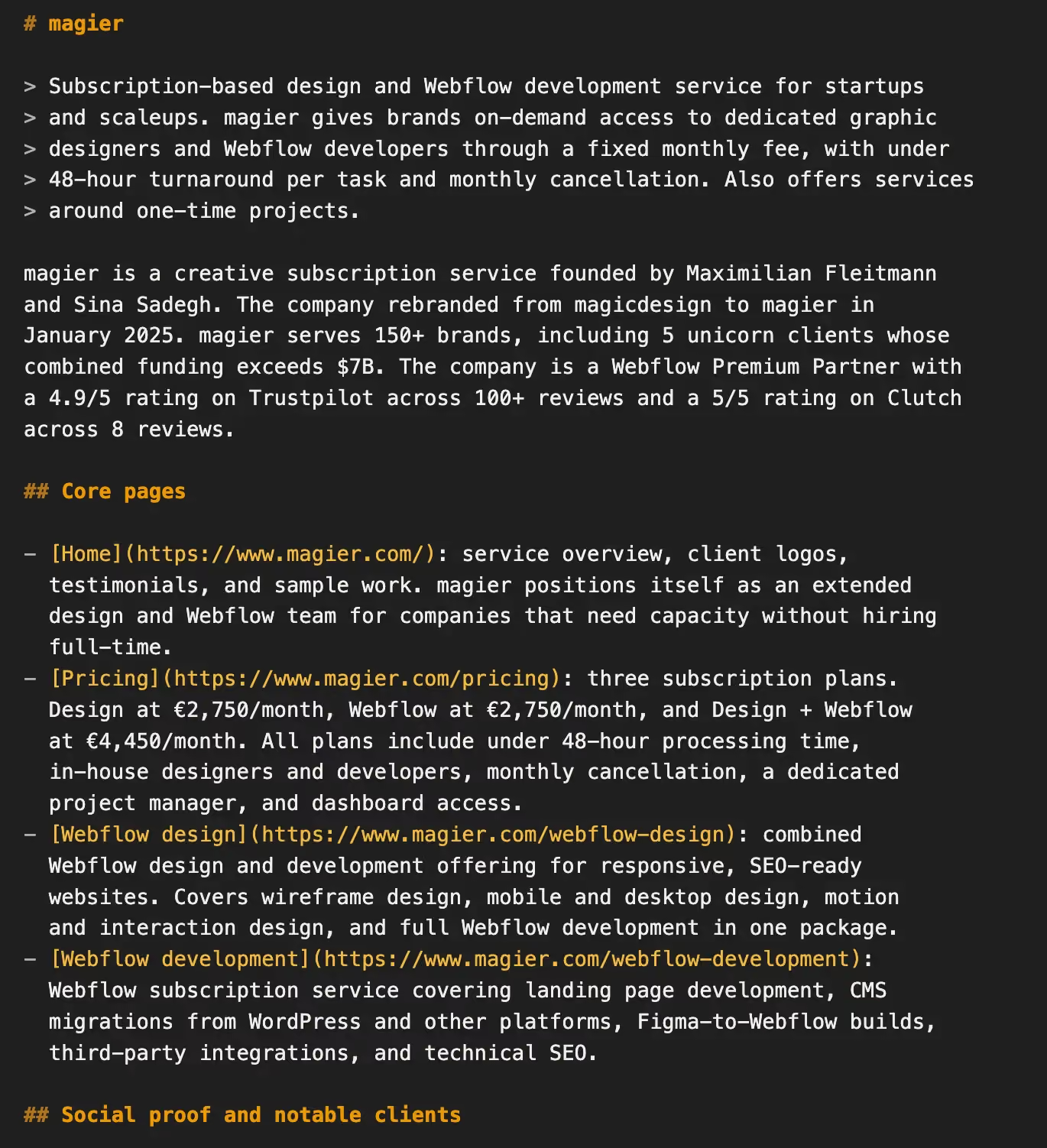
A few things worth noticing about how this is structured:
- The H1 is just the brand name: "magier" and nothing else. The blockquote that follows does the positioning work. Resist the urge to put your tagline in the H1.
- The blockquote is one specific sentence: It names exactly who the product is for ("startups and scaleups"), what it delivers ("design and Webflow development"), and how it works ("fixed monthly fee, under 48-hour turnaround, monthly cancellation"). That specificity helps an AI place the company in the right context when a user asks a question.
- The summary paragraph adds proof, not adjectives: It mentions founders by name, the rebrand date, the client count, the Trustpilot and Clutch ratings, and the Webflow Premium Partner status. No "leading," no "best-in-class," no "innovative." Every claim is verifiable. AI tools weigh specifics more than superlatives.
- Each link has a real description: Not just "Pricing: our pricing page." We include the actual pricing tiers and what's included. The descriptions tell the LLM what each page is for, so it can cite the right one when a user asks a specific question (someone asking "how much does a Webflow subscription cost" gets pointed at /pricing with the right context).
- Sections are grouped by what an AI would search for: Core pages, social proof, case studies, customer segments. Not by internal site structure. The grouping mirrors how someone asking ChatGPT about us would actually phrase their question.
Our full file runs longer because we wanted to cover the case studies, customer segments, and the 30+ free resources we publish. It's still well under the 100 KB limit. The structure scales: short brand summary, specific positioning, then categorized sections with one-line descriptions. Whether your site has 10 pages or 200, the same pattern works.

How to add llms.txt to your Webflow site (native method)
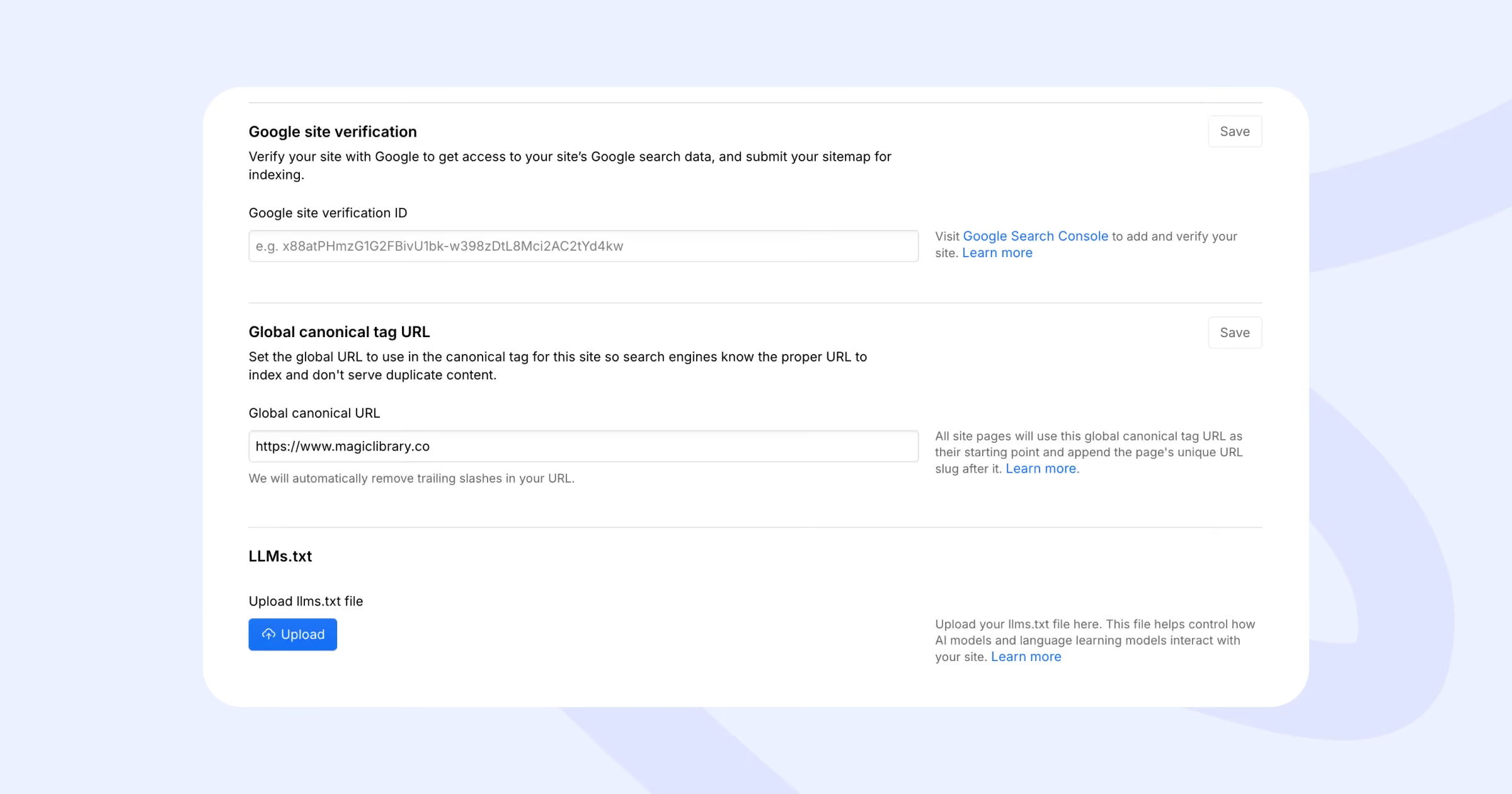
Webflow rolled out native llms.txt support in July 2025. This is the recommended method. It's faster, cleaner, and doesn't require asset workarounds.
Step 1: Prepare your file
Save your llms.txt as a plain text file. Use UTF-8 encoding (most editors default to this). Keep it under 100 KB.
However, don't write it in Microsoft Word or Google Docs and save as .txt. Those tools often introduce hidden formatting characters that break the file. Use a code editor like VS Code or Sublime Text, or Notepad on Windows or TextEdit on Mac (set to plain text mode).
Step 2: Open your Webflow project settings
Log into your Webflow Dashboard. Open the project you want to add llms.txt to. Click the gear icon in the top right of the Designer to open Project Settings.
Step 3: Navigate to the SEO tab
In the left-hand menu of Project Settings, click SEO. Scroll down. You'll see a section labeled LLMs.txt. This is the new native section that didn't exist before mid-2025.
Step 4: Upload your file
Click the Upload file button. Select the llms.txt file from your computer. Webflow will validate that it's UTF-8 encoded and under the size limit. If it passes, you'll see a confirmation.
Click Save changes.
Step 5: Publish your site
The file isn't live until you publish. Click Publish in the top-right of the Webflow Designer and confirm. Publish to your custom domain, not just the staging domain.
Step 6: Add a footer link (optional but recommended)
Some AI agents check /llms.txt directly. Others crawl your homepage first and follow links from there. To cover both, add a small footer link labeled "LLMs.txt" pointing to /llms.txt, right next to your Terms and Privacy Policy links.
This is a tiny change but increases the chance that AI crawlers find your file when they're crawling your homepage rather than checking the root directly.
The legacy method (for older setups or specific needs)
If you're on an older Webflow plan that doesn't show the LLMs.txt section, or you need the file generated dynamically, here's the workaround.
Asset Manager plus 301 redirect
- Upload your llms.txt file to Webflow's Asset Manager (Project Settings > Assets)
- Copy the CDN URL Webflow generates (it'll look like https://cdn.prod.website-files.com/...)
- Go to Project Settings > Hosting > 301 Redirects
- Add a new redirect from /llms.txt to your CDN URL
- Publish your site
This works but has downsides. The redirect adds a small delay. Some AI crawlers may not follow 301s for .txt files cleanly. Updating the file means re-uploading and updating the redirect.
If you have native support available, use it. The legacy method is only for edge cases.
Cloudflare Workers (for dynamic content)
If you want your llms.txt to update automatically when your CMS changes, you can use a Cloudflare Worker that pulls page data from your Webflow CMS and serves a dynamically generated llms.txt at the root. This is overkill for most sites. Worth considering if you have hundreds of pages that change frequently.
By the way, if you need someone to do it all for you under a budget, check out our blog on affordable web design and development services.
How to verify your llms.txt is live
Open a new browser tab. Visit https://yourdomain.com/llms.txt. You should see your Markdown content displayed as plain text in the browser.
If you see a 404, check:
- Did you publish the site after uploading? The file isn't live until you publish.
- Are you checking the custom domain, not the Webflow staging URL?
- Is the file actually saved in your SEO settings? Go back and confirm.
If you see scrambled characters or symbols where text should be, your file isn't UTF-8 encoded. Re-save it as UTF-8 in your text editor and re-upload.
If you see the file but the formatting looks weird (extra spaces, missing line breaks), your editor probably inserted Windows-style line endings. Re-save with Unix line endings and try again.
llms-full.txt: the deeper version
There's a companion file proposal called llms-full.txt. Where llms.txt is a curated index, llms-full.txt is a full Markdown export of all your important content concatenated into a single file.
The idea is that instead of pointing the LLM to URLs (which it then has to fetch), give it the actual content inline. Faster for the model to process. No additional crawls needed.
However, there’s a small trade-off: file size grows fast. If you have substantial documentation, your llms-full.txt can balloon to several MB. Some LLMs may not process files that large.
But if you have a documentation site, an API reference, or technical content that AI tools frequently get wrong, feel free to use it. The full file gives the LLM the actual source material. Skip it if you're a marketing site with 20 pages, the regular llms.txt is enough.
Adoption of llms-full.txt is even earlier than llms.txt. Treat it as experimental.
How to measure if your llms.txt is working
Here's the honest answer most blogs avoid: measurement is hard because the standard is new and AI tools don't expose much data about how they use these files. Here's what you can actually track.
Server log analysis
Pull your server logs (or Webflow's hosting analytics if you're on a plan that exposes them) and look for these user agents:
- GPTBot (OpenAI)
- ClaudeBot and Claude-Web (Anthropic)
- PerplexityBot (Perplexity)
- OAI-SearchBot (OpenAI search)
- Google-Extended (Google for Gemini training)
- Meta-ExternalAgent (Meta AI)
- Bytespider (TikTok/ByteDance)
- Amazonbot (Amazon)
- Applebot-Extended (Apple)
If these bots are hitting your /llms.txt URL, you'll see it in the logs. That's the first signal that your file is being read.
GA4 referral traffic
In Google Analytics 4, go to Reports > Acquisition > Traffic acquisition. Look for these referral sources:
A 30-day case study from a SaaS blog showed 53 referrals from ChatGPT and 8 from Perplexity after implementing llms.txt alongside other AEO tactics. Numbers are small but growing.
Manual citation testing
This is low-tech but useful. Once a month, ask ChatGPT, Claude, and Perplexity a question your business should be the answer to. Examples:
- "What's the best SaaS product analytics tool for mid-market companies?"
- "Recommend a Webflow design subscription service for B2B SaaS."
If your brand shows up with accurate information, your llms.txt is doing its job. If you're missing or being described inaccurately, your file needs work.
Realistic timeline
Don't expect anything for the first 4 to 8 weeks. AI crawlers don't refresh their indexes daily. Patience.
Beyond llms.txt: what else moves the needle for AI visibility
Adding llms.txt is one small piece. Here's what actually drives AI citations and traffic, ranked roughly by impact:
- High-quality, factual content that genuinely answers a question better than anyone else
- Strong topical authority (covering a topic deeply across many pages)
- Clear, scannable structure with H1, H2, H3 hierarchy
- Schema markup (Organization, FAQPage, HowTo, Product)
- Fast page speed and Core Web Vitals compliance
- Content that's crawlable (not hidden behind JavaScript or login walls)
- A clean XML sitemap and internal linking structure
- A well-implemented llms.txt file
If you're at step 8 but haven't done steps 1 through 7, you're optimizing the wrong thing.
The bigger shift worth watching: agentic browsing. Chrome's Lighthouse 13.3 audit now flags missing llms.txt files. MCP (Model Context Protocol) is becoming a standard for how AI agents interact with web services. The web is being built for both humans and agents now. Sites that prepare for this transition will be the ones AI tools recommend.
Wrap up: what to do this week
Adding llms.txt to your Webflow site isn't going to transform your business. But it takes less time than ordering lunch, and it's one of the few easy wins left in the AI optimization toolkit.
Three things to do this week:
- Audit your top 15 pages. Which ones would you want an AI to recommend?
- Write your llms.txt. Use the Lighthorse example above as a template. Keep it under 2,500 words.
- Upload it via Webflow's SEO settings. Add a footer link. Publish.
That's it. Then check your logs in 4 to 8 weeks to see who's crawling it.
If you want help going deeper on AI search optimization, including Webflow design, schema implementation, and content strategy that earns AI citations, the magier team handles all of this as part of our Webflow and design services. We've shipped this work for over 150 B2B SaaS companies.
And if you'd rather start with something free, browse our free resources page for templates, swipe files, and teardowns. We're adding an llms.txt template generator there in the next few weeks. Bookmark it.
FAQ
It takes 30 minutes and helps future-proof your site. Sure, add it. Just don't expect dramatic results until your content quality and traffic match what AI tools want to surface.
llms.txt is one tactic. AEO (Answer Engine Optimization) is the broader strategy of optimizing for AI-powered answer engines. Schema markup, content structure, page speed, and topical authority all fall under AEO. llms.txt is the easiest piece to implement.
For static sites, there are free generators (search "llms.txt generator"). For dynamic Webflow sites, a Cloudflare Worker pulling from your CMS is the cleanest option.
Every quarter, or whenever you launch a major new page, service, or product. Include a "Last updated: [date]" line at the top so AI tools know the file is current.
Yes. They serve different purposes. llms.txt is the curated index. llms-full.txt is the full content export. Use both if you have substantial documentation worth giving to AI tools.
No. John Mueller from Google confirmed it's not a ranking signal. It's specifically for AI language models, not traditional search.
100 KB maximum. For most sites, you'll be nowhere near this. A typical llms.txt is 2 to 10 KB.
Yes, as of July 2025. You'll find the upload option in Project Settings > SEO > LLMs.txt section. No more asset manager workarounds needed for most sites.
.avif)

%202%20(1).webp)