Webflow vs Contao: Which CMS Is Right for Your Team in 2026?
Choosing a CMS is NEVER a technical decision. You need to consider how your team wants to work, who owns your data, how much you want to depend on a vendor, and how much developer capacity you have on hand. Webflow and Contao both build websites, and both do it well within their respective design philosophies. But they're built for fundamentally different teams, with fundamentally different priorities.
As of 2026, 64% of all websites use a CMS, and the gap between what different platforms offer has only widened. Understanding the real trade-offs before you commit saves you from an expensive rebuild 18 months later.
Webflow gives you near-total creative control within a managed environment, while Contao gives you total ownership of the environment itself.
Neither is universally better. The right answer depends on who you are. We've worked with enough teams across different technical setups to know that Webflow is not the answer for everyone (despite us being a Webflow partner), and this guide won't pretend otherwise. We'll give Contao a fair evaluation and tell you when it's the stronger choice.
Here's what this guide covers:
- What each platform actually is and who it's built for
- Feature-by-feature comparison across design, CMS, hosting, SEO, performance, security, and pricing
- Webflow's May 2026 pricing restructure
- Contao's GDPR, BITV 2.0, and EAA compliance depth
- Real-world scenarios mapping specific team types to the right platform
- Who should not use each platform
- When neither Webflow nor Contao is the right answer
Webflow vs Contao at a glance
| Category | Webflow | Contao |
|---|---|---|
| Platform type | No-code SaaS visual builder | Open-source PHP CMS |
| Target audience | Designers, marketers, freelancers | Developers, enterprise, public sector |
| Hosting | Proprietary AWS (managed) | Self-hosted (you choose) |
| Pricing | $0 to $2,500+/mo (site + workspace + seats + add-ons) | Free software, pay for hosting and development |
| Learning curve | Moderate (visual, but CSS knowledge helps) | Steep (PHP/HTML knowledge required) |
| Design freedom | Excellent (visual, near-code control) | Good (developer-dependent) |
| CMS | Excellent (visual collections, 20,000 item limit on Premium) | Excellent (complex permissions, no item caps) |
| SEO | Excellent (native tools, clean HTML output) | Good (extensions required for advanced features) |
| Performance | Excellent (managed CDN, Brotli, HTTP/3) | Good to Excellent (hosting-dependent) |
| Security | Managed by Webflow | User-managed (your responsibility) |
| GDPR compliance | Partial (data on Webflow's US servers by default; EU residency on Enterprise only) | Strong (full data sovereignty, self-hosted) |
| Accessibility (EAA/BITV 2.0) | Good (manual implementation required) | Strong (built-in EAA and BITV 2.0 support) |
| Custom code access | Limited (embeds only) | Full (unrestricted core code access) |
| G2 rating | 4.4/5 (975 reviews) | 4.5/5 (2 reviews — limited sample) |
Webflow and Contao are not competing versions of the same thing. They're different tools built for different jobs, and treating them as interchangeable options leads to the wrong choice regardless of which one you pick. That’s why, before comparing features, it helps to understand what each platform is trying to do.
{{freebie}}
What is Webflow?
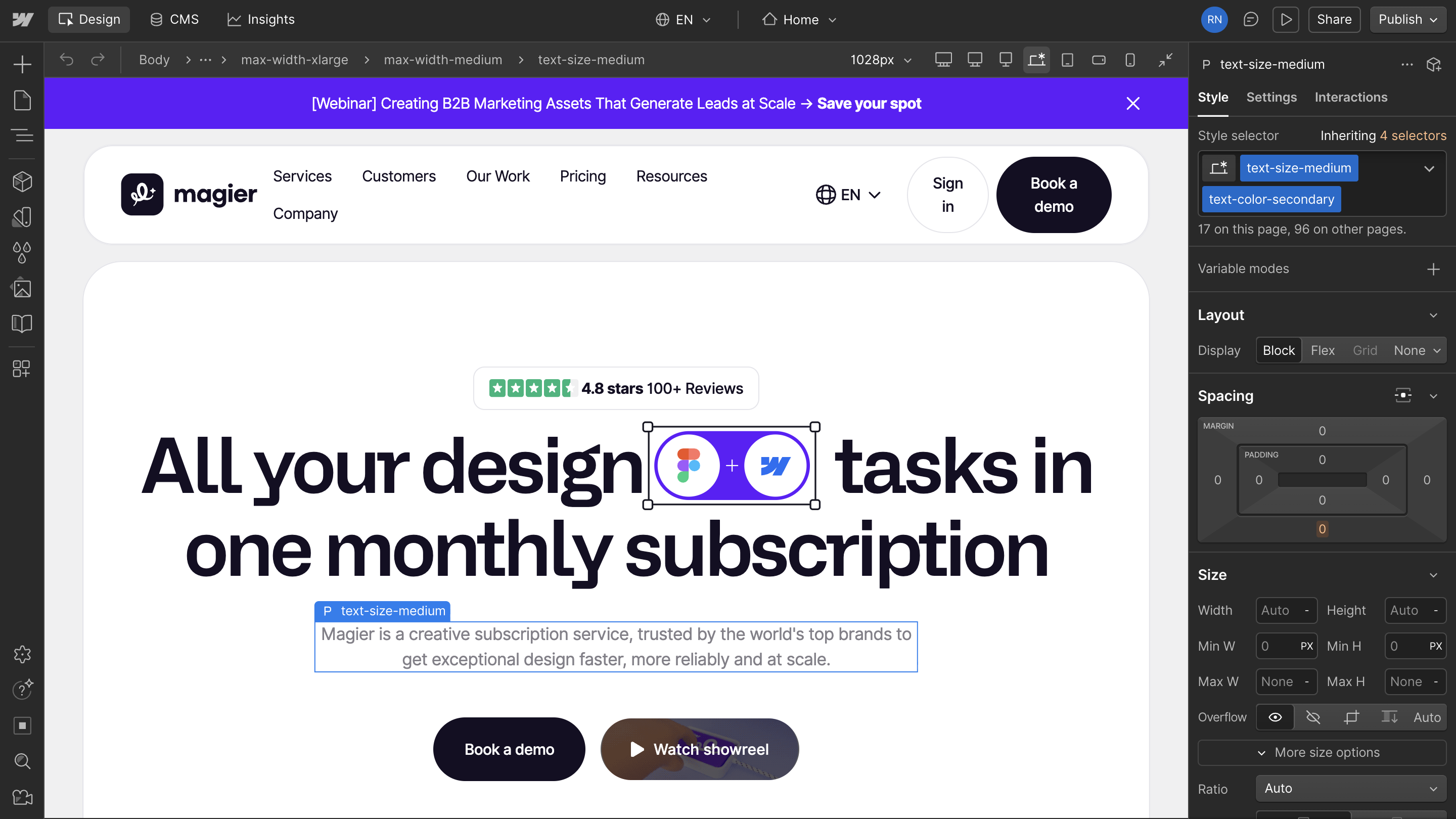
Webflow is a no-code SaaS platform that combines a visual design environment, a hosted CMS, and managed infrastructure into a one platform. Designers can build directly in the browser using a canvas that exposes CSS properties (flexbox, grid, animations, interactions) through a visual interface rather than a code editor. As a result, they get production-ready HTML, CSS, and JavaScript that is clean and semantic.
Launched in 2013, Webflow now serves 3.5 million users across a wide range of teams, from solo freelancers to enterprises. Notable companies running on Webflow include Dropbox, Dell, and Philips. Its G2 rating sits at 4.4 out of 5 stars. All infrastructure, hosting, security, and platform updates are managed by Webflow itself, running on AWS with a global CDN.
What is Contao?
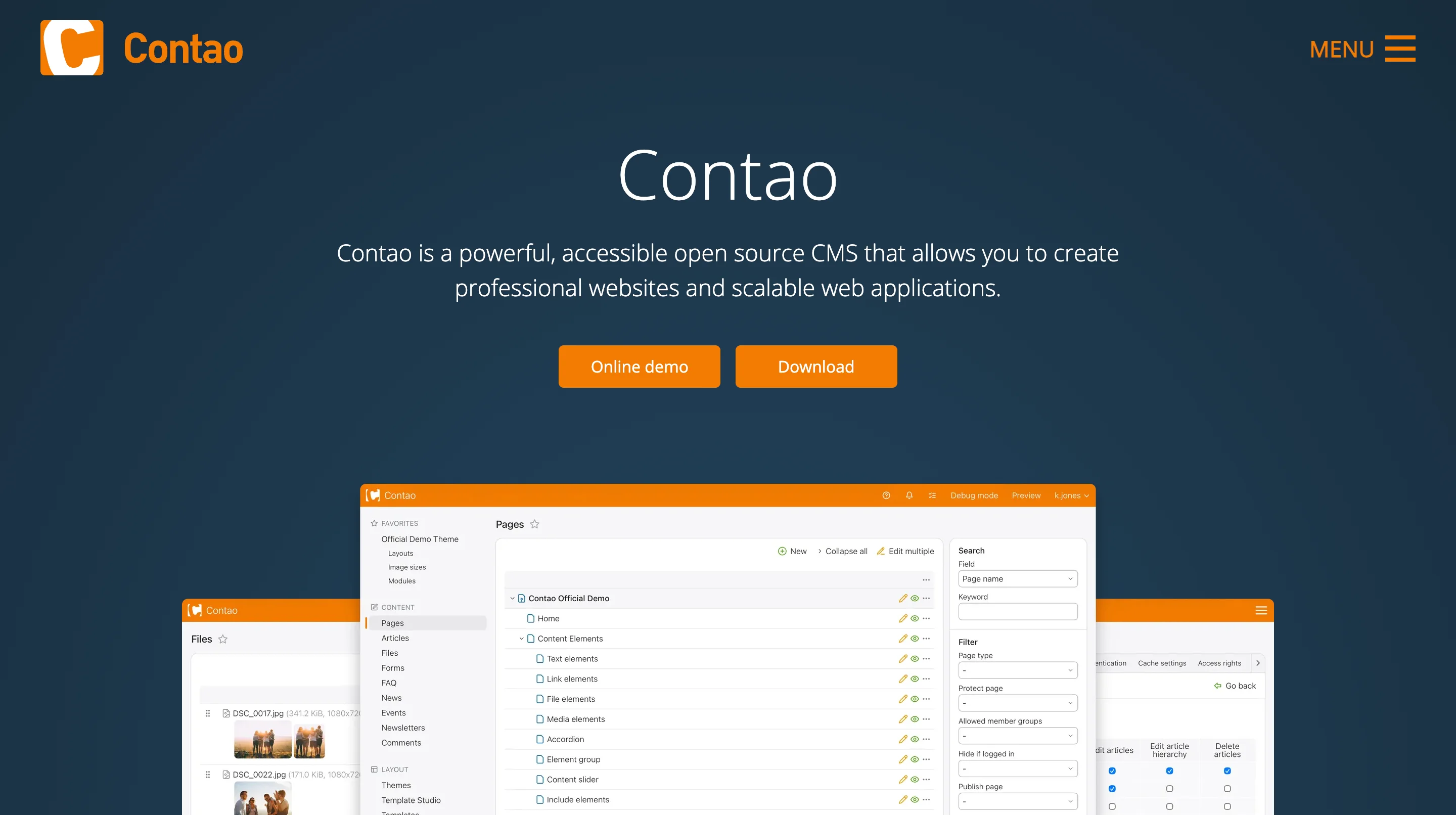
Contao is an open-source PHP CMS built on the Symfony framework, first released in 2006 under the name TYPOlight and renamed in 2010. It's self-hosted, meaning you download the software, deploy it on your own server, and own every aspect of the installation. It currently powers over 175,000 websites, with particularly strong adoption in German-speaking markets (Germany, Austria, Switzerland) and among public sector and educational organizations.
Contao's backend is structured and editor-friendly, with a hierarchical page tree, granular user permission controls, and support for multilingual content architectures. Installation and management are handled through the Contao Manager (a graphical interface) or via Composer on the command line. Its G2 rating sits at 4.5 out of 5 stars. Where Webflow holds 1.11% of the global CMS market, Contao holds 0.06%, which reflects its deliberate niche focus rather than a quality gap.
{{cta}}
Design and visual editing
This is the category where Webflow and Contao diverge most sharply, and for design-led teams, it's often the deciding factor before any other comparison matters.
Webflow
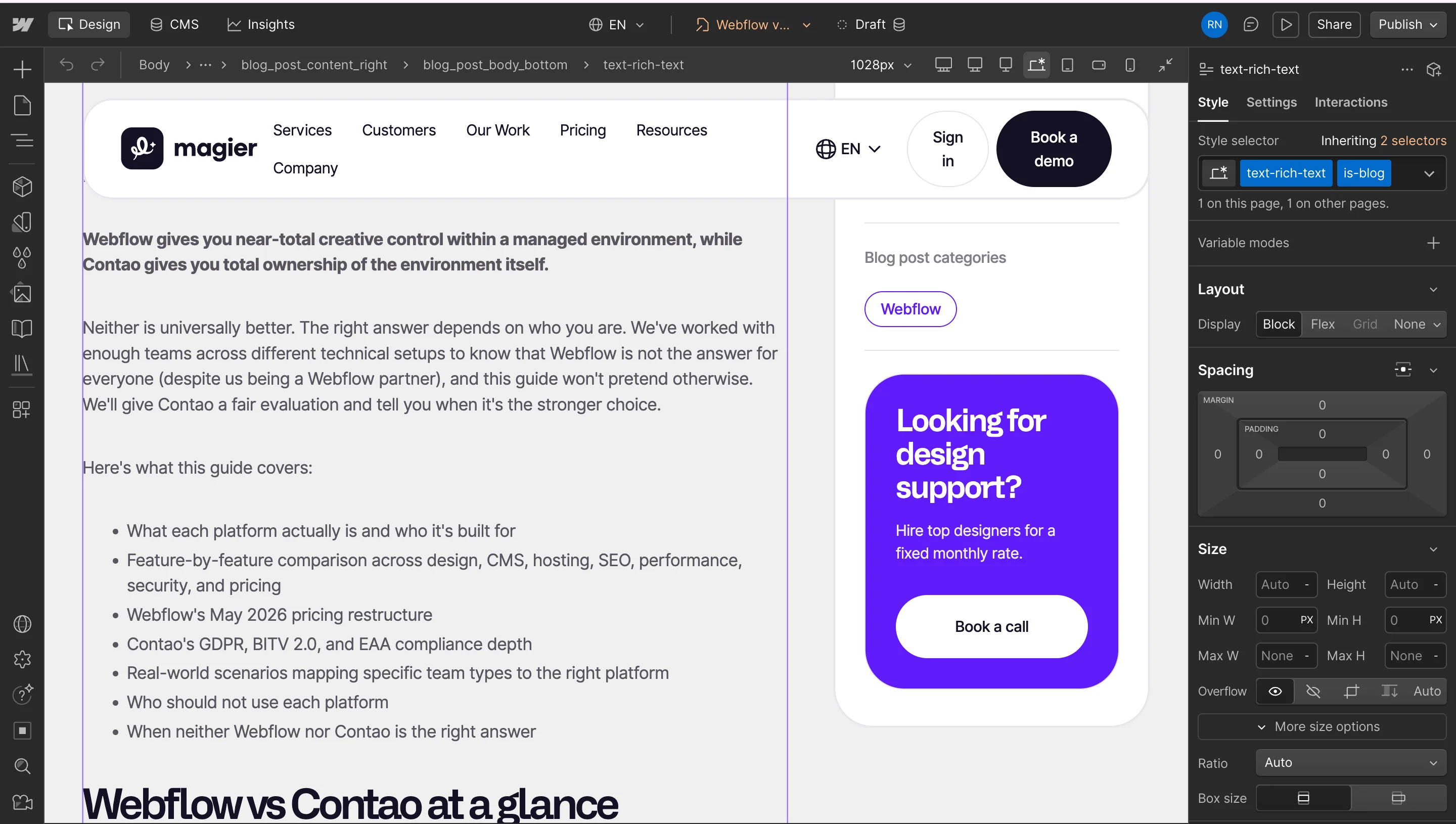
Webflow's design environment works like Photoshop for the web, which is exactly how Webflow describes it and why it resonates with designers who find traditional code editors limiting. You get to build layouts visually using a box model that directly corresponds to CSS flexbox and grid. Animations, scroll interactions, hover states, and responsive breakpoints are all controlled through a visual panel rather than written as code. The output is clean, semantic HTML and CSS that a developer would recognize as professional-grade.
That said, "no-code" is a slight oversimplification. Building complex layouts in Webflow well requires a genuine understanding of CSS concepts. Designers who don't know what flexbox or grid does will hit walls quickly. The platform is better described as low-code with a visual interface, and teams who get the most out of it tend to have at least one person who thinks in CSS, even if they never write it. For teams that fit that description, Webflow's design environment is fast and powerful in practice.
Contao
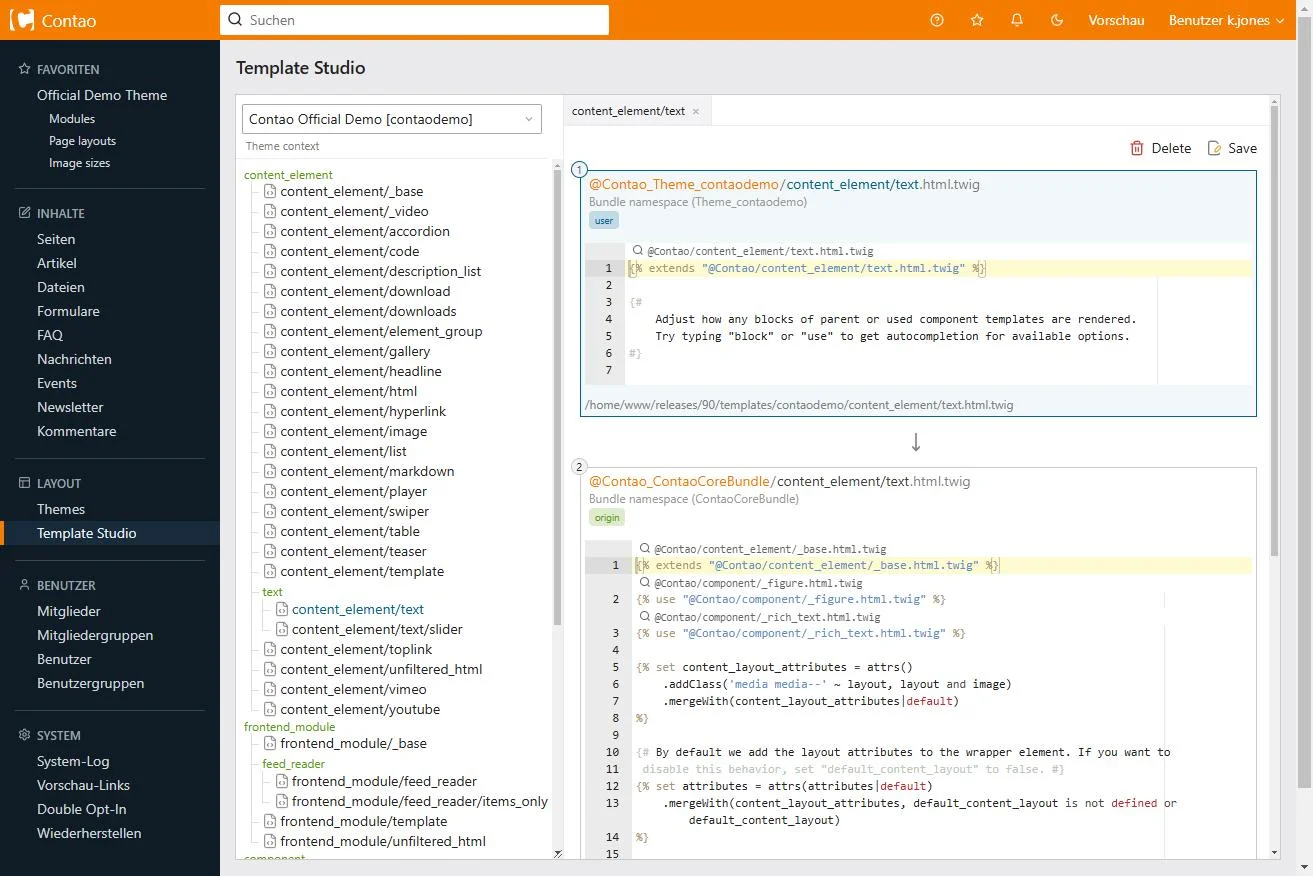
Contao uses a traditional templating system. Layouts are defined through templates, themes, and backend modules, and creating custom designs requires PHP, Twig (Contao's templating language), CSS, and JavaScript. Editors can manage content through a structured backend interface, but the design itself is entirely in the hands of whoever built the site. For organizations that have a developer maintaining the codebase, this is not a limitation. For organizations that want designers or marketers to own visual changes, it is. Contao's extension library includes a wide range of functional modules, including Isotope eCommerce for teams that need shop functionality without switching platforms.
What Contao offers instead of visual design flexibility is structural integrity. Its templating system enforces a clean separation between content and presentation, which makes large-scale content operations easier to maintain over time. Sites built in Contao tend to age better architecturally because the content model isn't tangled up with design decisions.
| Feature | Webflow | Contao |
|---|---|---|
| Design approach | Visual canvas with CSS-based controls (flexbox, grid, animations) | Template and module system; layouts defined in PHP and Twig |
| Who owns visual changes | Designers and marketers can make visual changes independently | Developers must handle any structural or layout changes |
| Skill level required | Moderate — CSS knowledge helps significantly | High — PHP, Twig, CSS, and JavaScript required |
| Animations and interactions | Built-in visual controls for scroll, hover, and page animations | Requires custom JavaScript development |
| Output quality | Clean, semantic HTML and CSS | Clean output when built by an experienced developer |
| Content/design separation | CMS fields bind to design elements directly | Strict separation enforced by templating architecture |
| Long-term maintainability | Good — visual tools make changes accessible to non-developers | Strong — clean architecture ages well when properly built |
If you use Figma for designing, you'll like our plugin recommendations. And if you're in need for graphic design inspo, you could check out this roundup of the best styles.
CMS and content management
Both platforms have strong content management capabilities, but they're optimized for different types of content operations.
Webflow CMS
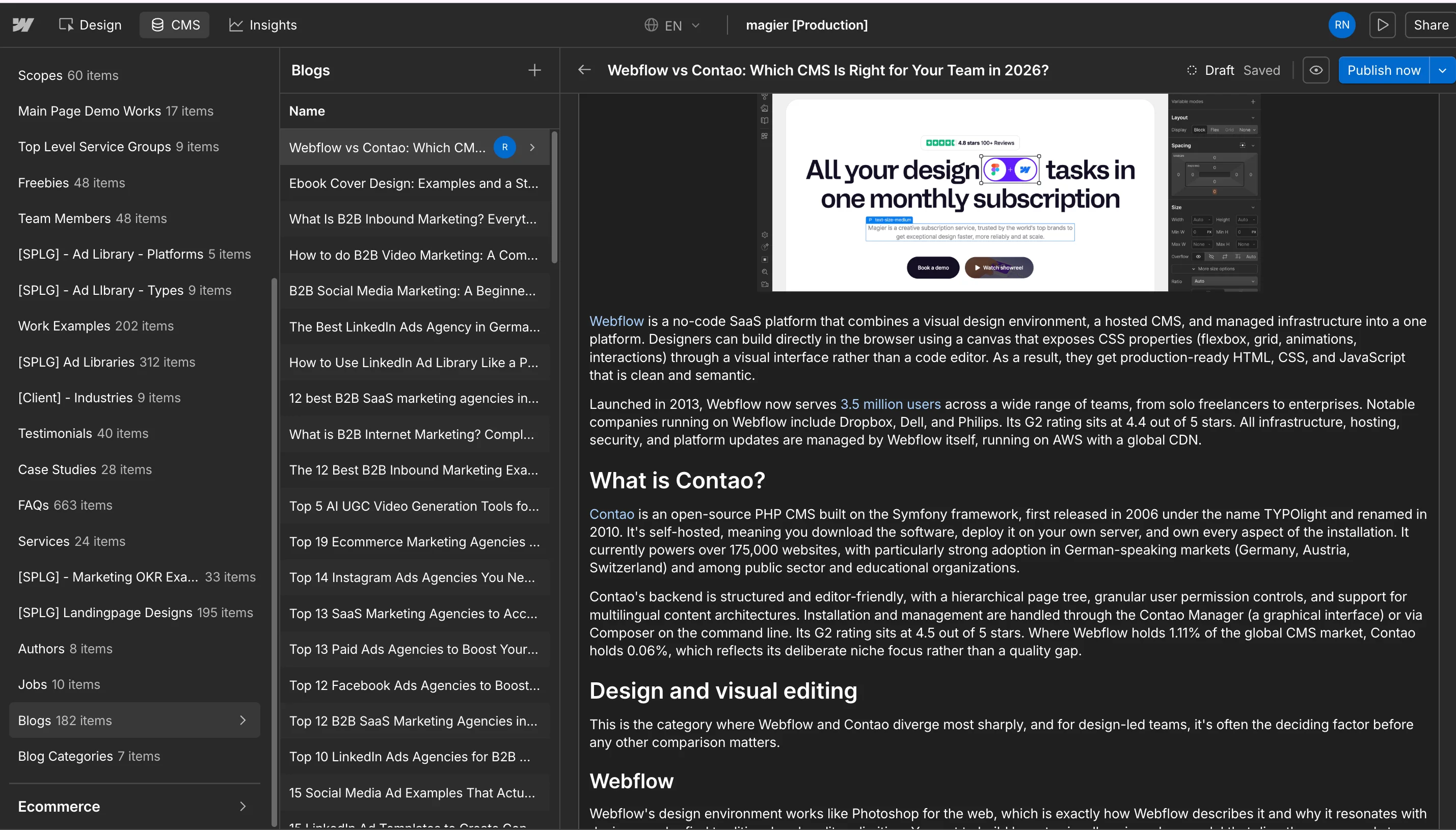
Webflow's CMS is built around collections, which are structured content types such as blog posts, team members, case studies, and resources, with custom fields, reference relationships, and dynamic page generation. Editors manage content through a visual interface that requires minimal training. CMS fields can be bound directly to design elements, so a marketing manager can update a case study without touching the design at all.
The Premium plan (Webflow's standard tier as of the May 2026 restructure) supports up to 20,000 CMS items and 40 collections. For most marketing websites, that's more than enough. For large content operations with thousands of articles or complex nested relationships, it becomes a real constraint worth evaluating carefully before committing.
Contao CMS
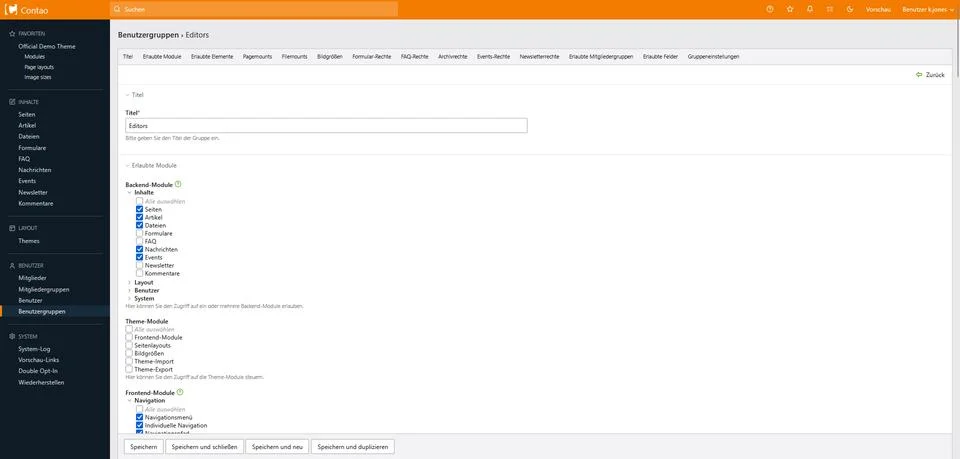
Contao's CMS excels in two areas where Webflow has meaningful limitations. First, permissions. Contao allows extremely granular control over who can access, edit, or publish which content. Individual editors can be restricted to specific pages, specific content elements, or specific fields, which makes it well-suited to large organizations with multiple content teams or strict editorial workflows. Second, scale. There are no item caps. A university managing thousands of course pages, or a government department managing a portal with hundreds of subsections and editors, fits Contao's model better than Webflow's.
Multilingual support is another Contao strength. Managing a fully multilingual site in Webflow requires either Webflow's Localization add-on (priced separately) or workarounds using separate CMS collections. Contao handles multilingual architectures as a native capability, which is a meaningful advantage for European organizations operating in multiple languages.
| Feature | Webflow | Contao |
|---|---|---|
| Content model | Visual collections with custom fields and reference relationships | Hierarchical page tree with structured content elements |
| Editor interface | Visual, minimal training required for content editors | Structured backend — editor-friendly for content, not for design |
| CMS item limits | 20,000 items and 40 collections on Premium plan | No item caps |
| User permissions | Basic role-based access | Granular permissions at page, element, and field level |
| Multilingual support | Via Localization add-on (paid separately) or CMS workarounds | Native — no add-on or workaround required |
| Best for | Marketing sites, blogs, resource centers, SaaS content operations | Large organizations with complex permissions and multilingual needs |
Hosting, ownership, and vendor lock-in
This is where the philosophical difference between Webflow and Contao becomes most concrete, and where teams should think carefully before reaching a consensus.
Webflow's hosting model
Webflow hosts every site on its own infrastructure, running on AWS with a global CDN, automatic SSL, DDoS protection, Brotli compression, and HTTP/2 and HTTP/3 support. You don't manage servers, apply security patches, or think about infrastructure at all. For teams without technical staff, this is a genuine operational advantage that saves meaningful time and reduces the risk of security incidents from deferred maintenance.
The other side of that arrangement is vendor dependency. Your site's design, CMS structure, and interactive logic live inside Webflow's proprietary system. Webflow does allow you to export your site's HTML and CSS, but that export does not include CMS data, dynamic functionality, or form logic. If you want to move off Webflow, you're not migrating a site, you're rebuilding one. That's a meaningful commitment, and it's worth understanding before you sign up rather than after you've spent a year building.
Webflow has overhauled its pricing twice in recent years, most recently in May 2026 when it merged two plan tiers and introduced new pricing categories. Teams that had built their budgets around the previous plan structure had to adapt. That's not a knock against Webflow specifically, SaaS platforms change pricing, but it's a reason to factor platform pricing stability into your decision if your organization is sensitive to budget variability.
Contao's hosting model
Contao gives you complete ownership. You choose your hosting provider, you choose the country where your data is stored, and you can move your site to a different server at any time without permission from or cost to any third party. The software itself is free, permanently. There is no subscription that can be modified, no plan you can be moved off of, and no vendor whose business decisions affect your operating environment.
But that freedom comes with responsibility. You manage server updates, PHP version compatibility, database backups, security patches, and extension updates. For organizations with a developer or a reliable hosting partner, this is routine work. For organizations without that capacity, it represents a real operational burden that is easy to underestimate when evaluating costs.
| Feature | Webflow | Contao |
|---|---|---|
| Hosting model | Proprietary managed hosting on AWS — you cannot self-host | Self-hosted — you choose any provider, in any country |
| Infrastructure management | Fully managed — no server work required | Your responsibility — server, PHP, database, backups |
| CDN | Global CDN included automatically | Optional — configure your own CDN |
| Data ownership | Data stored on Webflow's servers — you cannot change this | Complete data ownership — you control where everything lives |
| Portability | HTML/CSS export available, but CMS data and logic do not export — moving off Webflow means rebuilding | Move to any server at any time with no vendor permission or cost |
| Vendor dependency | High — pricing changes and platform decisions affect your site directly | None — free software with no ongoing vendor relationship |
| SSL | Included automatically | Configured via your hosting provider |
Pricing: what you actually pay in 2026
This section requires more attention than most comparisons give it, because Webflow's pricing model has multiple layers that make the headline price misleading, and Contao's "free" label obscures the real total cost.
Webflow's pricing (post-May 2026 restructure)
In May 2026, Webflow merged its CMS plan ($23/mo annual) and Business plan ($39/mo annual) into a single new tier called the Premium plan at $25/mo annual. This was the platform's most significant pricing change since its December 2024 seat restructure.
PlanAnnual priceBest forStarterFreePrototyping, learning the platformBasic$15/moSimple marketing pages, no CMS neededPremium$25/moMarketing sites, SaaS, blogs, content teamsTeam$2,500/moLarge organizations, includes 10 seatsEnterpriseCustomRegulated industries, mission-critical sites
Those are Site plan prices, and they're the ones most articles quote. But Webflow's pricing actually has four layers that stack on top of each other. A Site plan determines what a single site can do. A Workspace plan determines how many people can build sites together (Core Workspace starts at $28/mo). Per-seat fees apply to each collaborator ($15-$39/mo per seat depending on role). Add-ons like Optimize (from $299/mo), Analyze, and Localize layer on top.
A realistic B2B marketing team on annual billing, running one Premium site with a Core Workspace and two full seats, typically pays between $113 and $128 per month, not $25. That's still a reasonable price for a fully managed platform, but it's a very different number than what the marketing page shows.
Contao's real cost
Contao's software is free, and that is accurate. You download it, deploy it, and use it without any ongoing license fee. Your actual costs are:
- Domain registration: roughly $10 to $20 per year
- Hosting: $5 to $50 per month depending on provider and site requirements
- Initial development: the most significant cost, typically several thousand dollars for a custom Contao build by an experienced developer or agency
- Ongoing maintenance: developer time for updates, security patches, and extension management
The comparison that matters is not Webflow's subscription cost versus Contao's hosting cost. It's the total cost of ownership over two or three years, including development time. For organizations with in-house PHP developers, Contao's total cost can be significantly lower than Webflow's. For organizations that would need to hire a developer for every maintenance task, Webflow's subscription model often works out cheaper in practice.
| Feature | Webflow | Contao |
|---|---|---|
| Software cost | Subscription-based — from $15/mo (Basic) to $2,500/mo (Team) | Free — open source, no license fee |
| Hosting cost | Included in site plan | $5–$50/mo depending on provider and requirements |
| Realistic team cost | $113–$128/mo for a typical B2B marketing team (site + workspace + 2 seats, annual billing) | Low ongoing cost, but significant upfront development investment |
| Add-ons | Optimize from $299/mo, Localize and Analyze priced separately | Most extensions free or low-cost |
| Development cost | Lower — marketers and designers can work independently | Higher upfront — custom build typically several thousand dollars |
| Maintenance cost | Near zero — Webflow handles updates and infrastructure | Ongoing developer time required for updates and patches |
| Pricing stability | Has restructured twice since 2024 — budget for potential changes | Software cost is permanently fixed at zero |
SEO capabilities
For marketing teams, SEO is often one of the top three factors in platform selection, and both platforms support strong SEO with different implementation approaches.
Webflow
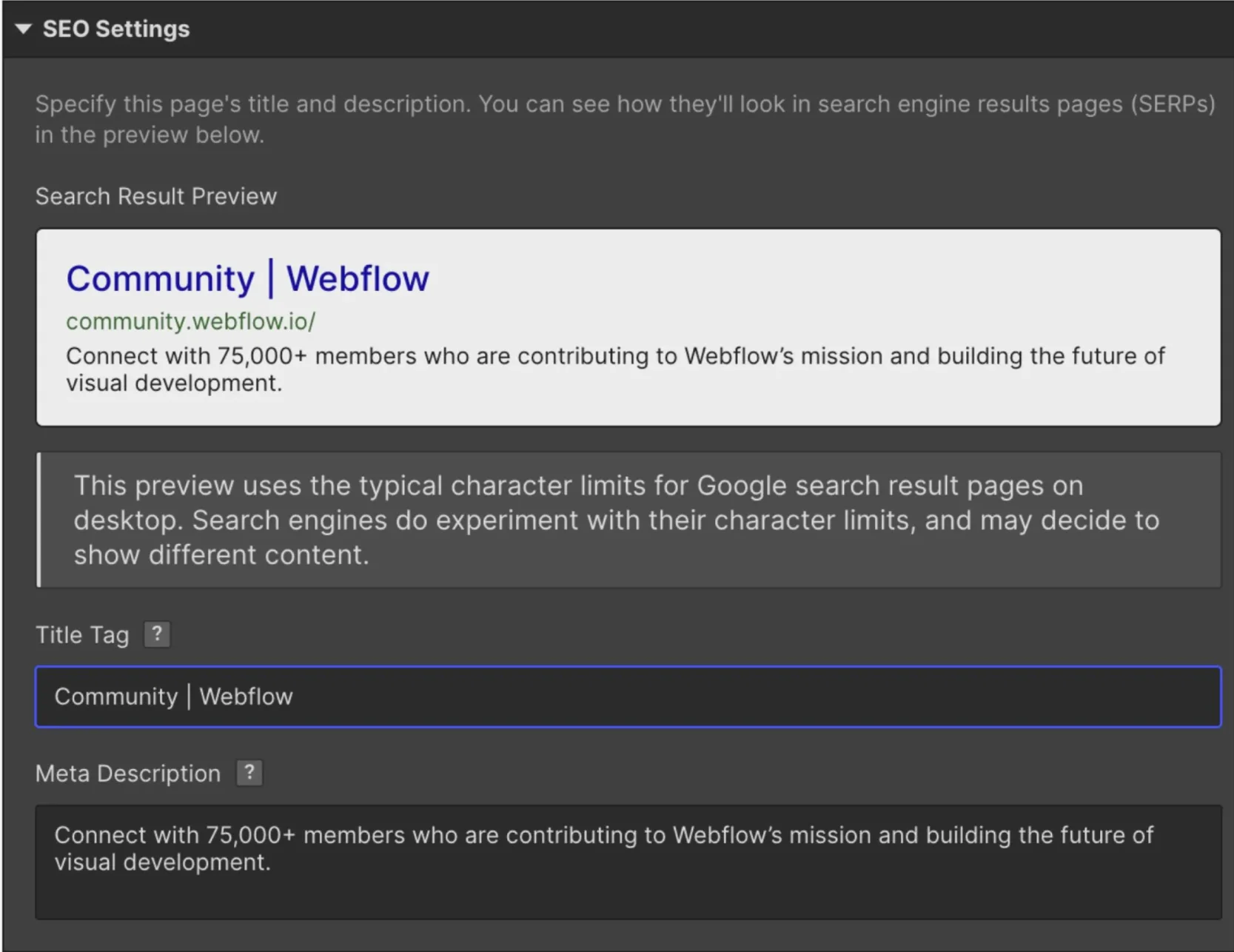
Webflow handles the fundamentals well out of the box. You get editable title tags and meta descriptions on every page, canonical URL control, automatic sitemap generation, clean redirect management, and semantic HTML that search engines read cleanly. CMS collection fields can be bound dynamically to SEO metadata, so a blog post's title automatically populates the meta title without manual duplication.
Where Webflow falls short relative to WordPress is guided on-page optimization. There's no built-in equivalent of Yoast SEO or Rank Math, so teams that rely on those tools for readability scores, keyword density checks, or structured content guidance will need to build those workflows manually or through integrations. Schema markup is supported but requires custom code embeds rather than native implementation.
Core Web Vitals performance is generally strong on Webflow sites when built with care, because the managed infrastructure removes many of the common sources of performance drag (unoptimized hosting, slow plugins, uncompressed assets).
You can learn more on Webflow SEO here.
Contao
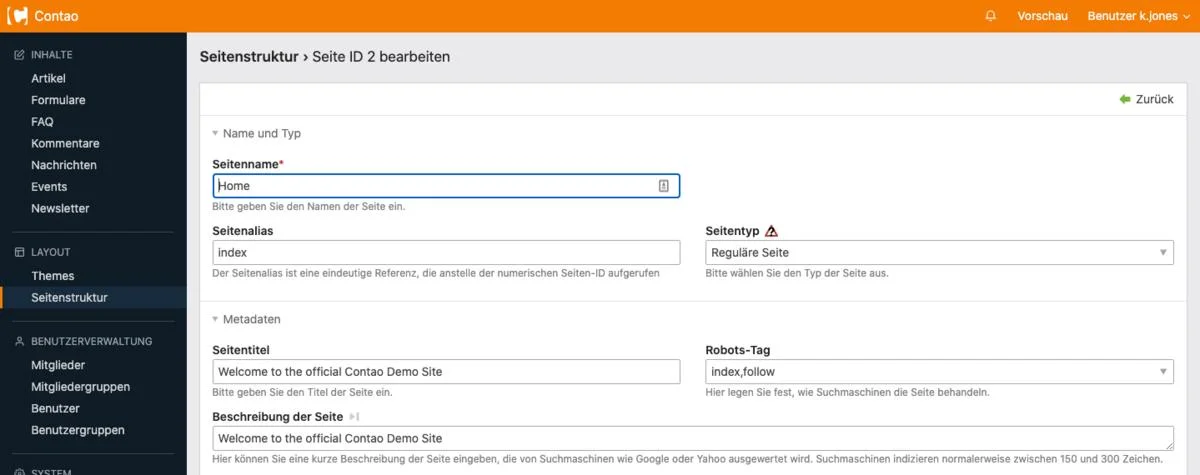
Contao includes several SEO capabilities natively that Webflow requires custom code to implement. Schema.org tagging is built in. Automatic XML sitemap generation is standard. Redirects and error pages always return the correct HTTP status codes. The hierarchical page structure makes managing meta tags, canonical URLs, and visibility settings across large site architectures much easier for developers.
The limitation is that advanced SEO capabilities beyond these basics depend on extensions, configuration, and developer expertise. Contao doesn't have the equivalent of WordPress's plugin library, so teams expecting a rich library of SEO tools will find the options thinner than they're used to.
| Feature | Webflow | Contao |
|---|---|---|
| Meta tags | Editable on every page; bindable to CMS fields dynamically | Editable per page through the backend |
| Canonical URLs | Built in | Built in |
| XML sitemap | Automatic generation | Automatic generation |
| 301 redirects | Built-in redirect manager | Correct HTTP status codes returned natively |
| Schema markup | Via custom code embeds — not native | Schema.org tagging built in natively |
| On-page SEO guidance | None built in — no equivalent of Yoast or Rank Math | None built in — requires extensions or manual workflows |
| HTML output | Clean, semantic HTML | Clean, semantic HTML when properly built |
| Core Web Vitals | Generally strong out of the box due to managed infrastructure | Dependent on hosting quality and configuration |
| Advanced SEO tools | Via integrations — no native plugin library | Via extensions — thinner library than WordPress |
Performance
Both platforms can deliver fast sites. The difference is in how much control you need and how much work you're willing to do to achieve that performance.
Webflow's managed infrastructure is the main story here. Every site gets a global CDN, Brotli compression, HTTP/2 and HTTP/3 support, and automatic image optimization without any server configuration on your part. For teams without infrastructure expertise, Webflow's performance floor is meaningfully higher than what a poorly configured self-hosted setup would deliver. You don't need to think about PHP opcode caching, database query optimization, or CDN configuration, because Webflow has already handled it.
Contao's performance is a variable rather than a constant. A well-configured Contao installation on a quality hosting provider, with proper PHP version, opcode caching, database optimization, and a CDN in front of it, can match or exceed Webflow's performance. A default installation on basic shared hosting will not. The ceiling is high, but reaching it requires technical investment. For teams with DevOps capability, Contao gives you more control over the performance levers. For teams without it, Webflow's baseline is the safer bet.
| Feature | Webflow | Contao |
|---|---|---|
| CDN | Global CDN included automatically | Optional — configure your own |
| Compression | Brotli compression enabled automatically | Depends on server configuration |
| HTTP protocol | HTTP/2 and HTTP/3 supported | Depends on hosting provider |
| Image optimization | Automatic | Manual or via extensions |
| Performance floor | High — managed infrastructure sets a strong baseline | Variable — depends entirely on hosting and configuration |
| Performance ceiling | Good — limited server-level control | High — full control over every performance lever |
| Best for teams without DevOps | Yes — strong performance requires no technical input | No — performance depends on server expertise |
"The '$25 a month' conversation always comes up. By the time we've walked a team through what their actual setup needs, it's usually closer to $120. That's still a fair price for what you get, but it's a different decision than the headline suggests."

Security
Security is an area where the right answer depends less on the platforms' capabilities and more on your team's capacity to act on them.
Webflow manages security entirely on its side. Automatic security updates, SSL included, DDoS protection, and infrastructure monitoring are all handled without any input from your team. For organizations without a dedicated security or operations function, this removes a category of risk that is easy to ignore until it becomes a crisis.
Contao's security model is sound by design. Its reduced plugin footprint compared to WordPress means fewer third-party vulnerabilities to manage. Regular security updates are released by the Contao core team, and the Symfony foundation it's built on is enterprise-tested and well-maintained. The catch is that applying those updates, monitoring for vulnerabilities in your specific extension set, and securing your server environment is your team's responsibility. The platform is secure when properly maintained. "Properly maintained" requires someone who knows what they're doing.
If your team has no developer or systems administrator, Webflow's security model is the more reliable option in practice, not because Contao is inherently less secure, but because security requires consistent attention and the managed model removes that dependency on your team.
| Feature | Webflow | Contao |
|---|---|---|
| Security updates | Automatic — applied by Webflow without your involvement | Manual — your team applies core and extension updates |
| SSL certificate | Included and auto-renewed | Configured via your hosting provider |
| DDoS protection | Included | Depends on hosting provider |
| Third-party vulnerability exposure | Low plugin footprint reduces exposure | Smaller extension library than WordPress reduces exposure |
| Server security | Managed by Webflow | Your responsibility |
| Infrastructure monitoring | Handled by Webflow | Your responsibility or via hosting provider |
| Best for teams without a sysadmin | Yes — security requires no ongoing team input | No — consistent maintenance is required to stay secure |
GDPR, accessibility, and compliance
This section matters most for European organizations, public sector teams, and anyone in a regulated industry. It's also where Contao has its clearest structural advantage over Webflow, and where most comparison articles fail to give Contao adequate credit.
GDPR compliance
Webflow stores all site data, CMS content, form submissions, and user data on its own infrastructure, running on AWS servers primarily based in the United States. Webflow offers a Data Processing Agreement and can be configured to support GDPR compliance in many scenarios. For most commercial websites, this is sufficient. For organizations in sectors where data residency is legally regulated, such as healthcare providers handling patient data, financial institutions, or certain public sector bodies, storing data on a US-based SaaS platform introduces compliance complexity that may not be acceptable.
Contao's self-hosted model gives you complete data sovereignty. You choose which country your server is in, which provider you trust, and how data is stored and processed. GDPR compliance measures are built in by default, including double opt-in for all subscriptions and registrations, legally required storage period logging, and no dependency on any third-party cloud platform. For organizations where "we own and control all our data" is a non-negotiable requirement, Contao's architecture is fundamentally more compatible with that position than Webflow's.
Accessibility (EAA and BITV 2.0)
Webflow produces accessible HTML when designers build with accessibility in mind. There are no native accessibility checking tools built into the platform, so compliance with standards like WCAG 2.1/2.2 depends on the deliberate choices of whoever builds the site.
Contao has built-in support for BITV 2.0, the German federal accessibility ordinance that applies to public sector websites in Germany, and for the European Accessibility Act (EAA), which came into full force across EU member states in 2025. For public sector organizations in Germany, Austria, and Switzerland, or for any organization subject to the EAA's requirements, this compliance out of the box is a meaningful advantage. As a reference point for how seriously the web accessibility gap is taken, as of 2025 the median Lighthouse Accessibility score across the web is over 85%, yet 67% of sites still explicitly remove default focus outlines, one of the most basic accessibility requirements.
| Feature | Webflow | Contao |
|---|---|---|
| Data storage location | AWS servers, primarily US-based — you cannot change this | Your choice — host in any country on any provider |
| Data sovereignty | Partial — Webflow offers a DPA but data lives on their infrastructure | Complete — you own and control all data |
| GDPR default measures | DPA available; compliance requires manual configuration | Double opt-in, storage period logging built in by default |
| Suitable for regulated industries | With care — depends on sector-specific data residency requirements | Yes — self-hosted model aligns naturally with strict data requirements |
| WCAG 2.1/2.2 support | Achievable — requires deliberate implementation by the designer | Achievable — requires deliberate implementation by the developer |
| BITV 2.0 compliance | Manual implementation required | Built-in support |
| European Accessibility Act (EAA) | Manual implementation required | Built-in support — came into full force 2025 |
| Best for public sector (DACH) | No — compliance overhead is significant | Yes — purpose-aligned with public sector requirements |

Which team should choose Webflow
So where does Webflow actually win? These are the scenarios where it's the stronger choice, based on what we've seen across 150+ brands at magier.
- SaaS marketing teams without a dedicated developer: Webflow lets your marketing team update landing pages, publish blog posts, create new campaign pages, and manage content without filing developer requests. That's not a minor convenience. For fast-moving companies, the ability to ship a landing page in an afternoon rather than waiting a week for developer availability is a genuine competitive advantage.
- Design-led agencies building client sites: If visual quality is what your agency charges a premium for, Webflow's design environment lets you build things that would require custom development on any other no-code platform. The output is clean enough for discerning clients, and the CMS is easy enough for those clients to manage independently after handoff.
- Startups that need to ship quickly and iterate constantly: The combination of fast publishing, A/B testing through integrations, and a design environment that doesn't require code means early-stage teams can test and change positioning without infrastructure overhead.
- B2B companies running content marketing at scale: Case study libraries, resource centers, blog operations, event pages, and team directories all work well in Webflow's CMS model. The visual CMS makes content production fast and the dynamic collections keep the design consistent across hundreds of pages.
- Teams that want to reduce developer dependency without reducing design quality: Let's face it: most companies can't justify keeping a developer on standby for website updates. Webflow closes that gap better than any comparable platform at this price point.
Who should not use Webflow
Webflow is the right answer for a lot of teams. It is not the right answer for all of them.
- Organizations where data must stay on European servers: Webflow's Standard plans store data on US-based infrastructure by default, with no option to change this. EU data residency is only available on the Enterprise plan, which is custom-priced. If your compliance requirement is non-negotiable and your budget doesn't extend to Enterprise, Webflow is a structural mismatch. If you are evaluating Enterprise, confirm data residency terms in the contract before committing.
- Teams that need unrestricted backend customization: Webflow allows you to add custom code through embeds, but you cannot modify the platform's core output or behavior. If you need custom server-side logic, a complex API integration built into the CMS layer, or functionality that goes beyond what embeds and third-party services can provide, you'll hit a hard wall.
- Agencies managing 20 or more client sites: Webflow's per-site billing model means your costs scale linearly with client count. At 20+ sites, the Workspace fees, per-site plans, and per-seat costs stack into a number that may not match your client margins. This is a real pain point in r/webflow discussions, and it's worth running the actual cost model before committing.
- Developers who want to work in their own tech stack: If your team is productive in PHP, React, or another framework and wants full control over how the site is built and deployed, Webflow's visual abstraction is more constraint than convenience.
- Organizations that cannot absorb vendor pricing changes: Webflow changed its pricing significantly in December 2024 and again in May 2026. If your organization's budget process makes mid-contract pricing changes difficult to absorb, a platform with a history of restructuring deserves careful evaluation.
Which team should choose Contao
Contao earns its place for specific teams and contexts where its structural advantages are the deciding factor.
- European public sector organizations with BITV 2.0 or EAA compliance requirements: For German, Austrian, and Swiss public institutions, Contao's built-in compliance with both standards is a meaningful operational advantage over platforms that require manual implementation.
- Organizations in regulated industries requiring data on their own servers: Healthcare providers, financial institutions, and any organization operating under strict data residency requirements will find Contao's self-hosted model fundamentally more compatible with their compliance posture than any SaaS platform.
- Developer-led agencies in the DACH market with PHP expertise: If your agency already works in PHP and has developers comfortable with Symfony, Contao is a natural fit. The learning curve is steep for newcomers, but shallow for teams already working in the framework's wider toolset.
- Enterprises with complex multi-user permission structures: Contao's granular permission system, where individual editors can be restricted to specific pages, content elements, or fields, is well-suited to large organizations where different teams own different sections of the site.
- Organizations running large multilingual sites: Native multilingual support without a paid add-on is a genuine competitive advantage for European organizations managing content in multiple languages simultaneously.
- Teams that want full open-source ownership with no ongoing SaaS dependency: If the value proposition of "we own this completely and no vendor can change our costs or access" is important to your organization, Contao is one of the few platforms that actually delivers it at a professional level.
Who should not use Contao
Contao's strengths come with real operational requirements that some teams simply can't meet.
- Teams without in-house developer or agency PHP expertise: Contao is not a platform you configure through a settings panel. Building and maintaining a Contao site requires genuine PHP development knowledge. Without it, you'll be dependent on outside help for changes that other platforms would let you make in minutes.
- Marketing teams that need to update the site without developer involvement: Contao's backend is editor-friendly for content updates, but structural site changes, new page types, and design modifications require developer access to templates and code. If your marketing team expects full autonomy over the site, Contao's model will create friction.
- Startups and small businesses that need to launch quickly on a tight budget: The initial development cost for a properly built Contao site is higher than getting started on Webflow's free plan. For teams with tight timelines and limited resources, the upfront investment doesn't make sense until the scale justifies it.
- Teams that don't have bandwidth for ongoing maintenance: Contao requires regular updates to the core, extensions, PHP version, and server environment. Deferred maintenance creates security vulnerabilities. If your team can't commit to that work reliably, a managed platform removes the risk.
When neither Webflow nor Contao is the right answer
Sometimes the best answer to "Webflow vs Contao?" is "neither." These are the scenarios where a different platform fits better.
| Situation | Better choice | Why |
|---|---|---|
| High-volume content operation (blog, news, media) | WordPress | Largest plugin library, mature blogging tools, Yoast/Rank Math for SEO, maximum plugin flexibility |
| German-speaking enterprise needing open-source control at scale | TYPO3 | Contao's natural big-brother in the DACH market, enterprise-grade architecture, strong German community |
| Enterprise requiring complex content architecture and API-first delivery | Drupal | Enterprise-grade permissions, API-first content modeling, battle-tested for government and large organizations |
| Design-led team wanting a simpler visual builder with strong animations | Framer | More animation-focused than Webflow, simpler CMS, faster learning curve for motion-heavy sites |
| Content delivered to multiple channels (site, app, IoT, etc.) | Contentful or Sanity | Headless architecture, API-first content delivery, designed for omnichannel from the ground up |
The most common scenario we see where neither fits is a growing company that has outgrown Webflow's CMS limits but doesn't have the developer capacity for Contao. In that situation, WordPress with a well-maintained theme and a lean plugin setup often serves better than either platform in the comparison.

People often compare Framer against Webflow. If that is of your interest, you could read their comparison here.
Migrating between Webflow and Contao
If you're already on one platform and considering a move, here's what that transition actually involves.
Moving from Contao to Webflow
The main areas to evaluate before starting are content type mapping (your Contao page structures will need to be rebuilt as Webflow CMS collections), URL structure preservation and redirect mapping (critical for SEO continuity), and form and integration replacement. The most technically complex element is any custom PHP functionality built into your Contao installation. Webflow has no server-side code capability, so those features need to be rebuilt using Webflow Logic, third-party automation tools like Zapier or Make, or external APIs. For standard marketing sites, this migration is manageable. For sites with significant custom backend logic, it's a substantial project.
Moving from Webflow to Contao
Webflow does provide a site export, but that export delivers static HTML and CSS, not a functioning CMS-driven site. All dynamic content, collection logic, form handling, and CMS relationships need to be rebuilt in Contao from scratch. Most teams making this move are doing so for compliance or data ownership reasons, not because they found the migration easy. Budget for it as a full rebuild with the benefit of content that's already been created.
Final thoughts
Your platform choice will shape how your team works for years, so it's worth getting it right the first time. Webflow and Contao are both capable platforms. They're just capable of different things, and the team that thrives on one often struggles with the other.
Webflow wins when speed, design quality, and reduced developer dependency matter most. Contao wins when data sovereignty, compliance, and full technical ownership are the priority. And sometimes the answer is neither, which is a fine conclusion to reach if it means you end up on a platform that actually fits your team.
Getting the platform right is only half the work. The design, the content architecture, and the ongoing execution matter just as much. If you're building or rebuilding on Webflow and want a design partner who works in it every day, take a look at how magier works.
{{cta}}
FAQ
Webflow delivers strong performance by default through its managed CDN, Brotli compression, and HTTP/3 support. A well-configured Contao installation on quality hosting can match or exceed Webflow's speed. A default Contao setup on shared hosting will not. For teams without server expertise, Webflow's performance floor is more reliable. For teams with DevOps capability, Contao gives you more direct control.
The headline Premium plan price is $25 per month on annual billing. But a realistic B2B marketing team running one Premium site with a Core Workspace and two full-access collaborators pays between $113 and $128 per month on annual billing, once Workspace fees and per-seat costs are included. Add-ons like Optimize (from $299/mo), Localization, and Analyze stack on top of that.
Contao is used primarily for professional websites where data ownership, compliance, and content architecture matter more than visual design speed. Common use cases include German public sector websites, European corporate portals, educational institution websites, and multilingual organizational sites. It's the platform of choice for PHP development agencies in the DACH market.
Contao is built with GDPR compliance measures by default, including double opt-in for all subscriptions, legally required storage period logging, and self-hosted architecture that gives you complete data sovereignty. It also supports BITV 2.0 and the European Accessibility Act (EAA). For organizations with strict data residency requirements, Contao's self-hosted model is fundamentally more compatible with GDPR than a SaaS platform storing data on US servers.
Webflow is better for marketing teams that want strong SEO out of the box without developer involvement. Contao has a slight advantage in built-in schema.org markup and gives developers full control over technical SEO implementation. For most teams, Webflow's SEO capabilities are sufficient and easier to use consistently.
Yes, in a meaningful way. While Webflow allows you to export your site's HTML and CSS, the export doesn't include CMS data, dynamic functionality, or form logic. Moving off Webflow means rebuilding your site on the new platform, not migrating it. That's a real commitment worth understanding before you invest heavily in building on the platform.
Editors and content managers can update text, images, and content elements through Contao's backend without technical knowledge. Building the site, creating new page types, modifying layouts, and managing updates requires developer access. Contao is not a platform where a non-technical person can make structural changes independently.
The software is completely free and open-source. You pay for domain registration (roughly $10 to $20 per year) and hosting (roughly $5 to $50 per month). The significant cost for most organizations is developer time to build and maintain the site, which varies widely depending on complexity.
Webflow gives designers significantly more control and produces cleaner output than Wix. Wix is easier to learn and better suited to small businesses or individuals who want to build their own site without any design or development background. For professional websites where design quality matters, Webflow is the stronger platform.
They serve different needs. Webflow has a stronger design environment and requires no plugin management. WordPress has a larger plugin library, more content management flexibility, and better built-in SEO tooling through plugins like Yoast or Rank Math. For a marketing site managed by a design team, Webflow is often the better fit. For a content-heavy site managed by a content team, WordPress frequently wins.
Webflow is among the best for its specific use case, which is visual-first marketing websites built and managed by design and marketing teams. The May 2026 pricing restructure has made the Premium plan more accessible for most teams. For use cases that require self-hosting, complex permissions, or deep custom development, other platforms serve those needs better.
Whether something is "better" depends entirely on what you need. For design-led marketing sites and SaaS companies, Webflow is one of the strongest options available. For European public sector organizations, developer-led teams, or anyone requiring data sovereignty, platforms like Contao, TYPO3, or Drupal may fit better. For high-volume content operations, WordPress remains the most capable option.
.avif)



.avif)